

Receipt Scanner: SignumScan
Receipt Scanner: SignumScan is made and published by Mikola Marchuk. AppBrain is an independent app data site and isn't affiliated with Mikola Marchuk. The app name, icon, screenshots and description belong to Mikola Marchuk and are shown as published on the App Store.
AppBrain's verdict
- Last updated
- September 10, 2026
Rankings
App Store top chartsApp Store Rankings for Receipt Scanner: SignumScan
Competitors
Similar apps and more from Mikola MarchukMore from Mikola Marchuk


Releases
Updates seen on the App Store- Version
- 26.9.8
- Launched
- May 2026
No changelog data
User feedback
Ratings and reviews on the App StoreComments on Receipt Scanner: SignumScan for iOS
We don't have enough comments to show example comments. Please check back later.
Technology
Found in the app by AppBrain- Price
- Free
- App size
- 79.3 MB
- Content rating
- Everyone
Technologies used by Receipt Scanner: SignumScan
About the app and developer
About Receipt Scanner: SignumScan
Receipt Scanner: SignumScan is a business app developed by Mikola Marchuk.
What is the rating of Receipt Scanner: SignumScan?
Receipt Scanner: SignumScan has no ratings yet.
Is Receipt Scanner: SignumScan free?
Receipt Scanner: SignumScan is free. The app size is 79.26 MB. The latest version available is 26.9.8. The last update was on September 10, 2026.
What are the requirements for Receipt Scanner: SignumScan?
The app has a content rating of Everyone. The app has been available on the App Store since May 2026.
Developer information for Mikola Marchuk
Address:
Store listing
By Mikola Marchuk, from the App Store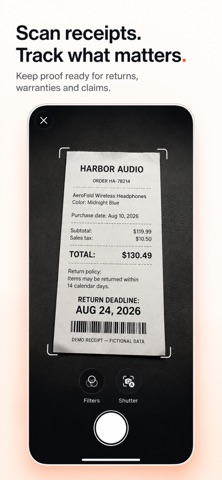





Description by Mikola Marchuk Written by the developer, not by AppBrain. Click to read.
SignumScan is a privacy-first receipt and document scanner built for what happens after the scan. Turn receipts, warranties, invoices, contracts, forms, and PDFs into a searchable library. Check scan quality, verify detected details in the original, track important dates, prepare claims, create reusable signatures, edit PDFs, and safely redact sensitive information right on your iPhone.
SCAN WITH CONFIDENCE
• Scan multi-page documents or import from Photos and Files
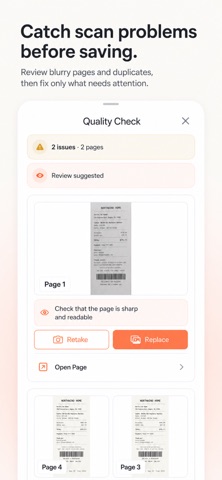
• Detect blur, glare, cropped text, duplicates, low resolution, and orientation issues
• Retake or replace only the affected page
• Export clean PDF or JPG files
VERIFY AND TRACK WHAT MATTERS
• Review AutoFill suggestions before applying them
• Compare alternative dates, amounts, and other detected values
• Open the exact page and OCR area where each value was found
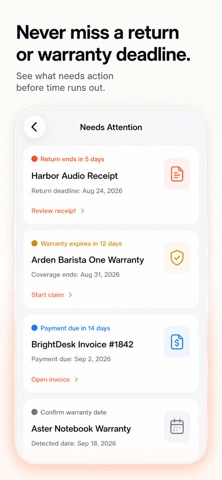
• Track warranty expiration, return windows, and payment due dates
• Get reminders for dates you confirm with SignumScan Pro
• Find documents by product, merchant, serial number, or page text with on-device OCR
PREPARE A WARRANTY CLAIM
• Add receipts, warranty pages, defect photos, and serial-number evidence
• Select, reorder, or exclude individual materials
• Generate a claim-ready PDF
• Edit the email, open Mail, share the package, or save it to your library
• Keep drafts, status history, and the completed package together
CREATE SIGNATURES AND EDIT PDFS
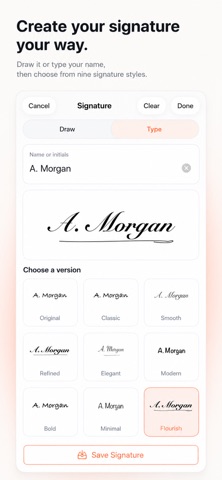
• Draw a signature or type your name or initials
• Improve a rough signature and choose from nine styles
• Preview, save, rename, delete, and reuse any number of signatures
• Add signatures, initials, text, stamps, drawings, and redactions
• Move, resize, rotate, duplicate, and edit elements later
• Apply elements across selected, following, or all pages with SignumScan Pro
REDACT SENSITIVE INFORMATION
• Find possible identity, payment, contact, banking, passport, and medical details on your iPhone
• Review suggested areas or cover any area manually
• Keep the original page intact and redaction blocks editable inside SignumScan
• Move, resize, rotate, duplicate, or remove redaction blocks
• Export flattened PDF or JPG copies with redactions permanently applied
• Block export if redaction data is missing or damaged to help prevent accidental disclosure
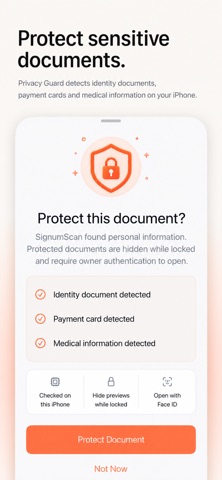
PRIVACY GUARD
• Detect sensitive identity, payment, and medical documents on your iPhone
• Hide document previews while the library is locked
• Move documents to Protected folders with SignumScan Pro
• Require system authentication to open protected documents
ORGANIZE AND RESTORE
• Organize documents with folders, tags, notes, and searchable OCR
• Keep original PDFs, confirmed details, reminders, editable markup, and claim materials together
• Restore supported document context through iCloud sync with SignumScan Pro
Scan-quality checks, OCR, AutoFill evidence, signature styling, redaction analysis, and Privacy Guard run on your iPhone. No mandatory account is required.
Scan once. Stay ready.
SignumScan Pro is required for advanced multi-page automation, unlimited automatic redaction scans, reminders, Protected folders, and iCloud sync.