

ReceiptMint: Expenses & Tax
ReceiptMint: Expenses & Tax is made and published by 家宝 戴. AppBrain is an independent app data site and isn't affiliated with 家宝 戴. The app name, icon, screenshots and description belong to 家宝 戴 and are shown as published on the App Store.
AppBrain's verdict
- Rating on App Store
- 5.00
- 5 ratings
- Last updated
- July 12, 2026
It doesn't have enough ratings yet to judge what users think.
Rankings
App Store top chartsApp Store Rankings for ReceiptMint: Expenses & Tax
Competitors
Similar apps and more from 家宝 戴Alternatives to ReceiptMint: Expenses & Tax


More from 家宝 戴


Releases
Updates seen on the App Store- Version
- 1.0.3
- Launched
- April 2026
No changelog data
User feedback
Ratings and reviews on the App StoreComments on ReceiptMint: Expenses & Tax for iOS
We don't have enough comments to show example comments. Please check back later.
Technology
Found in the app by AppBrain- Price
- Free
- App size
- 4.25 MB
- Content rating
- Everyone
Technologies used by ReceiptMint: Expenses & Tax
About the app and developer
About ReceiptMint: Expenses & Tax
ReceiptMint: Expenses & Tax is a business app developed by 家宝 戴.
What is the rating of ReceiptMint: Expenses & Tax?
ReceiptMint: Expenses & Tax is rated 5.00 out of 5 stars, based on 5 ratings.
Is ReceiptMint: Expenses & Tax free?
ReceiptMint: Expenses & Tax is free. The app size is 4.25 MB. The latest version available is 1.0.3. The last update was on July 12, 2026.
What are the requirements for ReceiptMint: Expenses & Tax?
The app has a content rating of Everyone. The app has been available on the App Store since April 2026.
Developer information for 家宝 戴
Address:
Store listing
By 家宝 戴, from the App Store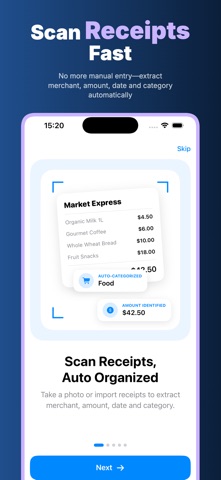


Description by 家宝 戴 Written by the developer, not by AppBrain. Click to read.
Built for everyday expense work
ReceiptMint is made for freelancers, small business owners, consultants, sales teams, contractors, travelers, students and anyone who needs clean records for reimbursements, bookkeeping, tax preparation or personal budgeting. Instead of keeping loose paper in a drawer or digging through camera roll photos, you can capture each receipt, confirm merchant, amount, date, currency, category and notes, then save it in one searchable local record.
Fast receipt capture with on-device OCR
Use the camera or choose an existing image from Photos. ReceiptMint uses OCR on your device to read useful receipt text and help identify fields such as merchant, total, date and category. You stay in control: every result can be edited before saving, and the raw OCR text can be reviewed when you need to double-check the source. The app is useful for meals, transport, accommodation, office supplies, shopping, medical expenses, entertainment and other day-to-day costs.
Manual entry when a scan is not enough
Receipts are messy: faded thermal paper, handwritten notes, foreign currencies, folded corners and blurry photos can all make automatic reading imperfect. ReceiptMint keeps the workflow practical by letting you add or correct details manually. You can choose a default currency and default category, attach notes, search records later, and keep expense history consistent even when the original receipt is not ideal.
Mileage records without bank connections or route tracking
ReceiptMint also helps you log mileage for business trips and reimbursements. Add the trip date, start location, end location, distance, unit, purpose, mileage rate and notes. The app can calculate an estimated reimbursement from the distance and rate you enter, but it does not connect to bank accounts and does not claim automatic route or mileage tracking. Your mileage log stays simple, editable and easy to export.
Reports for monthly, annual and mileage review
Turn scattered receipts and trips into useful summaries. Monthly reports show spending totals, receipt counts and category breakdowns. Annual reports help you review the full year for tax season, accountant handoff or business planning. Mileage reports summarize trips, total distance, estimated reimbursement and purpose breakdowns. Export PDF, CSV or ZIP reports when you need to send records for reimbursement, bookkeeping, tax filing or backup.
Privacy-first by design
Expense records often contain real names, payment totals, store details, client work, addresses, travel patterns, health costs and business information. ReceiptMint is designed around clear privacy principles:
Offline: core receipt capture, manual entry, local records, mileage logging, reports and exports can be used without depending on a web account.
No Login: open the app and start recording expenses; no sign-up, user profile or password is required just to manage your own receipts.
Privacy First: receipts, OCR text, categories, mileage, notes and reports are treated as private financial records.
On Device: OCR, receipt parsing, image handling, record storage, mileage calculations and report generation happen on your device.
No Cloud Upload: ReceiptMint does not upload your receipt images, OCR text, mileage records, notes, reports or projects to its own cloud.
Subscription note: Full access to scanning, expense records, mileage logs, reports and exports is available with an active subscription. Pricing and renewal terms are shown before purchase.
Privacy Policy
https://5gotogo.github.io/SnapReceipt-privacy/privacy-policy.html
Terms of Use
https://www.apple.com/legal/internet-services/itunes/dev/stdeula/