Recognize Text and let read is an overall app developed by Matthias Aigner.
Download Statistics
User Ratings
The app has no ratings yet.
App Information
Recognize Text and let read is FREE to download. The APK download size is 64.28 MB. The latest version available is 1.1.2. The last update was on September 2, 2025.
Technical Requirements
The app has a content rating of Everyone. The app has been available on Google Play July 2022.
Description
An OCR app is an application that can be used to digitize and edit text from images. OCR stands for Optical Character Recognition. The app uses advanced image to text conversion technology to recognize texts in different fonts and languages from images.
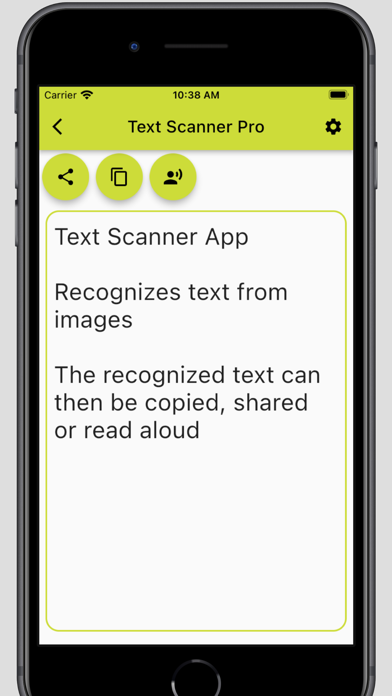
Are you looking for an OCR app to recognize text from images? Easily recognize text from images with our powerful Text Scanner app. Our Text Scanner supports the recognition of Latin, Chinese, Japanese, Indian and Korean fonts and outputs the recognized text in a text field.
Use the built-in Text-to-Speech (TTS) function to have the text read aloud, or easily share it by copying or sharing. Turn your smartphone into a versatile text scanner with our powerful image to text conversion technology.
Our OCR app stands out from the competition by supporting 5 different fonts in 44 different languages. Upgrade to the ad-free version to enjoy an even smoother user experience with our text recognition. Maximize your productivity with our Image to Text feature!
That is how it goes: Choose an image from the gallery or take a photo and the Text Recognition feature, the Image to Text feature, will recognize all the text in that image. The recognized text is then displayed in a text field where it can be edited. With our Text-to-Speech (TTS) function, the text can then be read aloud. The recognized text can then be copied or shared.
The Text Recognition feature uses OCR (Optical Character Recognition) to recognize text from images.
Application examples: Our OCR app can be useful in many situations. For example, if you have a textbook that you want to extract and edit text from, our Text Scanner app can help you with that. If you want to digitize cooking recipes from a cookbook to better organize or share them, you can easily do that with our OCR app. Even contracts or invoices that are only available in printed form can be digitized quickly and easily.
Limitations and Tips: Please note that the OCR app may have trouble recognizing text that is of poor quality or uses unusual fonts. We therefore recommend scanning texts of good quality and clear writing. Also ensure that the image has adequate lighting and the entire document is captured. Handwritten texts are recognized very poorly.
We wish you every success in recognizing text from images with our Text Scanner app.
Each subscription will automatically renew 3 days before the expiration date for
the same time period. Subscriptions can be cancelled at any time before the renewal.