

Red Sheet: PDF Study App
Red Sheet: PDF Study App is made and published by Foodmenu.world Inc. AppBrain is an independent app data site and isn't affiliated with Foodmenu.world Inc. The app name, icon, screenshots and description belong to Foodmenu.world Inc. and are shown as published on the App Store.
AppBrain's verdict
Established- Rating on App Store
- 5.00
- 4 ratings
- Last updated
- September 8, 2026
- Size
- 193.1 MB
It doesn't have enough ratings yet to judge what users think.
User feedback
Ratings and reviews on the App StoreComments on Red Sheet: PDF Study App for iOS
We don't have enough comments to show example comments. Please check back later.
Store listing
By Foodmenu.world Inc., from the App Store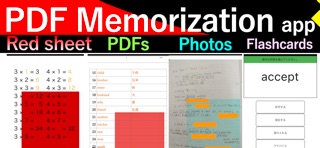
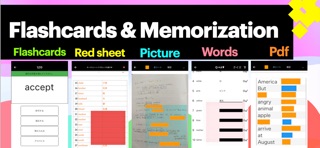


Description by Foodmenu.world Inc. Written by the developer, not by AppBrain. Click to read.
Turn your PDFs, notes, textbooks, handouts, and images into powerful study materials.
This app helps students memorize faster by hiding and revealing important parts of their own documents.
Import PDF files, photos, scanned notes, class handouts, worksheets, and study materials, then create memorization blocks directly on the page.
It works like a digital red sheet, flashcard maker, and PDF study tool in one simple app.
◆ PDF Memorization Made Simple
・Import PDF files and study directly from the page
・Hide words, definitions, formulas, diagrams, and answers
・Tap to reveal hidden areas while reviewing
・Use red sheet style memorization on PDF pages
・Study textbooks, school handouts, exam materials, and notes
・Create your own PDF memorization notebook
If you already study with PDFs, this app turns them into active memorization tools.
◆ Red Sheet Style Study for PDFs and Images
Use memorization blocks to cover the parts you want to remember.
Place blocks over text, formulas, diagrams, definitions, answers, or explanations.
・Hide text like using a red sheet
・Reveal answers by tapping
・Create blocks anywhere on a PDF or image
・Adjust block size by dragging the edges
・Change the color and style of blocks
・Use blocks for notes, textbooks, worksheets, and scanned documents
This is useful when you want to memorize from your own materials without rewriting everything into separate flashcards.
◆ Smooth Vertical Review for Memorization
Review multiple PDF pages and images smoothly.
Vertical scrolling makes it easy to study long documents, like moving a red sheet from top to bottom.
・Scroll vertically through study pages
・Review many PDF pages at once
・Memorize photos and handouts continuously
・Swipe between pages and cards
・Add more images when needed
・Study at your own pace
Useful for test prep, school study, certification exams, language learning, and daily review.
◆ Useful Study Tools
・One-tap show and hide for fast review
・Multiple memorization blocks for one page
・Auto-align blocks for cleaner layouts
・Zoom in with two fingers to study small text
・Hidden areas stay aligned even when zooming
・Add memo text to support memorization
・Hide memo text for self-testing
・Organize study decks by title or subject
Create separate study materials for English, science, history, math, medical terms, law, certification exams, or any subject that requires memorization.
◆ Great For
・Students preparing for tests and exams
・PDF study and textbook review
・Vocabulary memorization
・Language learning
・Science, history, math, and social studies
・Certification exam preparation
・Medical, legal, and technical study
・People who want a simple flashcards maker
・Students who use GoodNotes, notes apps, or PDF files
・Anyone who wants to memorize from their own materials
◆ How to Use
1. Import a PDF file, photo, or image
2. Place memorization blocks over the parts you want to hide
3. Tap to reveal the answer while studying
4. Repeat until you can remember it
5. Organize your materials by subject and review again
◆ Why This App Is Different
This app focuses on PDF memorization and red sheet style study.
You do not need to recreate every page from scratch.
Use your own PDFs, notes, handouts, images, and textbooks as they are, then hide only the parts you want to memorize.
It is a simple way to turn everyday study materials into flashcard-style memorization tools.
◆ Recommended If You Want
・A PDF study app for memorization
・A flashcards maker from PDFs
・A red sheet style study app
・A way to memorize school notes and handouts
・A simple tool for exam preparation
・A study app that works with your own materials
・A faster way to hide and reveal answers
Start studying your own PDFs, notes, and images with red sheet style memorization.
Make your study materials easier to review, repeat, and remember.
Terms of Service
https://hidevoicy.com/en/tos
Privacy Policy
https://hidevoicy.com/en/privacy
Safety and technology
Found in the app by AppBrain- Price
- Free
- App size
- 193.1 MB
- Content rating
- Everyone
Technologies used by Red Sheet: PDF Study App
Releases
Updates seen on the App Store- Version
- 5.0.4
- Launched
- September 2021
No changelog data
Alternatives
Similar apps and more from Foodmenu.world Inc.Alternatives to Red Sheet: PDF Study App







More from Foodmenu.world Inc.




Rankings
App Store top chartsApp Store Rankings for Red Sheet: PDF Study App
About the app and developer
About Red Sheet: PDF Study App
Red Sheet: PDF Study App is an education app developed by Foodmenu.world Inc.
User Ratings
Red Sheet: PDF Study App is rated 5.00 out of 5 stars. The rating is based on 4 ratings.
App Information
Red Sheet: PDF Study App is freely available from the App Store. The app size is 193.09 MB. The latest version available is 5.0.4. The last update was on September 8, 2026.
Technical Requirements
The app has a content rating of Everyone. The app has been available on the App Store since September 2021.
Developer information for Foodmenu.world Inc.
Address:
Frequently asked questions about Red Sheet: PDF Study App
Is Red Sheet: PDF Study App free?
Yes. Red Sheet: PDF Study App is free on the App Store.
Is Red Sheet: PDF Study App still available?
Yes. Red Sheet: PDF Study App is on the App Store, and the last update we saw was on September 8, 2026.
How large is Red Sheet: PDF Study App?
Red Sheet: PDF Study App is 193.09 MB.
Is Red Sheet: PDF Study App suitable for children?
App Store rates the content of Red Sheet: PDF Study App as suitable for everyone.
How do people rate Red Sheet: PDF Study App?
Red Sheet: PDF Study App scores 5.00 out of 5 stars, from 4 ratings on the App Store.
Who made Red Sheet: PDF Study App?
Red Sheet: PDF Study App was developed by Foodmenu.world Inc. It is listed in the education category on the App Store.
What are the best alternatives to Red Sheet: PDF Study App?
People looking at Red Sheet: PDF Study App also look at these education apps: 赤シートで暗記|暗記マーカーで問題作成できる暗記アプリ, わたしの写真暗記帳, Memorizing application, 暗記シート- 試験勉強学習用アプリ「FIGHT!」, WordMasking Lite.