

Redact Document & PDF
Redact Document & PDF is made and published by Navneet Kaur. AppBrain is an independent app data site and isn't affiliated with Navneet Kaur. The app name, icon, screenshots and description belong to Navneet Kaur and are shown as published on the App Store.
AppBrain's verdict
- Rating on App Store
- 4.44
- 9 ratings
- Last updated
- October 5, 2026
It doesn't have enough ratings yet to judge what users think.
Rankings
App Store top chartsApp Store Rankings for Redact Document & PDF
Competitors
Similar apps and more from Navneet KaurAlternatives to Redact Document & PDF


 Superchat - AI Task Assistant


More from Navneet Kaur


Releases
Updates seen on the App Store- Version
- 1.3.8
- Launched
- April 2026
No changelog data
User feedback
Ratings and reviews on the App StoreComments on Redact Document & PDF for iOS
We don't have enough comments to show example comments. Please check back later.
Technology
Found in the app by AppBrain- Price
- Free
- App size
- 23.3 MB
- Content rating
- Everyone
Technologies used by Redact Document & PDF
About the app and developer
About Redact Document & PDF
Redact Document & PDF is a business app developed by Navneet Kaur.
User Ratings
Redact Document & PDF is rated 4.44 out of 5 stars. The rating is based on 9 ratings.
App Information
Redact Document & PDF is freely available from the App Store. The app size is 23.29 MB. The latest version available is 1.3.8. The last update was on October 5, 2026.
Technical Requirements
The app has a content rating of Everyone. The app has been available on the App Store since April 2026.
Developer information for Navneet Kaur
Address:
Frequently asked questions about Redact Document & PDF
Is Redact Document & PDF free?
Yes. Redact Document & PDF is free on the App Store.
Is Redact Document & PDF still available?
Yes. Redact Document & PDF is on the App Store, and the last update we saw was on October 5, 2026.
How large is Redact Document & PDF?
Redact Document & PDF is 23.29 MB.
Is Redact Document & PDF suitable for children?
App Store rates the content of Redact Document & PDF as suitable for everyone.
How do people rate Redact Document & PDF?
Redact Document & PDF scores 4.44 out of 5 stars, from 9 ratings on the App Store.
Who made Redact Document & PDF?
Redact Document & PDF was developed by Navneet Kaur. It is listed in the business category on the App Store.
What are the best alternatives to Redact Document & PDF?
People looking at Redact Document & PDF also look at these business apps: Tagmentia, TaskBot AI Assistant, Oriole - Text to Speech Reader, Superchat - AI Task Assistant, Atlas AI: PDF Document Scanner.
Store listing
By Navneet Kaur, from the App Store

Description by Navneet Kaur Written by the developer, not by AppBrain. Click to read.
PDF Redact uses smart detection to find and hide personal information including names, addresses, Social Security numbers, account numbers, phone numbers, email addresses, and more. Just open a PDF, and the app instantly identifies what needs to be redacted.
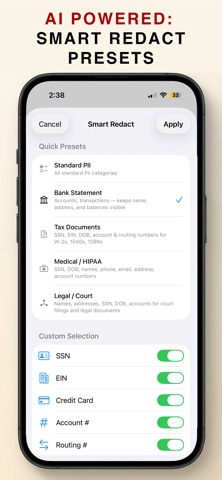
SMART PRESETS FOR EVERY USE CASE
• Standard PII — Detect all common personal identifiers
• Bank Statement — Hide transactions and account numbers on bank, card, and investment statements while keeping your name, address, and balances visible for loan and rental applications
• Tax Documents — Redact SSNs, EINs, and account numbers from W-2s, 1099s, and 1040s
• Medical / HIPAA — Remove patient identifiers to share medical records safely, including a HIPAA Safe Harbor option that also removes dates
• Legal / Court — Redact names, addresses, and financial details for court filings, with a court-filing format that leaves the last four digits visible as court rules allow
The app automatically detects your document type and applies the right preset.
POWERFUL DETECTION
• AI-powered name and address detection
• Account numbers, routing numbers, credit cards, and SSNs
• Transaction table detection for bank and credit card statements
• Dollar amounts and reference numbers
• Works on searchable PDFs, scans, and photos with built-in OCR
• Find & Redact — search for any word or number and redact every match
EASY TO USE
• Single tap to redact a word, double tap for an entire line
• Smart mode auto-detects sensitive data across all pages
• Manual mode for precise control with black box, white box, blur, or pixelate styles
• Review and dismiss any suggestion before exporting
PERMANENT, SEARCHABLE EXPORT
• Redacted text is removed from the file, not just covered with a box
• Everything you didn't redact stays searchable, saved as PDF/A
• Hidden text, metadata, and comments are stripped
• A built-in privacy audit checks every export before you share it
• Optional password protection
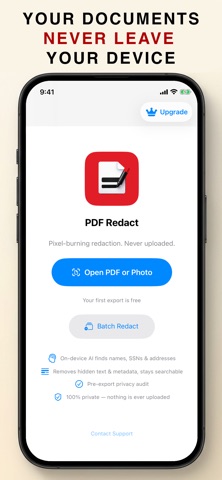
COMPLETE PRIVACY
• All processing happens on your device
• No internet connection required for redaction
• No document data is ever uploaded or shared
• What you redact stays redacted — permanently
Your first export is free. Upgrade to unlock unlimited redaction and batch processing.
Terms of Use (EULA): https://www.apple.com/legal/internet-services/itunes/dev/stdeula/
Prefer no subscription? A one-time 5 Export Pack is available.