

Redact Photo: Censor & Blur
Redact Photo: Censor & Blur is made and published by Vitor Manuel Paixao. AppBrain is an independent app data site and isn't affiliated with Vitor Manuel Paixao. The app name, icon, screenshots and description belong to Vitor Manuel Paixao and are shown as published on the App Store.
AppBrain's verdict
- Last updated
- July 14, 2026
Rankings
App Store top chartsApp Store Rankings for Redact Photo: Censor & Blur
Competitors
Similar apps and more from Vitor Manuel PaixaoAlternatives to Redact Photo: Censor & Blur


More from Vitor Manuel Paixao


Releases
Updates seen on the App Store- Version
- 1.0.5
- Launched
- November 2025
No changelog data
User feedback
Ratings and reviews on the App StoreComments on Redact Photo: Censor & Blur for iOS
We don't have enough comments to show example comments. Please check back later.
Technology
Found in the app by AppBrain- Price
- Free
- App size
- 13.6 MB
- Content rating
- Everyone
Technologies used by Redact Photo: Censor & Blur
About the app and developer
About Redact Photo: Censor & Blur
Redact Photo: Censor & Blur is an utilities app developed by Vitor Manuel Paixao.
User Ratings
The app has no ratings yet.
App Information
Redact Photo: Censor & Blur is freely available from the App Store. The app size is 13.63 MB. The latest version available is 1.0.5. The last update was on July 14, 2026.
Technical Requirements
The app has a content rating of Everyone. The app has been available on the App Store since November 2025.
Developer information for Vitor Manuel Paixao
Address:
Frequently asked questions about Redact Photo: Censor & Blur
Is Redact Photo: Censor & Blur free?
Yes. Redact Photo: Censor & Blur is free on the App Store.
Is Redact Photo: Censor & Blur still available?
Yes. Redact Photo: Censor & Blur is on the App Store, and the last update we saw was on July 14, 2026.
How large is Redact Photo: Censor & Blur?
Redact Photo: Censor & Blur is 13.63 MB.
Is Redact Photo: Censor & Blur suitable for children?
App Store rates the content of Redact Photo: Censor & Blur as suitable for everyone.
Who made Redact Photo: Censor & Blur?
Redact Photo: Censor & Blur was developed by Vitor Manuel Paixao. It is listed in the utilities category on the App Store.
What are the best alternatives to Redact Photo: Censor & Blur?
People looking at Redact Photo: Censor & Blur also look at these utilities apps: Redacter: Redact & Blur Text, Redact Tap, CoverID Redact: Privacy First, Redact: Blur Text & Hide Info, Markdown-IMG.
Store listing
By Vitor Manuel Paixao, from the App Store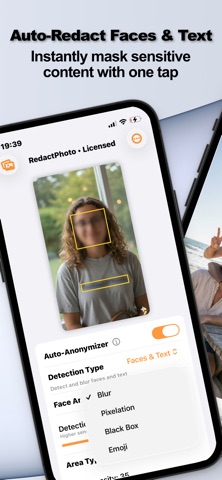


Description by Vitor Manuel Paixao Written by the developer, not by AppBrain. Click to read.
Redact Photo is the ultimate privacy-first image utility. Version 1.0.2 introduces new anonymization styles, stronger redaction output, and flexible subscription plans, making it the most versatile redaction tool on the App Store.
NEW IN VERSION 1.0.2:
• Pixelation Mode: A new anonymization style that pixelates regions for a classic, broadcast-grade look.
• Circular Face Masking: Mask faces with a natural circular area instead of a rectangle.
• Stronger Blur Output: Significantly improved blur intensity for better redaction quality.
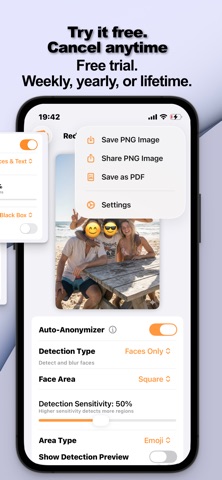
• Emoji in Faces & Text: Use emojis when running the combined Faces & Text detection mode.
• Subscription Plans: Flexible Weekly, Yearly, and Lifetime options. See details below.
POWERFUL REDACTION & ANONYMIZATION
• Auto-Detect: Instantly find faces and text using on-device AI.
• Multiple Styles: Choose between Blur, Pixelation, Black Box, or Emojis.
• Manual ROI Selection: Precision control to select exactly what you want to hide.
• Zoom & Edit: Get pixel-perfect accuracy with zoom capabilities.
• Circular or Rectangular Areas: Pick the masking shape that fits your needs.
• Metadata Scrubbing: Strip EXIF, GPS, and camera data to ensure your location stays private.
SMART IMAGE CONVERSION & RESIZING
• Format Freedom: Convert between HEIC, JPG, PNG, and PDF.
• Export to PDF: Convert your redacted images directly into secure PDF files.
• Precision Resizing: Adjust width, height, or file size via smart compression.
SUBSCRIPTION & PRICING:
Redact Photo is a premium privacy utility. Please note that using the app requires an active subscription or a lifetime purchase.
There are no confusing "Pro" tiers or restricted features—every plan gives you complete, unrestricted access to the entire app. We want you to experience the full power of Redact Photo risk-free, so we include a fully unlocked 3-Day Free Trial with our subscription plans.
Choose the option that fits you best:
- Weekly Subscription: Full access from the moment you subscribe. This is an immediate purchase with no trial; the plan renews weekly until cancelled.
- Annual Subscription: Starts with a fully unrestricted 3-day free trial. After the trial ends, the subscription automatically converts to a paid annual plan.
- Lifetime Access: Best value. A one-time purchase for permanent access to all features. This option is an immediate purchase with no trial and no recurring fees.
WHY REDACT PHOTO?
• Privacy-First: All processing happens on your device. Your photos never leave your phone.
• Lightweight: A minimal, fast interface with zero bloat.
TYPICAL USE CASES:
• Work: Redact sensitive ID or credit card info from documents.
• Social Media: Hide children's faces or license plates before sharing.
• Compliance: Strip GPS data from photos before professional uploads.
• Utility: Convert HEIC iPhone photos to PDF for easy emailing.
Download Redact Photo now and take full control of your image privacy.
Subscription Terms: Subscriptions automatically renew unless auto-renew is turned off at least 24 hours before the end of the current period.
Your account will be charged for renewal within 24 hours prior to the end of the current period.
You can manage or turn off auto-renew in your Apple ID Account Settings any time after purchase.
Standard Apple Terms of Use (EULA): https://www.apple.com/legal/internet-services/itunes/dev/stdeula/