

Referat: AI Meeting Notes
Referat: AI Meeting Notes is made and published by Commanigy. AppBrain is an independent app data site and isn't affiliated with Commanigy. The app name, icon, screenshots and description belong to Commanigy and are shown as published on the App Store.
AppBrain's verdict
- Best rank
- #5
- Top Paid, Denmark
- Last updated
- October 22, 2026
Rankings
App Store top charts- Highest rank
- #5
- Chart
- Top Paid
- Productivity
- Country
- Denmark
App Store Rankings for Referat: AI Meeting Notes
Competitors
Similar apps and more from CommanigyAlternatives to Referat: AI Meeting Notes


More from Commanigy


Releases
Updates seen on the App Store- Version
- 1.2.2
- Launched
- September 2026
No changelog data
User feedback
Ratings and reviews on the App StoreComments on Referat: AI Meeting Notes for iOS
We don't have enough comments to show example comments. Please check back later.
Technology
Found in the app by AppBrain- Price
- $1.99
- App size
- 4.85 MB
- Content rating
- Everyone
Technologies used by Referat: AI Meeting Notes
About the app and developer
About Referat: AI Meeting Notes
Referat: AI Meeting Notes is a productivity app developed by Commanigy.
What is the rating of Referat: AI Meeting Notes?
Referat: AI Meeting Notes has no ratings yet.
Is Referat: AI Meeting Notes free?
Referat: AI Meeting Notes costs $1.99. The app size is 4.85 MB. The latest version available is 1.2.2. The last update was on October 22, 2026.
What are the requirements for Referat: AI Meeting Notes?
The app has a content rating of Everyone. The app has been available on the App Store since September 2026.
Developer information for Commanigy
Address:
Frequently asked questions about Referat: AI Meeting Notes
Is Referat: AI Meeting Notes free?
No. Referat: AI Meeting Notes costs $1.99 on the App Store.
Is Referat: AI Meeting Notes still available?
Yes. Referat: AI Meeting Notes is on the App Store, and the last update we saw was on October 22, 2026.
How large is Referat: AI Meeting Notes?
Referat: AI Meeting Notes is 4.85 MB.
Is Referat: AI Meeting Notes suitable for children?
App Store rates the content of Referat: AI Meeting Notes as suitable for everyone.
Who made Referat: AI Meeting Notes?
Referat: AI Meeting Notes was developed by Commanigy. It is listed in the productivity category on the App Store.
What are the best alternatives to Referat: AI Meeting Notes?
People looking at Referat: AI Meeting Notes also look at these productivity apps: Brain.dmp: Notes & Voice Memos, HabitMkr: Habit Tracker, Prompt 21, Text2File, FocusFeed for YouTube.
Store listing
By Commanigy, from the App Store


Description by Commanigy Written by the developer, not by AppBrain. Click to read.
RECORD WITH ONE TAP
• One big red button. Recording continues when you lock your phone
• See the time on the Lock Screen and in the Dynamic Island
• Pause, and mark important moments as you go
• Import audio from Files, Voice Memos or the Share menu – video too
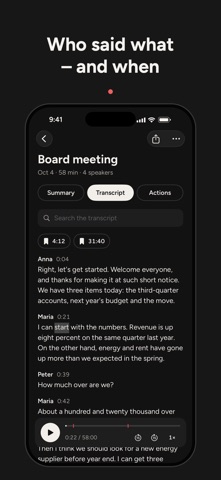
TRANSCRIPTS IN SEVEN LANGUAGES
• English, Danish, German, French, Spanish, Japanese and Korean – Referat detects the language itself
• Speech becomes text right on your phone with Whisper
• Referat finds the different speakers – name them with a tap
• Tap a word to hear that moment again, and play at 0.5–2× speed
• Search one recording or all of them
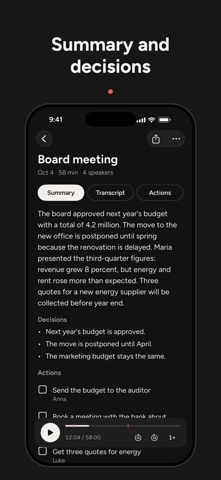
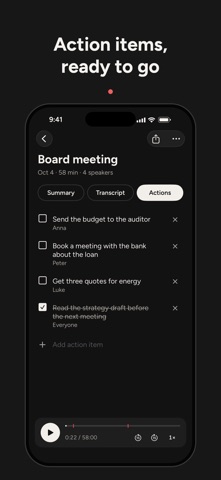
SUMMARY AND ACTION ITEMS
• A short summary, the decisions and a checklist of action items with owners – in the meeting's language
• Written by Apple Intelligence on your iPhone (iPhone 15 Pro and later with iOS 26)
• Copy the summary into an email or Slack with one tap
SHARE IT YOUR WAY
• Text, Markdown, PDF, subtitles (SRT/VTT) or the audio file
YOUR MEETINGS ARE YOURS
Everything – audio, transcript and summary – stays on your iPhone. There is no server, no account and no tracking. The speech model is downloaded once, and after that Referat works entirely offline.
PAY ONCE. THAT'S IT.
Referat costs a small one-time price: every feature and every future update, with no ads and no subscription. The extra app icons and a silly little game are included for everyone.
Remember to tell everyone in the meeting that you are recording.