

Reflowly: EPUB PDF Converter
Reflowly: EPUB PDF Converter is made and published by Jhomar Maravillas. AppBrain is an independent app data site and isn't affiliated with Jhomar Maravillas. The app name, icon, screenshots and description belong to Jhomar Maravillas and are shown as published on the App Store.
AppBrain's verdict
- Last updated
- September 28, 2026
Rankings
App Store top chartsApp Store Rankings for Reflowly: EPUB PDF Converter
Competitors
Similar apps and more from Jhomar MaravillasAlternatives to Reflowly: EPUB PDF Converter


More from Jhomar Maravillas


Releases
Updates seen on the App Store- Version
- 1.0
- Launched
- September 2026
No changelog data
User feedback
Ratings and reviews on the App StoreComments on Reflowly: EPUB PDF Converter for iOS
We don't have enough comments to show example comments. Please check back later.
Technology
Found in the app by AppBrain- Price
- Free
- App size
- 2.01 MB
- Content rating
- Everyone
Technologies used by Reflowly: EPUB PDF Converter
About the app and developer
About Reflowly: EPUB PDF Converter
Reflowly: EPUB PDF Converter is a books app developed by Jhomar Maravillas.
User Ratings
The app has no ratings yet.
App Information
Reflowly: EPUB PDF Converter is freely available from the App Store. The app size is 2.01 MB. The latest version available is 1.0. The last update was on September 28, 2026.
Technical Requirements
The app has a content rating of Everyone. The app has been available on the App Store since September 2026.
Developer information for Jhomar Maravillas
Address:
Frequently asked questions about Reflowly: EPUB PDF Converter
Is Reflowly: EPUB PDF Converter free?
Yes. Reflowly: EPUB PDF Converter is free on the App Store.
Is Reflowly: EPUB PDF Converter still available?
Yes. Reflowly: EPUB PDF Converter is on the App Store, and the last update we saw was on September 28, 2026.
How large is Reflowly: EPUB PDF Converter?
Reflowly: EPUB PDF Converter is 2.01 MB.
Is Reflowly: EPUB PDF Converter suitable for children?
App Store rates the content of Reflowly: EPUB PDF Converter as suitable for everyone.
Who made Reflowly: EPUB PDF Converter?
Reflowly: EPUB PDF Converter was developed by Jhomar Maravillas. It is listed in the books category on the App Store.
What are the best alternatives to Reflowly: EPUB PDF Converter?
People looking at Reflowly: EPUB PDF Converter also look at these books apps: Pocket Library Reader, Focus Reader: PDF & EPUB, Rishi Reader, Bare Reader, My Bookio.
Store listing
By Jhomar Maravillas, from the App Store

Description by Jhomar Maravillas Written by the developer, not by AppBrain. Click to read.
EPUB → PDF
Turn a DRM-free ePub into a paginated, printable PDF. Each chapter starts on a new page, the cover comes first, and the book's table of contents becomes PDF bookmarks. The book's own fonts, styles and pictures are kept, and no line of text is ever cut in half at the bottom of a page.
• Paper: A4 or US Letter (set for your country automatically)
• Margins: narrow, normal or wide
• Text size: small, medium or large
PDF → EPUB
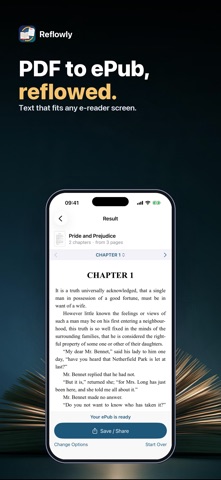
Turn a text PDF into a reflowable ePub that fits any e-reader screen. Reflowly rebuilds the book: running headers, footers and page numbers are removed, words split by a line-end hyphen are joined again, paragraphs that run across pages become whole, larger type becomes headings, and two-column pages are read column by column. New chapters start at each heading, or every 10 pages.
SEE IT FIRST
Converting and previewing are free: scroll through every PDF page, or read every reflowed chapter, before you decide. Saving and sharing the converted file is a one-time purchase — no subscription, no account, no ads.
GOOD TO KNOW
• DRM-free ePubs only. Books bought in e-book stores are usually copy-protected and can't be converted. Public-domain books and files an author or publisher gives you work great.
• PDF → ePub needs a PDF with selectable text. Scans and photos of pages have no text to reflow.
• Complex layouts (magazines, forms, heavy tables) may reflow imperfectly. Pictures on text pages are not carried over; pages that are only a picture are kept as pictures.
• Opens files from Files, or from another app with "Open in Reflowly".
Questions: overlapmarr@gmail.com