It doesn't have enough ratings yet to judge what users think.
Reframe – Photo Layout Editor is made and published by
Douglas Neish.
AppBrain is an independent app data site and isn't affiliated with Douglas Neish.
The app name, icon, screenshots and description belong to Douglas Neish and are shown as
published on the App Store.
About Reframe – Photo Layout Editor
Reframe – Photo Layout Editor is a photo & video app developed by Douglas Neish.
What is the rating of Reframe – Photo Layout Editor?
Reframe – Photo Layout Editor is rated 5.00 out of 5 stars, based on 4 ratings.
Is Reframe – Photo Layout Editor free?
Reframe – Photo Layout Editor is free. The app size is 2.45 MB. The latest version available is 1.4.2. The last update was on September 17, 2026.
What are the requirements for Reframe – Photo Layout Editor?
The app has a content rating of Everyone. The app has been available on the App Store since April 2026.
Description by Douglas Neish(from the App Store)
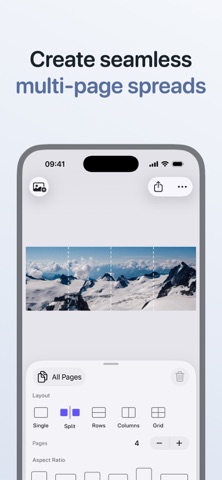
Reframe makes it easy to create polished image layouts for posts, carousels, and multi-page spreads in just a few taps. No subscriptions. No ads.
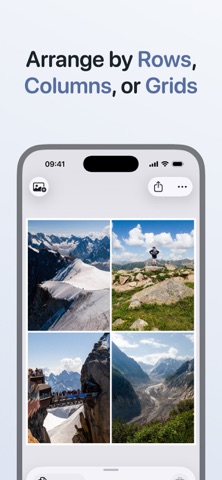
CHOOSE A LAYOUT Start with a layout that matches your idea. Use Single to feature one standout image. Use Split to turn one image into a seamless multi-page spread that swipes across a carousel. Use Rows or Columns for before-and-after shots or to show multiple photos together. Use Grid to display a collection or photo series.
CUSTOMISE THE PAGE Match your layout to any platform or style. Pick the aspect ratio you need so your post fits where you’re uploading. Adjust frame size for a bit of breathing room around your images. Choose a background color that complements your photos. Add a clean border for a polished, gallery-style finish.
APPLY SETTINGS YOUR WAY Keep every page consistent with shared settings. Or customize individual pages when you need more control.
FILL THE FRAME Mix vertical, horizontal, and square photos in one layout without worrying about cropping (unless you want to!). Toggle Fill Page so your images expand to use all available space. Tap any image to select it, then drag to fine-tune the crop so the focus is exactly where you want it.
PREVIEW YOUR LAYOUT Minimise the controls with one swipe and let your layout fill the screen. Review the final look before you export and post.
ARRANGE YOUR SEQUENCE Plan your story from first swipe to last. Reorder photos and pages in your carousel to plan the sequence before exporting.
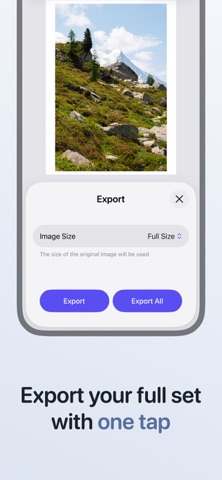
EASY EXPORT Export every page at once with a single tap. Smart sizing options select the best resolution to preserve the details in your photos, or go fully custom and set the exact long or short edge size you need. Optionally include your photo’s original metadata. Choose JPEG for best compatibility or HEIC for smaller files with excellent image quality.
PRIVATE PHOTO PICKER Reframe uses the built-in iOS photo picker. Only the photos you explicitly select are shared with the app, keeping the rest of your library private.
DESIGNED FOR iOS Reframe feels fast and responsive on iPhone, with smooth animations and subtle haptic feedback that makes editing layouts feel effortless and precise.
Each subscription will automatically renew 3 days before the expiration date for
the same time period. Subscriptions can be cancelled at any time before the renewal.