

RefSize Photo Dimension & Size
RefSize Photo Dimension & Size is made and published by Vinh Vo. AppBrain is an independent app data site and isn't affiliated with Vinh Vo. The app name, icon, screenshots and description belong to Vinh Vo and are shown as published on the App Store.
AppBrain's verdict
- Rating on App Store
- 5.00
- 1 ratings
- Last updated
- May 20, 2026
It doesn't have enough ratings yet to judge what users think.
Rankings
App Store top chartsApp Store Rankings for RefSize Photo Dimension & Size
Competitors
Similar apps and more from Vinh VoAlternatives to RefSize Photo Dimension & Size


More from Vinh Vo


Releases
Updates seen on the App Store- Version
- 1.2
- Launched
- January 2026
No changelog data
User feedback
Ratings and reviews on the App StoreComments on RefSize Photo Dimension & Size for iOS
We don't have enough comments to show example comments. Please check back later.
Technology
Found in the app by AppBrain- Price
- Free
- App size
- 24.8 MB
- Content rating
- Everyone
Technologies used by RefSize Photo Dimension & Size
About the app and developer
About RefSize Photo Dimension & Size
RefSize Photo Dimension & Size is an utilities app developed by Vinh Vo.
User Ratings
RefSize Photo Dimension & Size is rated 5.00 out of 5 stars. The rating is based on one rating ratings.
App Information
RefSize Photo Dimension & Size is freely available from the App Store. The app size is 24.79 MB. The latest version available is 1.2. The last update was on May 20, 2026.
Technical Requirements
The app has a content rating of Everyone. The app has been available on the App Store since January 2026.
Developer information for Vinh Vo
Address:
Store listing
By Vinh Vo, from the App Store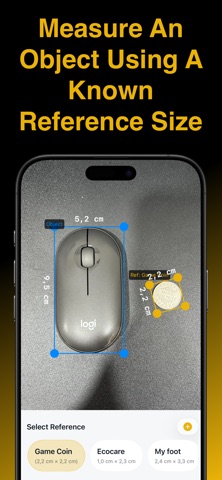



Description by Vinh Vo Written by the developer, not by AppBrain. Click to read.
No ruler? No problem! RefSize is a powerful camera measurement tool that lets you measure any object in the real world using a known reference. Whether it's a coin, a credit card, or a business card, RefSize turns your smartphone into a high-precision digital tape measure.
◆ Why RefSize?
_ Unlike traditional AR rulers that can be unstable, RefSize uses proportional scaling based on physical objects you already know. Just snap a photo, and get accurate dimensions instantly!
◆ Key Features:
_ Measure via Reference: Use familiar items (coins, bills, ID cards) as a scale to measure anything next to them.
_ High-Precision Tools: Use our Magnifying Glass (Zoom), drag-and-drop, and fine-tuning controls to mark edges with pixel-perfect accuracy.
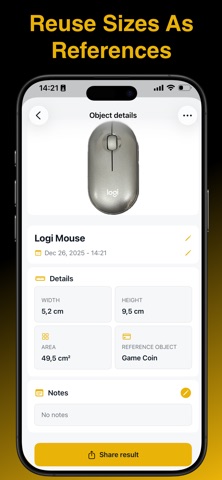
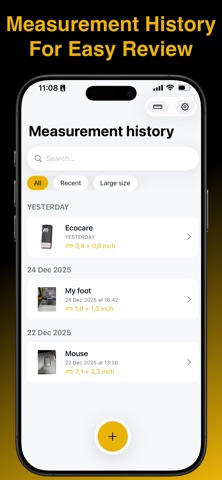
_ Measurement History & Lists: Save your measurements (e.g., "Computer Mouse - 12cm") into a dedicated list for quick reference later.
_ Smart Re-use: Once you measure an object, you can save its size and use it as a new reference for future photos.
_ Universal Units: Easily switch between Metric and Imperial units (mm, cm, m, inches, feet).
_ Custom References: Can't find a coin? Add your own custom reference objects by entering their known width or height.
◆ How it works in 3 Easy Steps:
_ Place & Snap: Put a familiar object (like a 1-cent coin) next to what you want to measure (like a computer mouse) and take a photo.
_ Calibrate: Drag the markers to match the size of the known reference.
_ Measure: Adjust the second set of markers to the target object. Boom! You have the exact dimensions. Press "Save" to add it to your history.
◆ Perfect For:
_ Online Shoppers: Check if a piece of furniture or a gadget will fit your space.
_ DIY & Handymen: Measure hardware, bolts, or craft materials on the go.
_ Collectors: Quickly document the size of stamps, coins, or artifacts.
_ Office & School: A handy tool for quick measurements when you don't have a physical ruler.
Download RefSize today and turn your camera into the smartest ruler in your pocket!
Terms of Use: https://www.apple.com/legal/internet-services/itunes/dev/stdeula/