

Regroup Mobile is made and published by Regroup. AppBrain is an independent app data site and isn't affiliated with Regroup. The app name, icon, screenshots and description belong to Regroup and are shown as published on the App Store.
AppBrain's verdict
Established- Rating on App Store
- 3.40
- 5 ratings
- Last updated
- September 30, 2026
It doesn't have enough ratings yet to judge what users think.
Rankings
App Store top chartsApp Store Rankings for Regroup Mobile
Competitors
Similar apps and more from Regroup


Releases
Updates seen on the App Store- Version
- 1.5.9.2
- Launched
- October 2020
No changelog data
User feedback
Ratings and reviews on the App StoreComments on Regroup Mobile for iOS
We don't have enough comments to show example comments. Please check back later.
Technology
Found in the app by AppBrain- Price
- Free
- App size
- 49.3 MB
- Content rating
- Everyone
Technologies used by Regroup Mobile
About the app and developer
About Regroup Mobile
Regroup Mobile is a business app developed by Regroup.
What is the rating of Regroup Mobile?
Regroup Mobile is rated 3.40 out of 5 stars, based on 5 ratings.
Is Regroup Mobile free?
Regroup Mobile is free. The app size is 49.33 MB. The latest version available is 1.5.9.2. The last update was on September 30, 2026.
What are the requirements for Regroup Mobile?
The app has a content rating of Everyone. The app has been available on the App Store since October 2020.
Developer information for Regroup
Address:
Frequently asked questions about Regroup Mobile
Is Regroup Mobile free?
Yes. Regroup Mobile is free on the App Store.
Is Regroup Mobile still available?
Yes. Regroup Mobile is on the App Store, and the last update we saw was on September 30, 2026.
How large is Regroup Mobile?
Regroup Mobile is 49.33 MB.
Is Regroup Mobile suitable for children?
App Store rates the content of Regroup Mobile as suitable for everyone.
How do people rate Regroup Mobile?
Regroup Mobile scores 3.40 out of 5 stars, from 5 ratings on the App Store.
Who made Regroup Mobile?
Regroup Mobile was developed by Regroup. It is listed in the business category on the App Store.
What are the best alternatives to Regroup Mobile?
People looking at Regroup Mobile also look at these business apps: eICS, WebEOC, Omnigo Mobile Software, Alertus Activator, StructionSite Construction App.
Store listing
By Regroup, from the App Store


Description by Regroup Written by the developer, not by AppBrain. Click to read.
Regroup Clients:
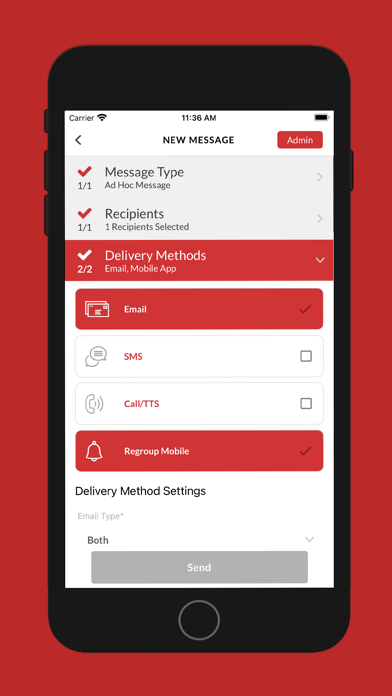
For clients of Regroup, the app empowers admins, staff, and other group leaders to easily and quickly access the full power of Regroup Mass Notification from the palm of their hand using any iOS device.
- Alert from Anywhere: Quickly reach any recipient or group from wherever you are by sending messages to mobile phones, landlines, email, social media, and more.
- Two-Tap Emergency Notifications: When seconds count, pre-programmed QuickMessage templates help you get information out fast with only two-taps in the app. System administrators can create an unlimited number of QuickMessage templates to use during any situation.
- Two-Way Messaging: Replies from recipients can be seen in real-time in the app so admins have immediate access to information and can take action fast.
- Bulk Replies and Updates: Admins can now select multiple recipients to send a bulk reply or update. They can also select recipients in bulk based on whether they have or haven’t replied to the original message.
- In-App Reports: View detailed delivery statistics for notifications on your iOS device.
- Built-In Security: Enable fingerprint login to prevent messages from being sent by unauthorized users.
Message Recipients:
If you’re part of an organization like a school, business, house of worship, or community that uses Regroup Mass Notification, you can download the free mobile app to customize your alert preferences and settings.
- Get Important Notifications Fast: Alerts can be delivered to the palm of your hand, and your organization can even deliver push notifications to you when cell towers are down or local cell networks are overloaded.
- Location-Based Alerts: With Regoup’s app installed and location services turned on, your organization can send emergency alerts based on your exact location to keep you safe in case of a critical event in your area.
- Configure Preferences: Use the app to easily update your notification preferences and keep your contact information up to date.