

Rekono OnePass is made and published by Rekono d.o.o. AppBrain is an independent app data site and isn't affiliated with Rekono d.o.o. The app name, icon, screenshots and description belong to Rekono d.o.o. and are shown as published on the App Store.
AppBrain's verdict
Established- Rating on App Store
- 4.84
- 38 ratings
- Last updated
- September 18, 2026
It doesn't have enough ratings yet to judge what users think.
Rankings
App Store top chartsApp Store Rankings for Rekono OnePass
Competitors
Similar apps and more from Rekono d.o.o.Alternatives to Rekono OnePass





Also available on Google Play

Releases
Updates seen on the App Store- Version
- 5.4.0
- Launched
- April 2020
No changelog data
User feedback
Ratings and reviews on the App StoreComments on Rekono OnePass for iOS
We don't have enough comments to show example comments. Please check back later.
Technology
Found in the app by AppBrain- Price
- Free
- App size
- 108.1 MB
- Content rating
- Everyone
Technologies used by Rekono OnePass
About the app and developer
About Rekono OnePass
Rekono OnePass is an utilities app developed by Rekono d.o.o.
User Ratings
Rekono OnePass is rated 4.84 out of 5 stars. The rating is based on 38 ratings.
App Information
Rekono OnePass is freely available from the App Store. The app size is 108.13 MB. The latest version available is 5.4.0. The last update was on September 18, 2026.
Technical Requirements
The app has a content rating of Everyone. The app has been available on the App Store since April 2020.
Developer information for Rekono d.o.o.
Address:
Frequently asked questions about Rekono OnePass
Is Rekono OnePass free?
Yes. Rekono OnePass is free on the App Store.
Is Rekono OnePass still available?
Yes. Rekono OnePass is on the App Store, and the last update we saw was on September 18, 2026.
How large is Rekono OnePass?
Rekono OnePass is 108.13 MB.
Is Rekono OnePass suitable for children?
App Store rates the content of Rekono OnePass as suitable for everyone.
How do people rate Rekono OnePass?
Rekono OnePass scores 4.84 out of 5 stars, from 38 ratings on the App Store.
Who made Rekono OnePass?
Rekono OnePass was developed by Rekono d.o.o. It is listed in the utilities category on the App Store.
What are the best alternatives to Rekono OnePass?
People looking at Rekono OnePass also look at these utilities apps: Moj Telekom, Moj A1, GremoNaElektriko, Moj Mobi, T-2 Poraba.
Store listing
By Rekono d.o.o., from the App Store


Description by Rekono d.o.o. Written by the developer, not by AppBrain. Click to read.
It is implemented to support the latest development standards, so it includes and utilizes all of the device’s functionalities and sensors (biometric authentication, QR code scanning using device’s camera, push notifications and other security features).
Two-factor PUSH authentication
You can now have much more control over your Rekono account as well as an improved and faster 2-factor authentication mechanism. With the implementation of push notifications, you can sign in to your Rekono accounts with your devices by simply clicking a button, which provides faster, if not even the fastest 2-factor authentication mechanism which is thoroughly secured by your device application’s PIN code or biometric authentication, if the device supports it. Rekono OnePass provides a simple and user-friendly design with a comfortable overview of your Rekono account information, OTP codes and settings, which you can freely adapt to your likes and needs.
OTPs
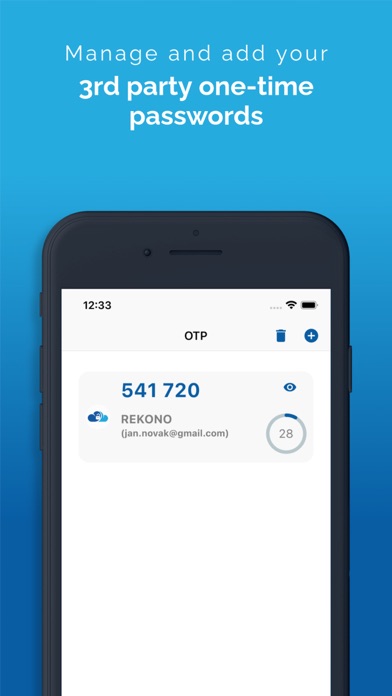
One-time passwords (OTPs) are now more clearly displayed on the main application screen when you log in to your Rekono account. By default, Rekono OTP code is automatically enrolled the moment you log in to the application and register your device, so OTP code cannot be deleted or erased. OTPs can now be added manually or automatically when scanning QR code with the QR code camera application scanner. This provides a simpler and faster way of adding OTP codes to the Rekono OnePass application. Manually adding OTPs is still supported in the application, when you must add OTP’s issuer shared secret and name with which OTP will be presented on the main screen.
Due to various user’s likes and needs, you have the possibility to modify the application settings, themes, languages and security provisions to your own taste.
Bank card enrollment using PIN/PAN
You will now be able to enroll your bank provider for online transactions in the application by using your bank card credentials. The intuitive process of adding the bank is short and consists of simple understandable steps.
3-D Secure PUSH notifications
With Rekono OnePass, you can now confirm online payments within the application, in quick and easy steps. To begin with, you make an online payment at a specific internet provider or merchant. After successfully executing the transaction, you then receive push notification to your device, which you click and navigate to the confirmation screen in the app.
You then authenticate yourself with biometrics or a PIN code that you have set up in your application. A few moments later the transaction screen is displayed with all the information about the transaction. By confirming/rejecting the transaction, the 3-D Secure transaction process is completed.
Local document signing and signing documents by using Push notifications
One of the most prominent features in 2.0.0 release is the document signing.
You can now digitally sign local documents right from the device's file system by simply selecting a file or a document from your device's storage and loading it in the app. With a click of a button the document will be securely signed by using Rekono Sign services on our secure servers. By means of PUSH notifications, you will be able to digitally sign documents on-the-fly when a service provider or a customer submits a document to the Rekono.Sign services. A few moments later you will receive a push notification informing you that there are documents waiting to be signed. After interacting with the notification, you will receive a detailed preview of the submitted documents, so you can decide to sign or reject the selected documents. After successful signing, the documents can be downloaded to your device or you can share them across other platforms or applications.