



AppBrain's verdict
- Last updated
- November 5, 2026
- Size
- 67.5 MB
User feedback
Ratings and reviews on the App StoreComments on Relay GTD for iOS
We don't have enough comments to show example comments. Please check back later.
Store listing
By Michael Fraser Buffini, from the App StoreDescription by Michael Fraser Buffini Written by the developer, not by AppBrain. Click to read.
Relay includes the GTD lists, guided daily and weekly reviews, and Horizons for your areas, goals, vision and purpose. You can use GTD from your first day, without building the system yourself.
CAPTURE ON EVERY DEVICE
Type into the app, or tap Share in any app on iPhone and iPad and choose Relay. On a Mac, press Control+Option+N to capture over any app. Or forward an email to your own private Relay address. Relay keeps every capture in your Inbox until you decide what it is.
CLARIFY, THEN ENGAGE
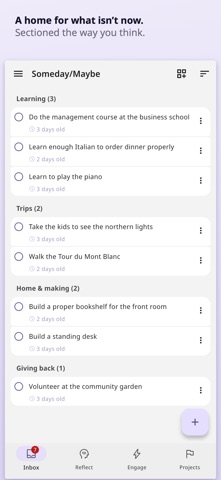
Clarify asks a few short questions, and you decide whether each item is a next action, a project with a defined outcome, something you are waiting for, a Someday/Maybe item, reference, or something to drop. Engage then shows the actions you can do now, filtered by where you are, how much time you have and whether you have the energy.
GUIDED REVIEWS
The weekly review is the step most people skip, because it depends on remembering to check everything. Relay guides you through the weekly review one step at a time: you clear the Inbox, update each project, then check your Horizons. Trigger lists prompt you with the ordinary categories people skip, so you remember the commitments you had forgotten. A five-minute daily review helps you plan each day.
HORIZONS: WHAT YOUR WORK IS FOR
Horizons shows the levels above your projects: the areas you are responsible for, the goals you are working towards, and your vision and purpose. A next action can be part of a project, and you link each project to the goal or area it serves. So you can see what a piece of work is for, and notice when a whole area has gone quiet.
WIDGETS
On iPhone and iPad, put a Relay list such as Inbox, Next Actions or Soft Landscape on the Home Screen. Complete an item without opening the app, or tap to capture. On a Mac, add a widget for Inbox, Next Actions, Soft Landscape, Scheduled, Waiting For or Projects. Widgets need iOS 17 or macOS 14.
WORKS WITH THE APPS YOU ALREADY USE
Apple Calendar, Apple Reminders, Google Calendar, Outlook Calendar, Google Tasks, Microsoft To Do, Todoist, Notion and Linear. Relay shows your calendar beside today's actions. Tasks from your other apps arrive in your Inbox first, without retyping.
ON EVERY DEVICE
Relay runs on iPhone, iPad and Mac, on Windows and on the web, with one account. The reviews, Horizons and Clarify are the same everywhere. Sign in with Google or Microsoft on any device. Sign in with Apple works everywhere except the Windows app.
AI THAT WAITS TO BE ASKED
Press the lightbulb for help to clarify. Relay's AI questions a vague capture, such as "Sort out the car", and says when a task you wrote is really a project. The AI also checks that a project's "done when" is clear enough for someone else to check. On a project, the AI offers a few points to consider, based on that project's own tasks and gaps: a stalled Waiting For item, a decision being avoided, or work that no longer serves the outcome. The AI can also draft a trigger list for a review. The AI never writes your next actions for you, never rewrites your words, and reads nothing unless you ask.
SUBSCRIPTION
Relay is a paid product, and every account includes the whole app. New accounts have 30 days free, with no card needed, starting when you choose. After that, pay monthly or yearly. Payment is charged to your Apple Account at confirmation of purchase. A subscription renews automatically unless it is cancelled at least 24 hours before the end of the current period. Manage or cancel your subscription on iPhone or iPad in Settings, under your name, then Subscriptions; on a Mac, in the App Store app, under your account.
Terms of use: https://relaygtd.com/terms
Privacy policy: https://relaygtd.com/privacy
Getting Things Done and GTD are registered trademarks of the David Allen Company. Relay is not affiliated with, authorised by, or endorsed by the David Allen Company.
Safety and technology
Found in the app by AppBrain- Price
- Free
- App size
- 67.5 MB
- Content rating
- Everyone
Technologies used by Relay GTD
Releases
Updates seen on the App Store- Version
- 1.1.6
- Launched
- September 2026
No changelog data
Rankings
App Store top chartsApp Store Rankings for Relay GTD
About the app and developer
About Relay GTD
Relay GTD is a productivity app developed by Michael Fraser Buffini.
What is the rating of Relay GTD?
Relay GTD has no ratings yet.
Is Relay GTD free?
Relay GTD is free. The app size is 67.54 MB. The latest version available is 1.1.6. The last update was on November 5, 2026.
What are the requirements for Relay GTD?
The app has a content rating of Everyone. The app has been available on the App Store since September 2026.
Relay GTD is made and published by Michael Fraser Buffini. AppBrain is an independent app data site and isn't affiliated with Michael Fraser Buffini. The app name, icon, screenshots and description belong to Michael Fraser Buffini and are shown as published on the App Store.
Developer information for Michael Fraser Buffini
Address:
Share Relay GTD
Subscribe now to get full and unlimited access to AppBrain Intelligence. You'll have access to:
- App Intelligence dashboard (performance timeline, competitor comparison, country rankings, insight cards)
- Detailed ranking data per app
- Full timeline per developer
- Device market shares data per country
- Unlimited keyword tracking
AppBrain is an app data site, we track rankings, ratings, installs for all apps and games on Google Play and the App Store. AppBrain doesn't host app files or APKs, all install links go directly to the official store. All trademarks are owned by their respective owners.
More apps
App statistics
About AppBrain