




AppBrain's verdict
- Last updated
- August 1, 2026
- Size
- 5.91 MB
User feedback
Ratings and reviews on the App StoreComments on RemindLink: Bookmark Reminder for iOS
We don't have enough comments to show example comments. Please check back later.
Store listing
By Roshan Balakrishna Shetty, from the App StoreDescription by Roshan Balakrishna Shetty Written by the developer, not by AppBrain. Click to read.
Save articles, videos, social media posts, tutorials, and other links for later. Add one-time or recurring reminders, organize bookmarks automatically, and create QR codes to share links with anyone.
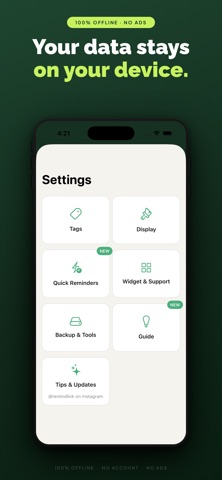
No sign-up. No cloud sync. Your bookmarks stay on your device.
◆ SAVE LINKS FROM ANY APP
Save links directly from YouTube, Instagram, Reddit, X, LinkedIn, Chrome, Slack, WhatsApp, Telegram, and more using the share sheet.
◆ FLEXIBLE LINK REMINDERS
Set one-time or recurring reminders every hour, day, week, month, year, or at a custom interval.
◆ QUICK REMINDER PRESETS
Save frequently used reminder times, such as “Tonight” or “Weekend Morning,” and apply them with one tap.
◆ TURN MESSAGES INTO REMINDERS
Paste or share text containing a link and a date or time, such as “Client meeting zoom.us/xyz tomorrow at 9am.” RemindLink automatically extracts the title, link, and reminder time.
◆ BOOKMARK MANAGER & LINK ORGANIZER
Keep saved links in one place and find them by title, URL, or category. RemindLink automatically categorizes bookmarks from more than 50 platforms.
◆ QR CODE GENERATOR, SHARE & SCAN
Create QR codes for bookmarks and reminders. Transfer links between devices, let anyone scan a QR code to open a URL, or bundle up to 10 titled links into one scannable list.
Shared QR codes can be opened without installing RemindLink.
◆ QUICK ADD SHORTCUTS
Hold the + button and slide to scan a QR code, export JSON, or manually add a bookmark.
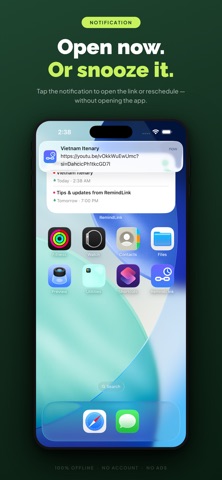
◆ ACTIONABLE NOTIFICATIONS
Open a saved link or reschedule it directly from the notification.
◆ HOME SCREEN WIDGET
View upcoming reminders and add bookmarks from your home screen.
◆ AUTO-DETECT COPIED URLS
RemindLink detects URLs copied to your clipboard, making them faster to save.
◆ BULK BOOKMARK ACTIONS
Select multiple bookmarks to reschedule, copy, delete, export, or add reminders.
◆ BACKUP, IMPORT & EXPORT
Create local backups, restore bookmarks, import supported files, or export links to browser-compatible formats and spreadsheets.
◆ HELPFUL GUIDES
Use built-in guides to learn about key features and sharing options.
◆ THEMES & CUSTOMIZATION
Choose Light, Dark, or System theme, use 12-hour or 24-hour time formats, and enable Left Hand Mode.
◆ OFFLINE & PRIVATE
Everything is stored locally on your device. No account, cloud sync, or ads. RemindLink works fully offline.
PERFECT FOR
• Articles and blogs to read later
• YouTube videos and social media posts
• Tutorials, courses, and links with deadlines
• Links shared through Slack, email, WhatsApp, and Telegram
• Reading lists with recurring reminders
• Organizing bookmarks across platforms
• Creating QR codes for links, posters, or notice boards
• Anyone who saves links and forgets to revisit them
ALL FEATURES
• Bookmark manager and link organizer
• Save links from any app
• One-time and recurring reminders
• Hourly, daily, weekly, monthly, yearly, and custom intervals
• Quick reminder presets
• Turn messages into reminders
• QR code generator for links
• QR sharing and importing
• QR codes for one link or up to 10 links
• Shared QR codes that work without RemindLink
• Hold-and-slide + shortcuts
• Home screen widget
• Automatic clipboard URL detection
• Automatic categories for more than 50 platforms
• Search by title, URL, or category
• Bulk bookmark actions
• Backup, restore, import, and export
• Browser and spreadsheet exports
• Built-in guides
• Light, Dark, and System themes
• 12-hour and 24-hour time formats
• Actionable notifications
• Trash and restore
• Left Hand Mode
• In-app feedback
• Fully offline
• No account required
• No ads
• Free to use
Save links. Set reminders. Organize bookmarks. Share with QR codes.
RemindLink - the bookmark manager and reminder app that brings saved links back at the right time.
Safety and technology
Found in the app by AppBrain- Price
- Free
- App size
- 5.91 MB
- Content rating
- Everyone
Technologies used by RemindLink: Bookmark Reminder
Releases
Updates seen on the App Store- Version
- 1.4
- Launched
- July 2026
No changelog data
Alternatives
Similar apps and more from Roshan Balakrishna ShettyAlternatives to RemindLink: Bookmark Reminder


Also available on Google Play

Rankings
App Store top chartsApp Store Rankings for RemindLink: Bookmark Reminder
About the app and developer
About RemindLink: Bookmark Reminder
RemindLink: Bookmark Reminder is a productivity app developed by Roshan Balakrishna Shetty.
What is the rating of RemindLink: Bookmark Reminder?
RemindLink: Bookmark Reminder has no ratings yet.
Is RemindLink: Bookmark Reminder free?
RemindLink: Bookmark Reminder is free. The app size is 5.91 MB. The latest version available is 1.4. The last update was on August 1, 2026.
What are the requirements for RemindLink: Bookmark Reminder?
The app has a content rating of Everyone. The app has been available on the App Store since July 2026.
RemindLink: Bookmark Reminder is made and published by Roshan Balakrishna Shetty. AppBrain is an independent app data site and isn't affiliated with Roshan Balakrishna Shetty. The app name, icon, screenshots and description belong to Roshan Balakrishna Shetty and are shown as published on the App Store.
Developer information for Roshan Balakrishna Shetty
Address: