It doesn't have enough ratings yet to judge what users think.
Remote Control for Apple TV is made and published by
Kenta Suzuki.
AppBrain is an independent app data site and isn't affiliated with Kenta Suzuki.
The app name, icon, screenshots and description belong to Kenta Suzuki and are shown as
published on the App Store.
About Remote Control for Apple TV
Remote Control for Apple TV is an utilities app developed by Kenta Suzuki.
User Ratings
Remote Control for Apple TV is rated 4.88 out of 5 stars. The rating is based on 8 ratings.
App Information
Remote Control for Apple TV is freely available from the App Store. The app size is 20.18 MB. The latest version available is 1.0.2. The last update was on June 16, 2026.
Technical Requirements
The app has a content rating of Everyone. The app has been available on the App Store since May 2026.
Description by Kenta Suzuki(from the App Store)
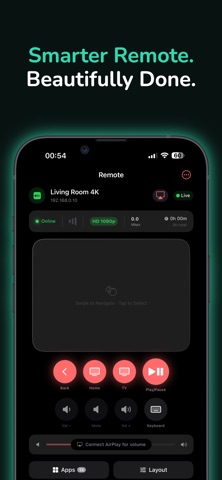
The most powerful Remote and Cast app — now with full Apple TV support.AirCast turns your iPhone into a complete companion for your TV. Navigate with a smart trackpad, type with your iPhone keyboard, control volume through AirPlay, and cast photos, videos, music, and documents wirelessly. Plus IPTV, screen mirroring, and live camera casting — all in one beautifully designed app.
Whether you're sharing memories with family, watching your favorite shows, presenting in a meeting, or using screen mirroring via AirPlay, AirCast is the most versatile casting and remote companion for your iPhone.
— DISCLAIMER —
AirCast is an independent third-party application and is not affiliated with, endorsed by, sponsored by, or approved by Apple Inc. "AirPlay" is a trademark of Apple Inc., registered in the U.S. and other countries. AirCast works with AirPlay-compatible streaming devices.
— KEY FEATURES —
CAST & STREAM
* Send photos, videos, and Live Photos wirelessly * Stream music with full playback controls * Cast PDFs, Word, Excel, and PowerPoint documents * Open and play web videos directly on the big screen * Cast URLs from your browser * Screen mirroring via AirPlay with low latency support
SMART REMOTE
* Gesture trackpad for fluid navigation — swipe to scroll, tap to select * Physical-style buttons: Back, Home, Menu, Play/Pause * Volume control through AirPlay connection * Built-in keyboard for fast text input on search, login, and forms * Customizable button layouts to match your style
IPTV PLAYER
* Load your own M3U or M3U8 playlists * Browse free channels with EPG support * Save favorites and create custom categories * Smooth playback with adaptive streaming
LIBRARY & FILE BROWSER
* Built-in file browser with WebDAV support * Add files from Cloud, Downloads, or local storage * Cast documents and media directly from your library * Organize your media collection in one place
PRO TOOLS
* Whiteboard: draw live and cast in real time * Screen mirroring with low latency * Live camera casting for tutorials, presentations, and more
— UNLOCK PRO — Get full access to all premium features with two flexible options:
* Weekly Plan — auto-renewable subscription with optional free trial * Lifetime Unlock — one-time purchase, all current and future Pro features
— SUBSCRIPTION DETAILS —
* Payment will be charged to your Apple ID account at confirmation of purchase. * Subscription automatically renews unless auto-renew is turned off at least 24 hours before the end of the current period. * Your account will be charged for renewal within 24 hours prior to the end of the current period. * You can manage subscriptions and turn off auto-renewal in your Account Settings after purchase. * Any unused portion of a free trial period is forfeited when you purchase a subscription.
Privacy Policy: https://air-cast-ed1ec.web.app/privacy.html Terms of Use: https://air-cast-ed1ec.web.app/terms.html
Each subscription will automatically renew 3 days before the expiration date for
the same time period. Subscriptions can be cancelled at any time before the renewal.