

Roku Remote Control : Smart TV
Roku Remote Control : Smart TV is made and published by Salah eddine Eddamouh. AppBrain is an independent app data site and isn't affiliated with Salah eddine Eddamouh. The app name, icon, screenshots and description belong to Salah eddine Eddamouh and are shown as published on the App Store.
AppBrain's verdict
Well rated- Rating on App Store
- 4.47
- 252 ratings
- Last updated
- October 2, 2026
Users rate it well: 4.5 stars from 252 ratings.
Rankings
App Store top chartsApp Store Rankings for Roku Remote Control : Smart TV
Competitors
Similar apps and more from Salah eddine EddamouhMore from Salah eddine Eddamouh


Releases
Updates seen on the App Store- Version
- 3.0.5
- Launched
- November 2024
No changelog data
User feedback
Ratings and reviews on the App StoreComments on Roku Remote Control : Smart TV for iOS
We don't have enough comments to show example comments. Please check back later.
Technology
Found in the app by AppBrain- Price
- Free
- App size
- 47.2 MB
- Content rating
- Everyone
Technologies used by Roku Remote Control : Smart TV
About the app and developer
About Roku Remote Control : Smart TV
Roku Remote Control : Smart TV is an utilities app developed by Salah eddine Eddamouh.
What is the rating of Roku Remote Control : Smart TV?
Roku Remote Control : Smart TV is rated 4.47 out of 5 stars, based on 250 ratings.
Is Roku Remote Control : Smart TV free?
Roku Remote Control : Smart TV is free. The app size is 47.25 MB. The latest version available is 3.0.5. The last update was on October 2, 2026.
What are the requirements for Roku Remote Control : Smart TV?
The app has a content rating of Everyone. The app has been available on the App Store since November 2024.
Developer information for Salah eddine Eddamouh
Address:
Store listing
By Salah eddine Eddamouh, from the App Store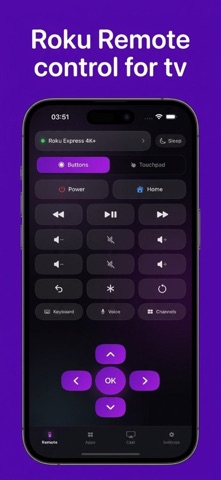


Description by Salah eddine Eddamouh Written by the developer, not by AppBrain. Click to read.
Lost your remote or tired of dead batteries? Our app connects automatically over Wi-Fi within seconds to give you full, seamless control of your TV.
KEY FEATURES:
• Complete Remote Control: Power ON/OFF, volume adjustment, mute, home, back, and navigation D-Pad.
• Ultra-Smooth Touchpad: Swipe to glide through menus and content with natural gestures.
• Fast Text Typing: Use your iPhone keyboard to search shows, movies, and enter passwords without the tedious on-screen keyboard.
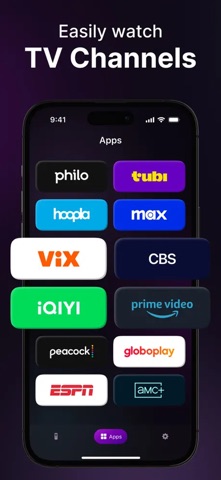
• Direct Channel Launcher: Access Netflix, YouTube, Prime Video, Hulu, Disney+, Max, Apple TV+, and all installed channels with a single tap.
• Quick Media Control: Play, pause, fast forward, rewind, and instant replay.
• Multi-Device Support: Seamlessly switch between multiple Roku TVs and streaming sticks across your home.
COMPATIBLE WITH ALL ROKU MODELS:
- TVs: TCL Roku TV, Hisense, ONN, Insignia, Sharp, Philips, JVC, RCA, Westinghouse, Hitachi, Magnavox, Sanyo, Element.
- Streaming Devices: Roku Streaming Stick (3500, 3600, 3800, 3810, 4K, 4K+), Roku Express, Roku Express 4K+, Roku Premiere, Roku Premiere+, Roku Ultra, Roku Ultra LT, Roku Streambar, and Roku Soundbar.
HOW TO CONNECT:
1. Ensure your iPhone and Roku device are connected to the exact same Wi-Fi network.
2. Open the app — it will automatically discover your Roku TV.
3. Tap your TV to connect and start controlling immediately!
Disclaimer: This application is not an official product of Roku, Inc. and is not affiliated with, endorsed by, or associated with Roku, Inc. or any TV manufacturers mentioned.
SUBSCRIPTION INFORMATION:
• Payment will be charged to your Apple ID Account at confirmation of purchase.
• Subscription automatically renews unless auto-renew is turned off at least 24 hours before the end of the current period.
• Your account will be charged for renewal within 24 hours prior to the end of the current period.
• Subscriptions may be managed and auto-renewal may be turned off by going to your App Store Account Settings after purchase.
• Any unused portion of a free trial period, if offered, will be forfeited when purchasing a subscription.
Privacy Policy: https://telegra.ph/Remote-Control-Privacy-Policy-11-19
Terms of Use (EULA): https://www.apple.com/legal/internet-services/itunes/dev/stdeula/