

Remote Desktop - by Threadmark
Remote Desktop - by Threadmark is made and published by Michael Inal. AppBrain is an independent app data site and isn't affiliated with Michael Inal. The app name, icon, screenshots and description belong to Michael Inal and are shown as published on the App Store.
AppBrain's verdict
- Rating on App Store
- 5.00
- 1 ratings
- Last updated
- June 23, 2026
- Size
- 15.1 MB
It doesn't have enough ratings yet to judge what users think.
User feedback
Ratings and reviews on the App StoreComments on Remote Desktop - by Threadmark for iOS
We don't have enough comments to show example comments. Please check back later.
Store listing
By Michael Inal, from the App Store

Description by Michael Inal Written by the developer, not by AppBrain. Click to read.
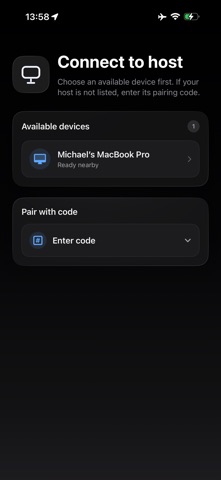
Remote Desktop lets you see and control your Mac or Windows PC right from your iPhone or iPad — anywhere you have internet. No complicated setup, no servers to run, no port forwarding, no monthly fees. Install the free host app on your computer, select your device, and you're connected.
Beautifully simple
Most remote desktop tools are built for IT departments. This one is built for you. There's nothing to configure. Open the app, click once, and your computer appears on screen — live, with sound, and fully controllable.
What you can do
• See your computer's screen in crisp, real-time video
• Hear your computer's audio streamed straight to your device
• Tap, scroll, and drag with an intuitive touch-cursor
• Type with your on-screen or hardware keyboard
• Use a connected trackpad or mouse for precise control
• Works great on both iPhone and iPad
Set up in seconds
Download the free Mac or Windows host app
Sign in with the same Apple Account on both devices
Select the device you want to control
Done — you're connected
Private by design
Your connection is direct and end-to-end. Pairing only works between devices signed into your own Apple Account, so no stranger can ever reach your computer. There's no middle-man server storing your screen or your data — the video, audio, and controls flow straight between your devices.
• Free to use
• No account to create
• No router settings to change
• No subscriptions
• Just works
Whether you need to grab a file, check on a long-running task, run a desktop app on the go, or help yourself from the couch — Remote Desktop keeps your whole computer one tap away.
Note: Requires the free companion host app for Mac or Windows, and both devices must be signed into the same Apple Account. A reliable internet connection is recommended for the best experience.
Safety and technology
Found in the app by AppBrain- Price
- Free
- App size
- 15.1 MB
- Content rating
- High
Technologies used by Remote Desktop - by Threadmark
Releases
Updates seen on the App Store- Version
- 0.1.6
- Launched
- June 2026
No changelog data
Alternatives
Similar apps and more from Michael InalAlternatives to Remote Desktop - by Threadmark


More from Michael Inal

Rankings
App Store top chartsApp Store Rankings for Remote Desktop - by Threadmark
About the app and developer
About Remote Desktop - by Threadmark
Remote Desktop - by Threadmark is an utilities app developed by Michael Inal.
What is the rating of Remote Desktop - by Threadmark?
Remote Desktop - by Threadmark is rated 5.00 out of 5 stars, based on one rating ratings.
Is Remote Desktop - by Threadmark free?
Remote Desktop - by Threadmark is free. The app size is 15.14 MB. The latest version available is 0.1.6. The last update was on June 23, 2026.
What are the requirements for Remote Desktop - by Threadmark?
The app has a content rating of High Maturity. The app has been available on the App Store since June 2026.
Developer information for Michael Inal
Address: