




AppBrain's verdict
- Last updated
- November 3, 2026
- Size
- 40.7 MB
User feedback
Ratings and reviews on the App StoreComments on Remote Desktop: itssle Link for iOS
We don't have enough comments to show example comments. Please check back later.
Store listing
By SnapWorks Lab, from the App StoreDescription by SnapWorks Lab Written by the developer, not by AppBrain. Click to read.
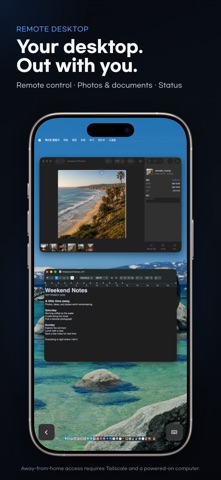
Connect your Mac to your iPhone or iPad with itssle Link. Work with your familiar keyboard, trackpad and input sources, and reach your desktop from outside your home. Open photos and documents stored on your computer and check its status from your mobile device.
Access from another network requires prior device pairing and a configured Tailscale connection. Your Mac must be powered on and reachable.
SMOOTH AND VIVID
• Up to 120 fps on devices with a 120Hz display
• HDR on supported Mac displays and devices (up to 60 fps)
• 4:4:4 Sharp Color Text (Beta): less color bleeding on colored text and thin lines in code and charts
• Lower display latency and fewer interruptions over Wi-Fi
• Checks wired (USB or LAN), Wi-Fi and outside routes in order
• See the route, frame rate and latency in the connection info
REMOTE CONTROL THAT FITS YOUR WORK
• Choose a configured Mac input source directly
• Keep iPhone or iPad keyboard input separate from Mac keyboard input
• Use direct touch, an on-screen trackpad, or an external keyboard and mouse
• Set scrolling direction, speed and inertia to suit your preference
• Zoom, pan and drag, or use viewing mode
• Hear Mac audio and paste text you copy on your iPhone or iPad
• Type on your Mac by voice with voice input
• Check connection status and progress, then reconnect when needed
• Open your selected Mac's connection screen quickly from a Home Screen widget
A SCREEN THAT FITS
• Apply a supported resolution that matches your iPad's aspect ratio for a workspace without letterboxing
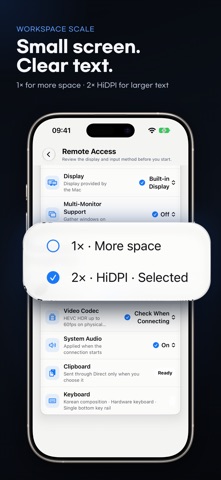
• Choose 1× for more workspace or 2× HiDPI for larger text
• Pick one display, or bring several displays together on one screen
• On iPhone, connect in landscape and return to portrait when you finish
• On iPhone Duo, a two-page home when unfolded; half folded, the Mac screen on top and the keyboard below
CONNECT TO YOUR DESKTOP FROM OUTSIDE YOUR HOME
• Continue working on your desktop over an external network
• Connect from an approved device using a Tailscale route you set up in advance
DESKTOP PHOTOS AND DOCUMENTS ON THE GO
• Browse and search folders selected on your Mac and approved for your device
• Zoom into photos and move between images
• Read supported PDFs, EPUBs, text and tables in dedicated viewers
• Save a file or open a copy in another app when you choose
• Browse shared files while keeping Mac originals unchanged
MAC STATUS AT A GLANCE
• Check CPU and memory usage, battery and available storage
• View your Mac model, chip, macOS and connection details
• See when information was updated and distinguish current status from past readings
• Check status and browse shared files without starting screen control
YOUR DEVICES, YOUR APPROVAL
• Manage paired devices and sharing permissions on your Mac
• Connect without a separate itssle account
• Analytics and crash reporting are off by default and independently optional
• If something goes wrong, contact the developer from the app with a diagnostics report attached
Available in English, Korean, Japanese, German, Simplified Chinese and Traditional Chinese. Choose your display language in the app.
GETTING STARTED
Install itssle Link on your Mac and iPhone or iPad, then pair your devices. Your Mac must be powered on and reachable. Use the same network or a separately configured Tailscale connection. Remote control requires macOS Screen Recording and Accessibility permission. Up to 120 fps is available on devices with a 120Hz display, and HDR on supported Mac displays and devices at up to 60 fps; the two cannot be used at the same time. 4:4:4 Sharp Color Text (Beta) works in landscape at up to 60 fps and cannot be used with HDR or 120Hz. Actual frame rate, latency, image quality and file previews depend on your Mac, device, network and file format.
Safety and technology
Found in the app by AppBrain- Price
- $9.99
- App size
- 40.7 MB
- Content rating
- Everyone
Technologies used by Remote Desktop: itssle Link
Releases
Updates seen on the App Store- Version
- 1.6.1
- Launched
- September 2026
No changelog data
Alternatives
Similar apps and more from SnapWorks LabMore from SnapWorks Lab


Rankings
App Store top charts- Highest rank
- #78
- Chart
- Top Paid
- Business
- Country
- South Korea
App Store Rankings for Remote Desktop: itssle Link
Top rankings
| Rank | Country | Category | List |
|---|---|---|---|
| 78 | South Korea | Business | Top Paid |
Ranking history in South Korea
About the app and developer
About Remote Desktop: itssle Link
Remote Desktop: itssle Link is a business app developed by SnapWorks Lab.
What is the rating of Remote Desktop: itssle Link?
Remote Desktop: itssle Link has no ratings yet.
Is Remote Desktop: itssle Link free?
Remote Desktop: itssle Link costs $9.99. The app size is 40.71 MB. The latest version available is 1.6.1. The last update was on November 3, 2026.
What are the requirements for Remote Desktop: itssle Link?
The app has a content rating of Everyone. The app has been available on the App Store since September 2026.
Remote Desktop: itssle Link is made and published by SnapWorks Lab. AppBrain is an independent app data site and isn't affiliated with SnapWorks Lab. The app name, icon, screenshots and description belong to SnapWorks Lab and are shown as published on the App Store.
Developer information for SnapWorks Lab
Address: