

Remote for Hisense Smart TV.
Remote for Hisense Smart TV. is made and published by DMYTRO PETUKH. AppBrain is an independent app data site and isn't affiliated with DMYTRO PETUKH. The app name, icon, screenshots and description belong to DMYTRO PETUKH and are shown as published on the App Store.
AppBrain's verdict
Well rated- Best rank
- #54
- Top Free, Mexico
- Rating on App Store
- 4.37
- 1,810 ratings
- Last updated
- October 21, 2026
Users rate it well: 4.4 stars from 1,810 ratings. Its best ranking is #54 in Top Free, Utilities in Mexico.
Rankings
App Store top charts- Highest rank
- #54
- Chart
- Top Free
- Utilities
- Country
- Mexico
Releases
Updates seen on the App Store- Version
- 5.7
- Launched
- January 2025
No changelog data
User feedback
Ratings and reviews on the App StoreComments on Remote for Hisense Smart TV. for iOS
We don't have enough comments to show example comments. Please check back later.
Technology
Found in the app by AppBrain- Price
- Free
- App size
- 117.1 MB
- Content rating
- Everyone
Technologies used by Remote for Hisense Smart TV.
About the app and developer
About Remote for Hisense Smart TV.
Remote for Hisense Smart TV. is an utilities app developed by DMYTRO PETUKH.
User Ratings
Remote for Hisense Smart TV. is rated 4.37 out of 5 stars. The rating is based on 1.8 thousand ratings.
App Information
Remote for Hisense Smart TV. is freely available from the App Store. The app size is 117.14 MB. The latest version available is 5.7. The last update was on October 21, 2026.
Technical Requirements
The app has a content rating of Everyone. The app has been available on the App Store since January 2025.
Developer information for DMYTRO PETUKH
Address:
Frequently asked questions about Remote for Hisense Smart TV.
Is Remote for Hisense Smart TV. free?
Yes. Remote for Hisense Smart TV. is free on the App Store.
Is Remote for Hisense Smart TV. still available?
Yes. Remote for Hisense Smart TV. is on the App Store, and the last update we saw was on October 21, 2026.
How large is Remote for Hisense Smart TV.?
Remote for Hisense Smart TV. is 117.14 MB.
Is Remote for Hisense Smart TV. suitable for children?
App Store rates the content of Remote for Hisense Smart TV. as suitable for everyone.
How do people rate Remote for Hisense Smart TV.?
Remote for Hisense Smart TV. scores 4.37 out of 5 stars, from 1,810 ratings on the App Store.
Who made Remote for Hisense Smart TV.?
Remote for Hisense Smart TV. was developed by DMYTRO PETUKH. It is listed in the utilities category on the App Store.
Store listing
By DMYTRO PETUKH, from the App Store
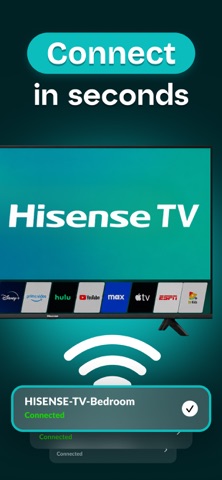
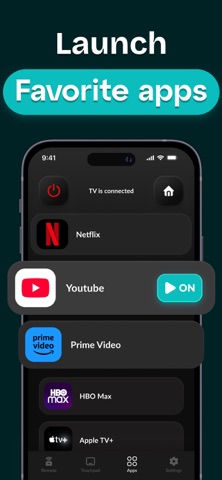


Description by DMYTRO PETUKH Written by the developer, not by AppBrain. Click to read.
Designed for Hisense smart TV owners who need reliable control without hunting for physical remotes or dealing with broken buttons.
HOW IT WORKS
The app connects to your Hisense TV through your home Wi-Fi network using the same protocol as your original remote. Once connected, it sends infrared-equivalent commands directly to your TV's receiver. The interface mirrors your physical remote layout but adds smartphone advantages like a full QWERTY keyboard for typing Netflix passwords or YouTube searches.
COMPATIBLE HISENSE TV MODELS
- VIDAA Smart TVs — U6, U7, U8, U9 series running VIDAA 4.0, 5.0, or 6.0 operating systems
- Android TV Models — A6, A7, H8, H9, H10 series with Android TV 9.0 or newer
- Roku TV Models — R6, R7, R8 series with built-in Roku platform
- 4K ULED Models — H65, H75, H85 series with quantum dot technology
KEY FEATURES
- Power and Volume Control — Turn your TV on and off, adjust volume, and mute audio instantly without reaching for the physical remote.
- Channel Navigation — Browse channels using number pad input or channel buttons, plus access your favorite channel list.
- Smart TV Menu Access — Navigate through Hisense's VIDAA interface, Android TV home screen, or Roku channel grid using directional pad controls.
- Keyboard Input for Apps — Type login credentials for Netflix, Hulu, Amazon Prime, and YouTube using your phone's full keyboard instead of navigating letter by letter.
- App Launch Shortcuts — Directly open Netflix, YouTube, Amazon Prime Video, Disney Plus, and other streaming apps without scrolling through the home screen.
WHO USES THIS APP
- Families with multiple Hisense TVs who want one smartphone solution that works with all their TVs in different rooms.
- College students whose original Hisense remote got lost during a move or broke from heavy use and need an immediate replacement.
- Parents whose kids constantly misplace the TV remote and want a backup solution that's always available on their phone.
- Seniors who find smartphone keyboards easier to use than navigating letter-by-letter on TV screens when entering passwords for streaming services.
HOW TO GET STARTED
1. Download the app and ensure your iPhone and Hisense TV connect to the same Wi-Fi network
2. Open the app and select your specific Hisense TV model from the compatibility list
3. Follow the pairing instructions to establish connection between your phone and TV
SUBSCRIPTION
Annual Plan: $9.99 per year — less than $1 per month for unlimited touchpad and playback controls
Payment charges to your iTunes account upon purchase confirmation. Subscriptions automatically renew unless auto-renewal is turned off at least 24 hours before the current period ends. Manage subscriptions in iTunes account settings.
DISCLAIMER
This app is designed as an independent remote control solution, not an official Hisense product. Hisense is a trademark of Hisense Group. VIDAA is a trademark of VIDAA USA. Android TV is a trademark of Google LLC. Roku is a trademark of Roku Inc.
Privacy Policy: https://hiremote.app/privacy
Terms of Use: https://hiremote.app/terms