Remote Rowing Coach is an overall app developed by Power Ten Development LLC.
Download Statistics
User Ratings
Remote Rowing Coach is rated 5.00 out of 5 stars. The rating is based on 7 ratings.
App Information
Remote Rowing Coach is FREE to download. The APK download size is 18.92 MB. The latest version available is 1.30. The last update was on November 14, 2025.
Technical Requirements
The app has a content rating of Everyone. The app has been available on Google Play March 2021.
Description
Please read the requirements for this app before downloading and purchasing remote coaching functionality.
Terms And Conditions https://powertendevelopment.com/remote-rowing-coach-terms-and-conditions/
Remote Rowing Coach is an iOS app designed to run on iPhone and iPad devices. Once the app is connected to the PM5 monitor on the erg it records workout metrics and displays them in real-time. It will also upload most workouts to the Concept2 Logbook provided the user authenticates with the Logbook from within the app. Remote Rowing Coach also provides the functionality (with the purchase of an in-app subscription) to allow another 3rd party to view PM5 metrics in real-time remotely. Please note that in order to access this functionality, the third party will also need another instance of Remote Rowing Coach running with the subscription service purchased for that device. Another way to view real-time metrics is to use the website associated with this app and which can be located at:
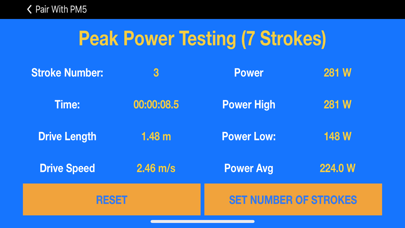
In order to use this app, a user is required to have a Concept2 rower with a PM5 monitor capable of Bluetooth. This app will NOT work with a PM3 or PM4 monitor. Additionally, the force curve functionality is ONLY available on PM5 monitors that were manufactured in late 2016 or later. Features Displays your workout in real-time. This screen shows the following metrics Current 500m/split Average 500m/split Distance Time Elapsed Stroke Number Drag Factor Power (Watts) Stroke Rate (Strokes per minute) Heart Rate and Heart Rate Zone (UT1, UT2, AT, TR, AN).
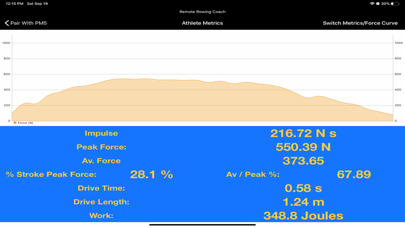
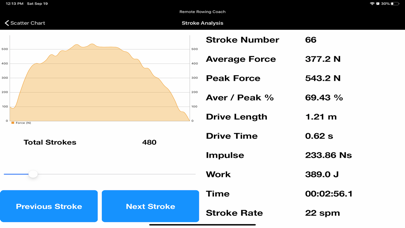
Force Curve Screen The force curve screen shows the following metrics. Real-time force curve data Impulse (calculated as Average Force x Stroke Time) Peak Force (in Newtons) Average Force (in Newtons) % of stroke rowed when peak force is achieved Average Force / Peak Force % Drive Time (seconds) Drive Length (meters) Work per stroke (Joules)
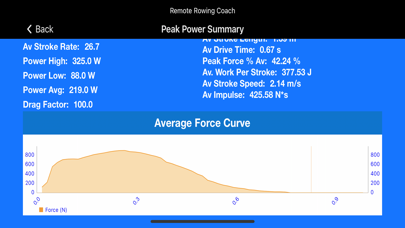
Training Review Remote Rowing Coach allows for the review of your training pieces. Provides average calculations for Stroke Rate, Average Heart Rate, Average Pace, Average Peak Power, Average Stroke Length, Average Drive Time, Peak Force Percentage Average, Average Work Per Stroke, Average Stroke Speed, Average Impulse.
Additionally, training summaries include maximum, minimum, and ending heart rate metrics.
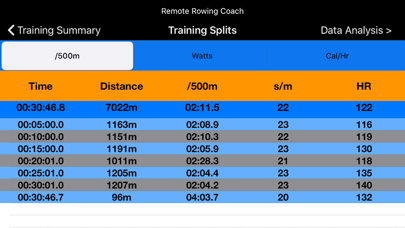
Training Splits The training split screen shows all splits recorded by the app/PM5 during your training.
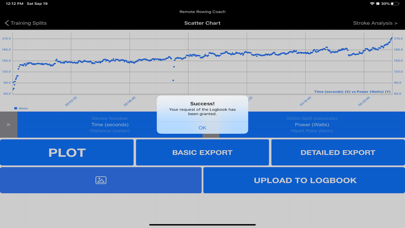
Data Analysis The data analysis screen allows for every metric captured to be displayed on a scatter graph. The user must choose the metric for the x-axis and also for the y axis and then plot the graph.
Training data can be uploaded to the Concept2 Logbook from this screen (assuming an account has been authenticated in the settings screen).
Training data can also be exported in a CSV in a more detailed fashion. (Stroke Number, Time, Distance, 500m Split, Power, Cal/Hr, Heart Rate, Stroke Rate, Peak Force, Average Drive Force, Drive Time. % of stroke at peak force, Impulse, Work per stroke, stroke speed, and all force curve points for each stroke.
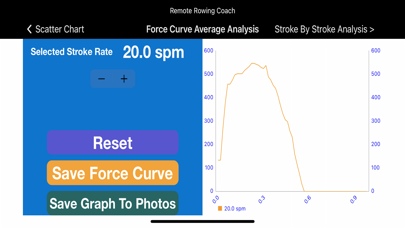
Force Curve Analysis (in-app purchase) Analyze your training data by looking at your average force curve for a particular stroke rate.
Stroke Analysis For those users equipped with a PM5 model that is a later than 2016 model. PM5 console (hardware version 600 or higher) force curve data collection is available.
The stroke analysis screen allows for stroke by stroke comparison of force curves for those users that want to look at any of their individual force curves.
Viewing Concept2 Logbook Training If your app is authenticated with the Concept2 Logbook, view your training data from within the app. A scatter graph is used to show pace / 500m, stroke rate, power, and heart rate (heart rate was recorded using the PM5).
Each subscription will automatically renew 3 days before the expiration date for
the same time period. Subscriptions can be cancelled at any time before the renewal.