

Remote Shuffle is made and published by Gonzalo Casal. AppBrain is an independent app data site and isn't affiliated with Gonzalo Casal. The app name, icon, screenshots and description belong to Gonzalo Casal and are shown as published on the App Store.
AppBrain's verdict
- Last updated
- October 3, 2026
Rankings
App Store top chartsApp Store Rankings for Remote Shuffle
Competitors
Similar apps and more from Gonzalo CasalAlternatives to Remote Shuffle




More from Gonzalo Casal

Releases
Updates seen on the App Store- Version
- 4.0
- Launched
- March 2026
No changelog data
User feedback
Ratings and reviews on the App StoreComments on Remote Shuffle for iOS
We don't have enough comments to show example comments. Please check back later.
Technology
Found in the app by AppBrain- Price
- Free
- App size
- 13.4 MB
- Content rating
- Everyone
Technologies used by Remote Shuffle
About the app and developer
About Remote Shuffle
Remote Shuffle is a music app developed by Gonzalo Casal.
User Ratings
The app has no ratings yet.
App Information
Remote Shuffle is freely available from the App Store. The app size is 13.36 MB. The latest version available is 4.0. The last update was on October 3, 2026.
Technical Requirements
The app has a content rating of Everyone. The app has been available on the App Store since March 2026.
Developer information for Gonzalo Casal
Address:
Store listing
By Gonzalo Casal, from the App Store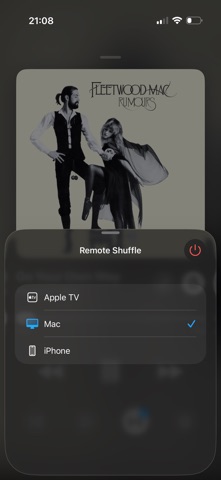
Description by Gonzalo Casal Written by the developer, not by AppBrain. Click to read.
HOW IT WORKS
1. Open Real Shuffle on your iPhone and tap the Remote button
2. Open Remote Shuffle on another device (iPhone, iPad, Apple TV, or Mac)
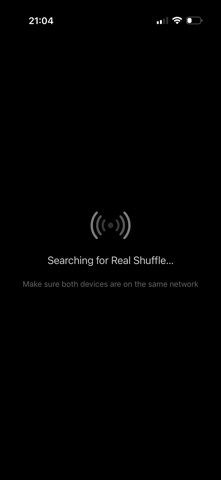
3. Remote Shuffle automatically connects over your local network
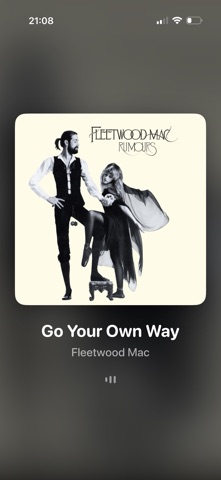
4. Select a device and start playing — album art, song info, and playback appear on the remote device
FEATURES
• Automatic discovery — finds Real Shuffle on your local network via Bonjour
• Apple Music playback — plays songs from your Apple Music library
• Full playback sync — play, pause, skip, and seek from Real Shuffle
• Album artwork display — see what's playing on the big screen
• Multi-device support — connect multiple devices, choose which one plays
• Shuffle and repeat sync — mode changes apply instantly
• Fast reconnection — picks up right where you left off
• Works across platforms — iPhone, iPad, Apple TV, and Mac (Designed for iPad)
REQUIREMENTS
• Real Shuffle (available on the App Store) on a separate device
• Apple Music subscription on both devices
• All devices on the same Wi-Fi network
Remote Shuffle requires Real Shuffle to function. It does not play music independently.