





AppBrain's verdict
Established- Rating on App Store
- 3.63
- 71 ratings
- Last updated
- November 5, 2026
- Size
- 19.1 MB
It doesn't have enough ratings yet to judge what users think.
User feedback
Ratings and reviews on the App StoreComments on Remote Shutter: camera connect for iOS
We don't have enough comments to show example comments. Please check back later.
Store listing
By Security Union LLC, from the App StoreDescription by Security Union LLC Written by the developer, not by AppBrain. Click to read.
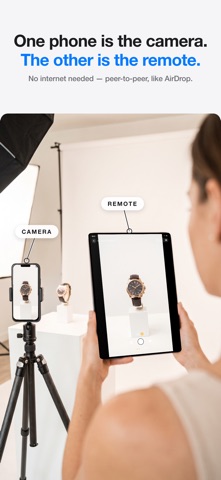
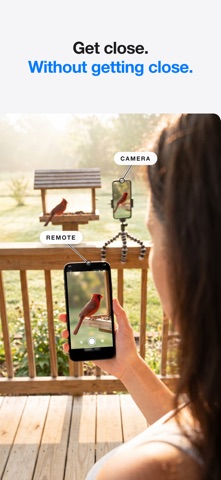
Remote Shutter uses peer-to-peer technology to link two devices directly. One becomes the camera, the other becomes your remote control with a live monitor. Perfect for group photos, selfies, tripod shots, creative angles, and hands-free photography.
NEW — MULTICAM: UP TO FOUR CAMERAS, ONE DIRECTOR
- Connect up to four iPhones as cameras and see every angle live in a grid
- One synced shutter fires photos or video on every camera at the same instant
- Footage collects automatically to the director, time-aligned for editing
- Set frame rate, resolution, aspect ratio, HDR and focus for every camera from the director
- Interviews, music, sports, dance, unboxings — shoot every angle at once
FULL MAC SUPPORT
- Use your Mac as the camera: built-in, USB and pro webcams, even your iPhone via Continuity Camera
- Switch between every camera connected to your Mac, live from your iPhone
- Or flip it: use your Mac's big screen as a director's monitor for your iPhone camera
FEATURES
- Control your camera from your Apple Watch — trigger the shutter from your wrist
- Selfies and group shots on the sharp rear camera — frame yourself from the remote's live preview
- Wireless remote shutter from up to 50 feet away
- Live camera preview on your remote device
- Switch cameras remotely — front/back on iPhone, any connected camera on Mac
- Camera flash control
- Adjustable photo timer
- Record video remotely — choose 24/30/60 fps, 1080p or 4K, aspect ratio and HDR from the remote
- Tap to focus on the remote's live preview (Pro)
- Works with iPhone, iPad, and Mac
- No internet or Wi-Fi network required — direct device-to-device connection (just keep Wi-Fi and Bluetooth turned on)
HOW TO USE
1. Open Remote Shutter on two devices
2. Devices connect automatically via peer-to-peer
3. Choose which device is the camera and which is the remote
4. Start shooting from anywhere in the room!
Whether you're directing four iPhones on a music video, shooting products with a pro camera on your Mac, directing from the big screen, or setting up a family photo, Remote Shutter gives you full wireless control of your camera from another device.
Safety and technology
Found in the app by AppBrain- Price
- Free
- App size
- 19.1 MB
- Content rating
- Everyone
Technologies used by Remote Shutter: camera connect
Releases
Updates seen on the App Store- Version
- 16.0.0
- Launched
- April 2013
No changelog data
Alternatives
Similar apps and more from Security Union LLCAlternatives to Remote Shutter: camera connect




Rankings
App Store top chartsApp Store Rankings for Remote Shutter: camera connect
About the app and developer
About Remote Shutter: camera connect
Remote Shutter: camera connect is a photo & video app developed by Security Union LLC.
What is the rating of Remote Shutter: camera connect?
Remote Shutter: camera connect is rated 3.63 out of 5 stars, based on 71 ratings.
Is Remote Shutter: camera connect free?
Remote Shutter: camera connect is free. The app size is 19.13 MB. The latest version available is 16.0.0. The last update was on November 5, 2026.
What are the requirements for Remote Shutter: camera connect?
The app has a content rating of Everyone. The app has been available on the App Store since April 2013.
Remote Shutter: camera connect is made and published by Security Union LLC. AppBrain is an independent app data site and isn't affiliated with Security Union LLC. The app name, icon, screenshots and description belong to Security Union LLC and are shown as published on the App Store.
Developer information for Security Union LLC
Address:
Frequently asked questions about Remote Shutter: camera connect
Is Remote Shutter: camera connect free?
Yes. Remote Shutter: camera connect is free on the App Store.
Is Remote Shutter: camera connect still available?
Yes. Remote Shutter: camera connect is on the App Store, and the last update we saw was on November 5, 2026.
How large is Remote Shutter: camera connect?
Remote Shutter: camera connect is 19.13 MB.
Is Remote Shutter: camera connect suitable for children?
App Store rates the content of Remote Shutter: camera connect as suitable for everyone.
How do people rate Remote Shutter: camera connect?
Remote Shutter: camera connect scores 3.63 out of 5 stars, from 71 ratings on the App Store.
Who made Remote Shutter: camera connect?
Remote Shutter: camera connect was developed by Security Union LLC. It is listed in the photo & video category on the App Store.
What are the best alternatives to Remote Shutter: camera connect?
People looking at Remote Shutter: camera connect also look at these photo & video apps: Cascable Studio: Camera Tether, Camera Connect & Control, Camera for Stop Motion Studio, teleshot, Wifibooth the PRO photo booth.