

RemoteStudy Learning App
RemoteStudy Learning App is made and published by CodeFluegel. AppBrain is an independent app data site and isn't affiliated with CodeFluegel. The app name, icon, screenshots and description belong to CodeFluegel and are shown as published on the App Store.
AppBrain's verdict
- Last updated
- July 20, 2026
- Size
- 210.6 MB
User feedback
Ratings and reviews on the App StoreComments on RemoteStudy Learning App for iOS
We don't have enough comments to show example comments. Please check back later.
Store listing
By CodeFluegel, from the App Store



Description by CodeFluegel Written by the developer, not by AppBrain. Click to read.
Teacher Workflow
Content Creation & Preparation
Create H5P Content: Use the Lumi authoring tool (https://lumi.education/en/) on your laptop to develop course materials.
Organize Learning Units: Save each learning unit as a separate .h5p file.
Archive Course: Zip the individual .h5p files into a course archive.
Content Distribution
Upload Archive: Upload the zipped archive to a file-sharing platform (e.g., https://transfer.zip).
Generate Download Link: Copy the download link provided by the platform.
Course Setup in the App
Launch App & Select Setup: Open the RemoteStudy app on your smartphone and choose the “Setup Course” option.
Enter Course Information:
Provide the course name.
Paste the download link for the course archive.
Download & Unpack Content:
Manually trigger the download of the zipped archive.
The app unpacks the archive and displays the individual H5P files as course content units.
Course Structuring & Student Enrollment
Setup Course Structure:
Label the content units and organize them into sections with headings and descriptions.
Sort the units to give the course a logical order.
Enroll Students:
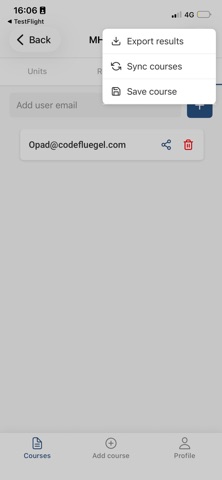
Input the email addresses of students to be invited.
An invite token is generated, which you can share manually or have sent automatically via email.
Monitoring & Syncing
Student Participation: Once students join, their status is set to “joined” after a manual update.
Progress Syncing:
The app collects xAPI statements from student interactions (e.g., quiz results, completion status).
Use a simple server infrastructure to sync course metadata and learning results.
Reporting:
Monitor student progress and results through the app’s dashboard.
Download progress reports as human-readable tables (CSV or XLSX), with students identified by their email addresses.
Student Workflow
Invitation & Enrollment
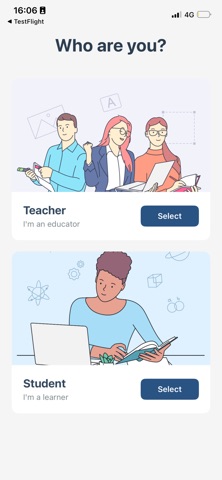
Receive Invitation: Get an invite token (typically via email) from your teacher.
Launch App & Join Course:
Open the RemoteStudy app on your smartphone.
Select the “Join Course” option and enter the invite token (and your email address if required).
Your enrollment status will update to “joined” once manually synced with the server.
Downloading Course Materials
View Course Overview:
After joining, review the course structure and the list of content units.
Manually Download Content:
Trigger the download of the course archive using the provided link.
The archive is unpacked locally so that each H5P file is available offline.
Engaging with the Course
Navigate & Select
Browse through the course sections and select a learning unit to begin.
Offline Learning:
Interact with the H5P content (reading materials, quizzes, activities, etc.) without needing constant connectivity.
Local Progress Tracking:
As you work through the material, the app collects xAPI statements (tracking quiz performance, completion status, etc.) locally.
Syncing Progress
Manual Sync: When you have connectivity, manually trigger a sync to upload your learning progress to the server.
Receive Updates: The sync process also retrieves any updates to the course structure or new content added by the teacher.
Review & Continue Learning
Local Feedback: Check your progress metrics (e.g., quiz scores and completion percentages) within the app.
Seamless Transition: Continue learning offline and sync periodically to ensure your progress is updated and reflected on the teacher’s dashboard.
Safety and technology
Found in the app by AppBrain- Price
- Free
- App size
- 210.6 MB
- Content rating
- Medium
Technologies used by RemoteStudy Learning App
Releases
Updates seen on the App Store- Version
- 1.3.1
- Launched
- January 2026
No changelog data
Alternatives
Similar apps and more from CodeFluegelAlternatives to RemoteStudy Learning App


More from CodeFluegel


Rankings
App Store top chartsApp Store Rankings for RemoteStudy Learning App
About the app and developer
About RemoteStudy Learning App
RemoteStudy Learning App is an education app developed by CodeFluegel.
User Ratings
The app has no ratings yet.
App Information
RemoteStudy Learning App is freely available from the App Store. The app size is 210.62 MB. The latest version available is 1.3.1. The last update was on July 20, 2026.
Technical Requirements
The app has a content rating of Medium Maturity. The app has been available on the App Store since January 2026.
Developer information for CodeFluegel
Address: