

RenderTide: Generative Video
RenderTide: Generative Video is made and published by WINDWARDER. AppBrain is an independent app data site and isn't affiliated with WINDWARDER. The app name, icon, screenshots and description belong to WINDWARDER and are shown as published on the App Store.
AppBrain's verdict
New- Rating on App Store
- 1.00
- 1 ratings
- Last updated
- September 14, 2026
- Size
- 38.7 MB
RenderTide: Generative Video came out 33 days ago. It doesn't have enough ratings yet to judge what users think.
User feedback
Ratings and reviews on the App StoreComments on RenderTide: Generative Video for iOS
We don't have enough comments to show example comments. Please check back later.
Store listing
By WINDWARDER, from the App Store


Description by WINDWARDER Written by the developer, not by AppBrain. Click to read.
Start with what should remain recognizable
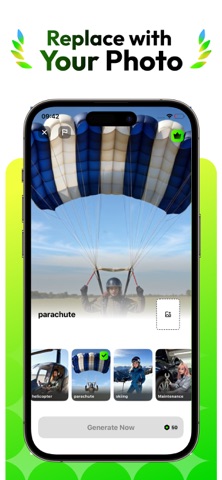
A useful source already contains decisions: a person at the center of a portrait, the shape of a product, the atmosphere of a place, or the visual language of an artwork. Before choosing a template, decide which of those qualities must stay clear in the result. Clear subject placement and intentional framing give the model more concrete context for the request. RenderTide can work with selected images or videos, so the creative brief can begin from a still composition or from media that already contains movement.
Let the template define the change
Templates are not just labels for appearance. Each available option gives the request a prepared visual direction. Choose one according to the role the result needs to play: a character-focused moment, a product concept, a short mood study, a visual greeting, or another scene built around source media you already have. Changing the template changes the brief, which makes it possible to explore another interpretation without rebuilding the idea from the beginning.
Judge the returned result on its own
Every generated result is the model's interpretation of the brief. Movement, framing, appearance, and small details may depart from the input or from what you expected. Preview the returned video, use the available editing controls where needed, and review it before exporting or publishing. Submit only media for which you hold the necessary usage rights or permissions, especially when a real person appears in the source. RenderTide must not be used for impersonation, deception, non-consensual media, or conduct that infringes anyone else's privacy, likeness, or legal rights.
RenderTide does not require an account or sign-in. Only media you actively select for a request is uploaded for that task. After the service delivers the requested output, it removes the original source file. RenderTide does not create or retain persistent face-identity records or raw facial-feature vectors from media sent for generation. Uploaded media is not used for advertising, user profiling, or AI model pre-training without your explicit consent. The Privacy Policy explains the full handling terms and applicable details.
When you confirm a subscription purchase, the charge is applied to the Apple ID account used for that transaction. The plan renews automatically for each new billing period unless it is cancelled at least 24 hours before the current period ends. You can manage or cancel the subscription from that Apple ID account's settings.
Terms of Service: https://rendertide.com/privacy-terms#terms
Privacy Policy: https://rendertide.com/privacy-terms#privacy
Safety and technology
Found in the app by AppBrain- Price
- Free
- App size
- 38.7 MB
- Content rating
- High
Technologies used by RenderTide: Generative Video
Releases
Updates seen on the App Store- Version
- 1.0.0
- Launched
- September 2026
No changelog data
Rankings
App Store top chartsApp Store Rankings for RenderTide: Generative Video
About the app and developer
About RenderTide: Generative Video
RenderTide: Generative Video is a productivity app developed by WINDWARDER.
User Ratings
RenderTide: Generative Video is rated 1.00 out of 5 stars. The rating is based on one rating ratings.
App Information
RenderTide: Generative Video is freely available from the App Store. The app size is 38.70 MB. The latest version available is 1.0.0. The last update was on September 14, 2026.
Technical Requirements
The app has a content rating of High Maturity. The app has been available on the App Store since September 2026.
Developer information for WINDWARDER
Address: