

ReplyKit - Quick Reply
ReplyKit - Quick Reply is made and published by MUHAMMED RISHAD KAKKIRI. AppBrain is an independent app data site and isn't affiliated with MUHAMMED RISHAD KAKKIRI. The app name, icon, screenshots and description belong to MUHAMMED RISHAD KAKKIRI and are shown as published on the App Store.
AppBrain's verdict
- Rating on App Store
- 5.00
- 18 ratings
- Last updated
- October 3, 2026
- Size
- 88.9 MB
It doesn't have enough ratings yet to judge what users think.
User feedback
Ratings and reviews on the App StoreComments on ReplyKit - Quick Reply for iOS
We don't have enough comments to show example comments. Please check back later.
Store listing
By MUHAMMED RISHAD KAKKIRI, from the App Store

Description by MUHAMMED RISHAD KAKKIRI Written by the developer, not by AppBrain. Click to read.
Whether you're handling customer support, managing business emails, replying to messages, or just tired of retyping the same phrases every day — ReplyKit puts your saved text templates right inside your keyboard. No more copy-pasting. No more retyping. Just tap and send.
WHY CHOOSE REPLYKIT?
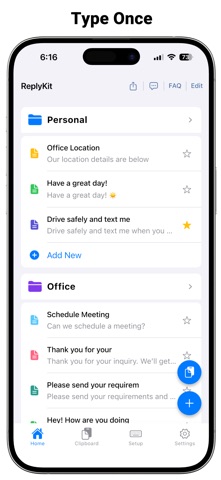
- SAVE ANY TEXT AS A TEMPLATE Create and store unlimited text templates for any situation. From canned responses and email signatures to quick reply messages and saved phrases — organize everything in one place.
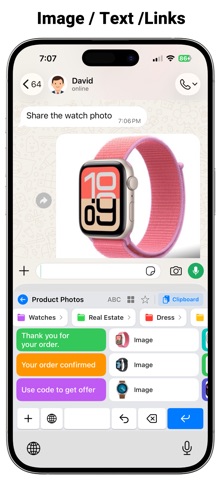
- REPLY IN ONE TAP Access your saved snippets directly from your keyboard in any app. WhatsApp, Gmail, Messages, Instagram, Slack — ReplyKit works everywhere you type.
- CUSTOM KEYBOARD BUILT FOR SPEED ReplyKit adds a powerful custom keyboard extension to your iPhone or iPad. Switch to it instantly while typing and paste any saved template in seconds.
- PERFECT FOR BUSINESS & PERSONAL USE Save time on customer support replies, sales follow-ups, HR responses, email templates, and everyday messaging. ReplyKit is trusted by freelancers, teams, and busy professionals who type the same things daily.
- ORGANIZE YOUR SNIPPETS YOUR WAY Group your text templates into categories. Keep work replies separate from personal messages. Find the right template instantly — no scrolling, no searching.
- WORKS IN EVERY APP .Type faster in Messages, WhatsApp, Gmail, Outlook, Slack, Teams, Instagram, Twitter, and more.
MORE WAYS REPLYKIT SAVES YOUR TIME
ReplyKit is more than a keyboard — it is your personal text expander and message template manager. Save canned responses, email templates, reply snippets, and your most-used phrases just one tap away.
Stop wasting minutes retyping the same messages. Every saved template becomes a keyboard shortcut — type faster, respond smarter, reclaim your time.
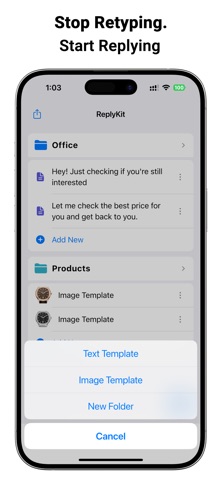
Not just text — ReplyKit supports image templates, image snippets, and image replies. Save logos, product photos, QR codes, or any image you send often and paste in one tap. Send image replies without opening your gallery.
From Gmail and Outlook to WhatsApp, Telegram, and Slack — text snippets, image snippets, and image templates are always ready inside your custom keyboard.
WHO IS REPLYKIT FOR?
- Customer Support Teams — Save canned responses and reply to tickets in seconds
- Sales & Marketing Professionals — Reuse proven email templates and follow-up messages
- Freelancers & Remote Workers — Save time on repetitive emails and client replies
- Social Media Managers — Store reply snippets for comments and messages
- Anyone Who Types the Same Thing Every Day
KEY FEATURES
- Unlimited text templates & reply snippets
- Custom keyboard extension for instant access
- One-tap paste in any app
- Organize templates into categories
- Save email signatures, canned responses & phrases
- Works with all messaging, email & social apps
- Auto text expansion for faster typing
- Clean, simple, easy-to-use interface
- Private & secure — your data stays on your device
STOP RETYPING. START REPLYING
Download ReplyKit today and turn your most-used messages, email templates, and reply snippets into a one-tap keyboard shortcut. Save time, reply faster, and never retype the same message again.
ReplyKit — Template Keyboard. The smarter way to type.
Privacy Policy: https://replykitapp.com/privacy.html
Terms of Use (EULA): https://replykitapp.com/terms.html
Safety and technology
Found in the app by AppBrain- Price
- Free
- App size
- 88.9 MB
- Content rating
- Everyone
Technologies used by ReplyKit - Quick Reply
Releases
Updates seen on the App Store- Version
- 4.1.0
- Launched
- April 2026
No changelog data
Alternatives
Similar apps and more from MUHAMMED RISHAD KAKKIRIAlternatives to ReplyKit - Quick Reply


More from MUHAMMED RISHAD KAKKIRI


Also available on Google Play

Rankings
App Store top chartsApp Store Rankings for ReplyKit - Quick Reply
About the app and developer
About ReplyKit - Quick Reply
ReplyKit - Quick Reply is a productivity app developed by MUHAMMED RISHAD KAKKIRI.
User Ratings
ReplyKit - Quick Reply is rated 5.00 out of 5 stars. The rating is based on 18 ratings.
App Information
ReplyKit - Quick Reply is freely available from the App Store. The app size is 88.87 MB. The latest version available is 4.1.0. The last update was on October 3, 2026.
Technical Requirements
The app has a content rating of Everyone. The app has been available on the App Store since April 2026.
Developer information for MUHAMMED RISHAD KAKKIRI
Address:
Frequently asked questions about ReplyKit - Quick Reply
Is ReplyKit - Quick Reply free?
Yes. ReplyKit - Quick Reply is free on the App Store.
Is ReplyKit - Quick Reply still available?
Yes. ReplyKit - Quick Reply is on the App Store, and the last update we saw was on October 3, 2026.
How large is ReplyKit - Quick Reply?
ReplyKit - Quick Reply is 88.87 MB.
Is ReplyKit - Quick Reply suitable for children?
App Store rates the content of ReplyKit - Quick Reply as suitable for everyone.
How do people rate ReplyKit - Quick Reply?
ReplyKit - Quick Reply scores 5.00 out of 5 stars, from 18 ratings on the App Store.
Who made ReplyKit - Quick Reply?
ReplyKit - Quick Reply was developed by MUHAMMED RISHAD KAKKIRI. It is listed in the productivity category on the App Store.
What are the best alternatives to ReplyKit - Quick Reply?
People looking at ReplyKit - Quick Reply also look at these productivity apps: AIMailMind, Bookmark Read Later - Linkjoy, Ki-note, AI ToneFix, Voice to Text: AI Minutes App.