

Resamplr is made and published by Scott Paterson. AppBrain is an independent app data site and isn't affiliated with Scott Paterson. The app name, icon, screenshots and description belong to Scott Paterson and are shown as published on the App Store.
AppBrain's verdict
Top 10- Best rank
- #9
- Top Paid, Finland
- Rating on App Store
- 4.75
- 20 ratings
- Last updated
- October 11, 2026
It doesn't have enough ratings yet to judge what users think. Its best ranking is #9 in Top Paid, Music in Finland.
Rankings
App Store top charts- Highest rank
- #9
- Chart
- Top Paid
- Music
- Country
- Finland
App Store Rankings for Resamplr
Top rankings
| Rank | Country | Category | List |
|---|---|---|---|
| 9 | Finland | Music | Top Paid |
| 41 | United States | Music | Top Paid |
| 53 | Japan | Music | Top Paid |
| 68 | Germany | Music | Top Paid |
| 35 | United Kingdom | Music | Top Paid |
| 41 | Iran | Music | Top Paid |
| 93 | Finland | Music | Top Grossing |
Ranking history in Finland
Releases
Updates seen on the App Store- Version
- 2.0.4
- Launched
- June 2026
No changelog data
User feedback
Ratings and reviews on the App StoreComments on Resamplr for iOS
We don't have enough comments to show example comments. Please check back later.
Technology
Found in the app by AppBrain- Price
- $4.99
- App size
- 326.2 MB
- Content rating
- Everyone
Technologies used by Resamplr
About the app and developer
About Resamplr
Resamplr is a music app developed by Scott Paterson.
User Ratings
Resamplr is rated 4.75 out of 5 stars. The rating is based on 20 ratings.
App Information
Resamplr costs $4.99. The app size is 326.20 MB. The latest version available is 2.0.4. The last update was on October 11, 2026.
Technical Requirements
The app has a content rating of Everyone. The app has been available on the App Store since June 2026.
Developer information for Scott Paterson
Address:
Frequently asked questions about Resamplr
Is Resamplr free?
No. Resamplr costs $4.99 on the App Store.
Is Resamplr still available?
Yes. Resamplr is on the App Store, and the last update we saw was on October 11, 2026.
How large is Resamplr?
Resamplr is 326.20 MB.
Is Resamplr suitable for children?
App Store rates the content of Resamplr as suitable for everyone.
How do people rate Resamplr?
Resamplr scores 4.75 out of 5 stars, from 20 ratings on the App Store.
Who made Resamplr?
Resamplr was developed by Scott Paterson. It is listed in the music category on the App Store.
Store listing
By Scott Paterson, from the App Store




Description by Scott Paterson Written by the developer, not by AppBrain. Click to read.
2.0 turns Resamplr into a full workstation. Lay your beats and loops onto audio tracks with a proper timeline, record straight in through the mic or an audio interface, warp anything to tempo, and host your favourite AUv3 instruments and effects right inside the app.
Load sounds from the built-in library, import your own files, or extract audio from video. Drop a loop in and it auto-warps to your project tempo at the right bar count — no manual correction. Record through the microphone or a connected audio interface with live input metering, threshold recording, and quick pad assignment.
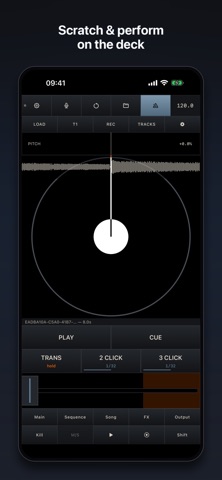
Chop samples non-destructively, build layered pads, tweak pitch, filters, envelopes, playback modes, and bus routing. Lock a pad's pitch independently of its speed with Sharp and Smooth timestretch modes, then sequence patterns with velocity, probability, ratchets, and live performance controls like 16 Levels and Roll. Scratch and perform on the deck, and when a pattern hits, resample it back to a pad and keep transforming it.
Resamplr also includes flexible FX buses, output processing, song arrangement, project saving, skipback capture, a light/dark theme, and offline export for sequences, songs, audio tracks, or individual pads.
Features:
4x4 pad sampler workflow built for fast beat making
Audio tracks with a full timeline — record, arrange, loop, and trim clips
Timestretch and keylock — independent pitch and tempo per pad, with Sharp and Smooth modes
Auto-warp loops to tempo on import, at the right bar count
Host third-party AUv3 instruments and effects
Built-in sounds plus import from Files and video audio extraction
Mic and audio interface recording with live meters and threshold capture
Sample chopping, layering, trimming, and waveform editing
Turntable-style deck for scratching and performance
Pattern sequencing with velocity, probability, ratchets, and nudge
Conditional trigs and polyrhythms / per-pad step lengths
16 Levels, Roll, resampling, and replay capture
Bus FX, output processing, song mode, and WAV export
Performance FX with automation per sequence and export
Parameter locks per step, per sequence with export
Effect automation
MIDI with fully custom mapping