

Resume Expert: CV Maker
Resume Expert: CV Maker is made and published by Zain Saeed Mughal. AppBrain is an independent app data site and isn't affiliated with Zain Saeed Mughal. The app name, icon, screenshots and description belong to Zain Saeed Mughal and are shown as published on the App Store.
AppBrain's verdict
- Rating on App Store
- 5.00
- 3 ratings
- Last updated
- September 24, 2025
It doesn't have enough ratings yet to judge what users think.
Rankings
App Store top chartsApp Store Rankings for Resume Expert: CV Maker
Competitors
Similar apps and more from Zain Saeed MughalAlternatives to Resume Expert: CV Maker


More from Zain Saeed Mughal





Releases
Updates seen on the App Store- Version
- 1.0.7
- Launched
- March 2025
No changelog data
User feedback
Ratings and reviews on the App StoreComments on Resume Expert: CV Maker for iOS
We don't have enough comments to show example comments. Please check back later.
Technology
Found in the app by AppBrain- Price
- Free
- App size
- 46.1 MB
- Content rating
- Everyone
Technologies used by Resume Expert: CV Maker
About the app and developer
About Resume Expert: CV Maker
Resume Expert: CV Maker is a productivity app developed by Zain Saeed Mughal.
What is the rating of Resume Expert: CV Maker?
Resume Expert: CV Maker is rated 5.00 out of 5 stars, based on 3 ratings.
Is Resume Expert: CV Maker free?
Resume Expert: CV Maker is free. The app size is 46.15 MB. The latest version available is 1.0.7. The last update was on September 24, 2025.
What are the requirements for Resume Expert: CV Maker?
The app has a content rating of Everyone. The app has been available on the App Store since March 2025.
Developer information for Zain Saeed Mughal
Address:
Store listing
By Zain Saeed Mughal, from the App Store



Description by Zain Saeed Mughal Written by the developer, not by AppBrain. Click to read.
What Makes Resume Expert the Best Option?
With Resume Expert, you can create an ATS resume that increases the chances of getting hired by 3x. Create a customized CV with advanced design options, custom fields, and professional templates, all within an intuitive, user-friendly CV app.
Pro Tip: Write matching cover letters with AI tools alongside your resume to further enhance your job applications.
Key Features of Resume Expert
* Fully Customizable CV Sections: Include your contact details, skills, accomplishments, education, and certificates among others. Each field can be easily altered and deleted to suit your needs.
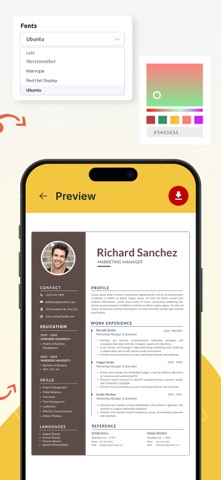
* Design Flexibility: From the given options, you can select how your CV should look. You can change the font, increase or decrease the font size, change the color, change the spacing, and even reorder the section from right to left.
* Professional Templates for Every Career: Modern professional ats resume templates for every industry and career level are available.
* LinkedIn and Portfolio Integration: Your LinkedIn profile and portfolio can be linked smoothly, giving employers easy access to your work history and work examples.
* Achievements: Summarize your internships, courses, certifications, and personal achievements. Make sure every notable accomplishment and qualification stands out in your CV.
* Multiple Language Support: Global opportunities are achievable, create your CV in different languages. Ideal for multilingual professionals looking for international employment or companies.
* Instant Preview And Save Drafts: Prior to finalizing the changes, look through the drafted version of your resume with the changes. Draft savings allows you to come back and work on it later.
* High-Quality PDF Export: Once your resume is perfect, export it in a high-quality PDF format ready for download and sharing.
How to Use Expert CV Maker
1.To create a resume, tap the button that is marked with “+Create CV”.
2.Now, fill out the forms with your personal details such as name, contact details, occupation, and others. You can also edit the sections to suit your chosen career path by renaming or deleting them.
3.Preview your resume by tapping the preview button that is located at the bottom right corner of the screen.
4.At the bottom start, select an ats resume template that catches your attention. You can change the font size and type, color, line height, along with other design aspects as per your liking.
5.As soon as you're done with your resume, the final step is to provide a name and export it while saving it in a high quality PDF format.
Resume Expert is not only about writing CVs. It is about ensuring that the moment a hiring manager takes a glance at your resume, you are guaranteed to make an impression. This CV Maker app provides you the edge to stand out if you're trying to get your ideal job, secure high-profile freelance projects, or improve your professional image.
Resume - Lifetime Access
Get the complete Resume Expert experience with a one-time purchase. Enjoy ad-free access with no recurring fees.
Download today and take the first step toward your next big opportunity!
Terms of Use: https://www.apple.com/legal/internet-services/itunes/dev/stdeula/
Contact us at: zsmapps2024@gmail.com