

Retro File Manager
Retro File Manager is made and published by Dmitrii Chuprov. AppBrain is an independent app data site and isn't affiliated with Dmitrii Chuprov. The app name, icon, screenshots and description belong to Dmitrii Chuprov and are shown as published on the App Store.
AppBrain's verdict
- Last updated
- July 28, 2026
Rankings
App Store top chartsApp Store Rankings for Retro File Manager
Competitors
Similar apps and more from Dmitrii ChuprovAlternatives to Retro File Manager


Releases
Updates seen on the App Store- Version
- 1.1.0
- Launched
- June 2026
No changelog data
User feedback
Ratings and reviews on the App StoreComments on Retro File Manager for iOS
We don't have enough comments to show example comments. Please check back later.
Technology
Found in the app by AppBrain- Price
- Free
- App size
- 27.4 MB
- Content rating
- Everyone
Technologies used by Retro File Manager
About the app and developer
About Retro File Manager
Retro File Manager is an utilities app developed by Dmitrii Chuprov.
What is the rating of Retro File Manager?
Retro File Manager has no ratings yet.
Is Retro File Manager free?
Retro File Manager is free. The app size is 27.39 MB. The latest version available is 1.1.0. The last update was on July 28, 2026.
What are the requirements for Retro File Manager?
The app has a content rating of Everyone. The app has been available on the App Store since June 2026.
Developer information for Dmitrii Chuprov
Address:
Frequently asked questions about Retro File Manager
Is Retro File Manager free?
Yes. Retro File Manager is free on the App Store.
Is Retro File Manager still available?
Yes. Retro File Manager is on the App Store, and the last update we saw was on July 28, 2026.
How large is Retro File Manager?
Retro File Manager is 27.39 MB.
Is Retro File Manager suitable for children?
App Store rates the content of Retro File Manager as suitable for everyone.
Who made Retro File Manager?
Retro File Manager was developed by Dmitrii Chuprov. It is listed in the utilities category on the App Store.
What are the best alternatives to Retro File Manager?
People looking at Retro File Manager also look at these utilities apps: OpticsOS, Network-Doctor, PCTransfer, AnyPlay Drive, PhotoCleaner - Clean Space..
Store listing
By Dmitrii Chuprov, from the App Store



Description by Dmitrii Chuprov Written by the developer, not by AppBrain. Click to read.
DUAL-PANEL NAVIGATION
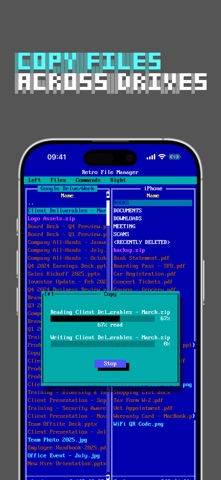
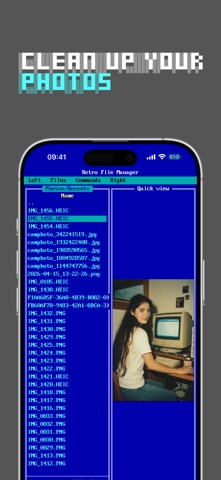
Two panels side by side, just like the classics. Browse your device and your cloud drives at the same time. The efficiency that power users have loved since the DOS era.
DOCUMENT FORMATS
Open PDF, EPUB, FB2, DjVu, Microsoft Office, images, and more. Dark mode for comfortable reading. Your reading position is saved automatically — pick up right where you left off.
CLOUD INTEGRATION
Connect Google Drive and Yandex Disk. Browse cloud files in the same familiar dual-panel interface.
FILE OPERATIONS
Copy files between panels with F5, move with F6 — just like the original. Select several files with a long-press and drag, then copy, move, or delete them as a batch. Share multiple files at once with F10. Create folders with F7.
KEYBOARD SHORTCUTS
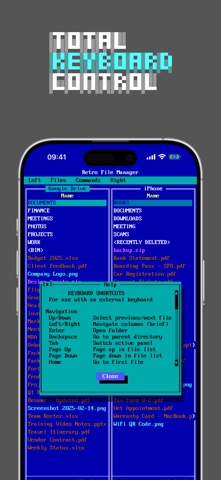
Connect an external keyboard and use classic shortcuts. F1 for help, F3 to view, F5 to copy, F6 to move, F7 to create folder, F8 to delete, F10 to share. On iPad, use number keys 1–0.
PRIVACY FIRST
No tracking. No ads. Your files stay private.
TRY EVERYTHING FOR 7 DAYS
Every feature is unlocked from the moment you install — try it on your own files:
• Dual-panel browsing of your photos and the folders you add from the Files app
• Google Drive and Yandex Disk
• Copy, move, share and batch operations (F5 / F6 / F10)
• PDF, EPUB, FB2, DjVu and Office document viewer
Start your free week today.
Terms of Use (EULA): https://www.apple.com/legal/internet-services/itunes/dev/stdeula/