

RetroDotTimer
RetroDotTimer is made and published by Andean Bear Studios GmbH. AppBrain is an independent app data site and isn't affiliated with Andean Bear Studios GmbH. The app name, icon, screenshots and description belong to Andean Bear Studios GmbH and are shown as published on the App Store.
AppBrain's verdict
- Last updated
- September 22, 2026
Rankings
App Store top chartsApp Store Rankings for RetroDotTimer
Competitors
Similar apps and more from Andean Bear Studios GmbHAlternatives to RetroDotTimer


Releases
Updates seen on the App Store- Version
- 1.6.0
- Launched
- April 2026
No changelog data
User feedback
Ratings and reviews on the App StoreComments on RetroDotTimer for iOS
We don't have enough comments to show example comments. Please check back later.
Technology
Found in the app by AppBrain- Price
- Free
- App size
- 6.90 MB
- Content rating
- Everyone
Technologies used by RetroDotTimer
About the app and developer
About RetroDotTimer
RetroDotTimer is an utilities app developed by Andean Bear Studios GmbH.
User Ratings
The app has no ratings yet.
App Information
RetroDotTimer is freely available from the App Store. The app size is 6.90 MB. The latest version available is 1.6.0. The last update was on September 22, 2026.
Technical Requirements
The app has a content rating of Everyone. The app has been available on the App Store since April 2026.
Developer information for Andean Bear Studios GmbH
Address:
Frequently asked questions about RetroDotTimer
Is RetroDotTimer free?
Yes. RetroDotTimer is free on the App Store.
Is RetroDotTimer still available?
Yes. RetroDotTimer is on the App Store, and the last update we saw was on September 22, 2026.
How large is RetroDotTimer?
RetroDotTimer is 6.90 MB.
Is RetroDotTimer suitable for children?
App Store rates the content of RetroDotTimer as suitable for everyone.
Who made RetroDotTimer?
RetroDotTimer was developed by Andean Bear Studios GmbH. It is listed in the utilities category on the App Store.
What are the best alternatives to RetroDotTimer?
People looking at RetroDotTimer also look at these utilities apps: Num Count-up, Rohrig's Animal Timer, 1 Bit Timer, DuelTempo: Chess Clock, Wall Countdown Timer.
Store listing
By Andean Bear Studios GmbH, from the App Store



Description by Andean Bear Studios GmbH Written by the developer, not by AppBrain. Click to read.
ONE TIMER, FULL SCREEN
• A large dot-matrix countdown, readable across the room
• Tap the display to start, pause, or resume — or turn on the Start/Pause button if you prefer one
• Optional landscape mode that fills the whole screen
• Keep the screen awake while a timer runs, with an only-while-charging option
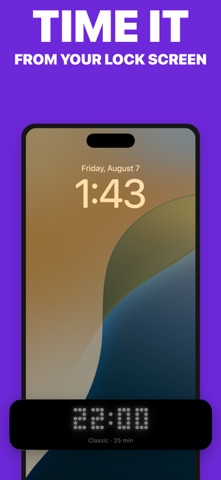
LOCK SCREEN AND DYNAMIC ISLAND
• The Live Activity shows a real dot-matrix face, not a plain text label
• It counts down on the Lock Screen and in the Dynamic Island
• It follows the color scheme you chose in the app, including changes made mid-run
• At zero it morphs into a checkmark and chimes once
WIDGETS, CONTROLS, AND SIRI
• A Home Screen widget that mirrors the timer, display-only
• Control Center buttons to start a Pomodoro or a preset without opening the app
• Siri and Shortcuts: start a timer, a preset, a Pomodoro, or the stopwatch, and pause, resume, or reset
TIMER MODES
• Presets: 5, 10, 25, and 45 minutes
• Custom duration, 1 to 180 minutes
• Classic Pomodoro: 25 minutes of work, 5-minute breaks, a 15-minute long break, 4 rounds
• Stopwatch with a live hundredths-of-a-second sub-display
• Multi-phase custom timers for intervals, rounds, and routines
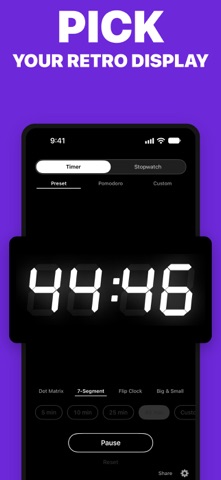
DISPLAY STYLES
• Dot Matrix — the original pixel grid, with adjustable dot weight and square or round dots
• 7-Segment — slanted LED calculator digits
• Flip Clock — split-flap digits with animated transitions (Pro)
• Big & Small — blocky digits with size-varied segments (Pro)
COLOR
• Transparent, Dark, and Light schemes
• Six premium schemes: Amber, Green Terminal, Blue Glow, VFD Cyan, Sunset, Neon Pink (Pro)
• Any text and background color you like (Pro)
• Multicolored digits with Rainbow, Pastel, Neon, and Sunset palettes (Pro)
WHEN TIME IS UP
• Freeze at 00 or morph into a checkmark
• A notification when the countdown ends
• Sound and haptic alerts between Pomodoro and custom-timer phases
WHAT THIS IS NOT
Retro Dot Timer runs one timer at a time. No task lists, no labels, no session history, no analytics, no cloud sync. It is a single, quiet countdown.
PRIVACY
No accounts, no tracking, no analytics, no data collection. Everything works offline.
FREE AND PRO
The app is a free download and stays useful forever without paying. Presets, custom durations, the Dot Matrix and 7-Segment displays, square dots, Pomodoro, the stopwatch, the widget, Control Center buttons, Siri shortcuts, and the Live Activity are all free.
Pro is a single one-time purchase, never a subscription. On iPhone and iPad it adds the Custom Timer Editor, six premium color schemes, custom colors, multicolored digits, and the Flip Clock and Big & Small displays. Pro is a Universal Purchase — the same payment unlocks the Mac menu-bar app.
Every Pro feature is unlocked free for 14 days, starting automatically at first launch. No signup, no payment details. When the trial ends nothing is charged, Pro features simply return to the free tier, and any custom timers you saved stay runnable.
LANGUAGES
English, Spanish, Spanish (Latin America), German, French, Simplified Chinese.
REQUIREMENTS
iOS 18.0 or later. iPhone and iPad.
SUPPORT
contact@andeanbearstudios.com