

Revera: TLDL Notes, Transcribe
Revera: TLDL Notes, Transcribe is made and published by Kirlos Yousef. AppBrain is an independent app data site and isn't affiliated with Kirlos Yousef. The app name, icon, screenshots and description belong to Kirlos Yousef and are shown as published on the App Store.
AppBrain's verdict
- Last updated
- October 20, 2026
- Size
- 17.1 MB
User feedback
Ratings and reviews on the App StoreComments on Revera: TLDL Notes, Transcribe for iOS
We don't have enough comments to show example comments. Please check back later.
Store listing
By Kirlos Yousef, from the App Store



Description by Kirlos Yousef Written by the developer, not by AppBrain. Click to read.
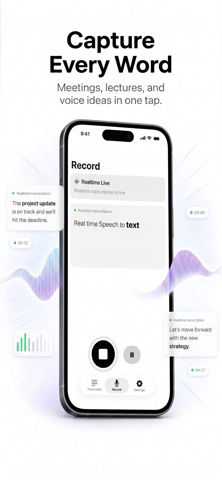
Record meetings, lectures, and voice memos, then instantly transcribe, summarize, translate, and extract action items from your audio. Whether you are capturing minutes from a meeting, recording a lecture, or just talking through ideas, Revera AI turns your speech into organized, searchable notes.
Capture every detail:
- Smart voice recorder with live mic level visualization
- Pause and resume recordings anytime
- Recording continues in the background while you use other apps
- Handles interruptions like phone calls automatically
- Perfect as a lecture recorder, interview recorder, or quick voice memo tool
Transcribe and translate:
- Real-time transcription — see words appear as you speak
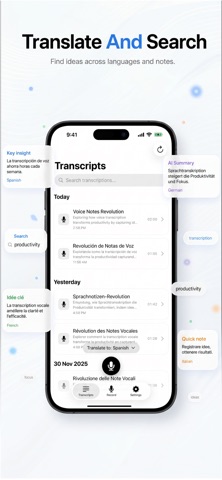
- Transcribe audio to text in 14+ languages
- Supported languages: Arabic, Chinese, English, French, German, Hindi, Italian, Japanese, Korean, Portuguese, Russian, Spanish, Turkish, and Dutch
- Choose a default transcription language or use auto-detect
- Live translation for multilingual conversations and global meetings
- Use Revera AI as your on-the-go translator and dictation assistant
Understand faster with AI:
- Get instant summaries of your recordings
- Switch between quick overviews and detailed summaries
- Use Revera AI as a summary AI note taker for long calls, podcasts, and lectures
Ask the built-in AI assistant anything about your transcript, such as:
- "What were the main points discussed?"
- "Extract all action items and decisions."
- "Translate this to Spanish."
The assistant always uses the full transcript context to give accurate, relevant answers.
Organize with keywords and action items:
- Automatically extract smart keywords from each transcript
- Use keywords as hashtags or plain text for better note taking and organization
- Share keywords as tags, captions, or a comma-separated list
- Auto-detect action items and to-dos from your recordings
- View action items in a dedicated section for each transcript
Listen smarter with segment playback:
- Each transcript is broken into timestamped segments
- Tap any segment to jump to that exact moment in the audio
- Quickly replay key quotes, decisions, or lecture moments without scrubbing
Powerful search:
- Search across all your transcriptions and voice notes
- Find content by any word, phrase, or keyword
- Instantly rediscover ideas, decisions, and meeting minutes from your history
Export and share your work:
- Full transcripts (plain text or Markdown)
- AI-generated summaries
- Keywords as hashtags or plain text lists
- Action items and to-dos
Perfect for pasting into project management tools, note apps, documents, or emails.
Works offline, syncs when ready:
- Record and use the app fully offline
- Recordings are queued and automatically transcribed when you are back online
- Clear indicators show when you are offline and when transcription is pending
Customizable and privacy-focused:
- Set your default transcription and translation language
- Enable or disable haptics
- Manage storage, clear cache, and delete recordings easily
- All recordings and transcripts are stored locally on your device for maximum privacy and security
Perfect for:
- Meeting minutes and interviews
- Lectures, classes, and presentations
- Personal notes, voice memos, and journaling
- Multilingual conversations and live translation
- Creators, podcasters, students, and professionals
- Anyone who prefers to just talk instead of typing
Turn your voice into organized, searchable notes with Revera AI. Just talk, and let the app record, transcribe, summarize, translate, and structure everything for you.
This app requires a purchase to unlock Pro features and access full functionality.
Terms & Conditions: https://www.revera.kirlosyousef.com/terms
Privacy Policy: https://www.revera.kirlosyousef.com/privacy
Safety and technology
Found in the app by AppBrain- Price
- Free
- App size
- 17.1 MB
- Content rating
- Everyone
Technologies used by Revera: TLDL Notes, Transcribe
Releases
Updates seen on the App Store- Version
- 1.6.1
- Launched
- December 2025
No changelog data
Alternatives
Similar apps and more from Kirlos YousefMore from Kirlos Yousef



Rankings
App Store top chartsApp Store Rankings for Revera: TLDL Notes, Transcribe
About the app and developer
About Revera: TLDL Notes, Transcribe
Revera: TLDL Notes, Transcribe is a productivity app developed by Kirlos Yousef.
User Ratings
The app has no ratings yet.
App Information
Revera: TLDL Notes, Transcribe is freely available from the App Store. The app size is 17.08 MB. The latest version available is 1.6.1. The last update was on October 20, 2026.
Technical Requirements
The app has a content rating of Everyone. The app has been available on the App Store since December 2025.
Developer information for Kirlos Yousef
Address:
Frequently asked questions about Revera: TLDL Notes, Transcribe
Is Revera: TLDL Notes, Transcribe free?
Yes. Revera: TLDL Notes, Transcribe is free on the App Store.
Is Revera: TLDL Notes, Transcribe still available?
Yes. Revera: TLDL Notes, Transcribe is on the App Store, and the last update we saw was on October 20, 2026.
How large is Revera: TLDL Notes, Transcribe?
Revera: TLDL Notes, Transcribe is 17.08 MB.
Is Revera: TLDL Notes, Transcribe suitable for children?
App Store rates the content of Revera: TLDL Notes, Transcribe as suitable for everyone.
Who made Revera: TLDL Notes, Transcribe?
Revera: TLDL Notes, Transcribe was developed by Kirlos Yousef. It is listed in the productivity category on the App Store.