

Reverse Audio Play — FlipWave
Reverse Audio Play — FlipWave is made and published by Anatoli Niculeac. AppBrain is an independent app data site and isn't affiliated with Anatoli Niculeac. The app name, icon, screenshots and description belong to Anatoli Niculeac and are shown as published on the App Store.
AppBrain's verdict
- Last updated
- April 9, 2026
Rankings
App Store top chartsApp Store Rankings for Reverse Audio Play — FlipWave
Competitors
Similar apps and more from Anatoli NiculeacAlternatives to Reverse Audio Play — FlipWave


More from Anatoli Niculeac


Releases
Updates seen on the App Store- Version
- 1.0
- Launched
- April 2026
No changelog data
User feedback
Ratings and reviews on the App StoreComments on Reverse Audio Play — FlipWave for iOS
We don't have enough comments to show example comments. Please check back later.
Technology
Found in the app by AppBrain- Price
- Free
- App size
- 18.4 MB
- Content rating
- Everyone
Technologies used by Reverse Audio Play — FlipWave
About the app and developer
About Reverse Audio Play — FlipWave
Reverse Audio Play — FlipWave is a music app developed by Anatoli Niculeac.
What is the rating of Reverse Audio Play — FlipWave?
Reverse Audio Play — FlipWave has no ratings yet.
Is Reverse Audio Play — FlipWave free?
Reverse Audio Play — FlipWave is free. The app size is 18.38 MB. The latest version available is 1.0. The last update was on April 9, 2026.
What are the requirements for Reverse Audio Play — FlipWave?
The app has a content rating of Everyone. The app has been available on the App Store since April 2026.
Developer information for Anatoli Niculeac
Address:
Frequently asked questions about Reverse Audio Play — FlipWave
Is Reverse Audio Play — FlipWave free?
Yes. Reverse Audio Play — FlipWave is free on the App Store.
Is Reverse Audio Play — FlipWave still available?
Yes. Reverse Audio Play — FlipWave is on the App Store, and the last update we saw was on April 9, 2026.
How large is Reverse Audio Play — FlipWave?
Reverse Audio Play — FlipWave is 18.38 MB.
Is Reverse Audio Play — FlipWave suitable for children?
App Store rates the content of Reverse Audio Play — FlipWave as suitable for everyone.
Who made Reverse Audio Play — FlipWave?
Reverse Audio Play — FlipWave was developed by Anatoli Niculeac. It is listed in the music category on the App Store.
What are the best alternatives to Reverse Audio Play — FlipWave?
People looking at Reverse Audio Play — FlipWave also look at these music apps: Reverse Audio & Play Singing, Voice Reverser: Play Backwards, Reverso - Play Reverse Audio, Say it Backwards - Challenge, Reverse Audio – Try the Trend.
Store listing
By Anatoli Niculeac, from the App Store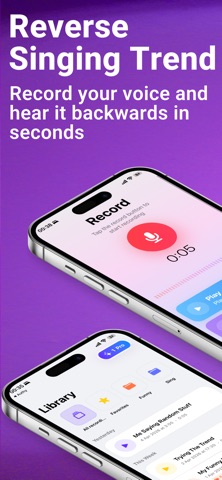



Description by Anatoli Niculeac Written by the developer, not by AppBrain. Click to read.
Ever wondered what your voice sounds like in reverse? Record, flip, and play back any sound in seconds with Reverse Play — the all-in-one audio reverser and recorder app.
Reverse Play uses high-quality audio processing to deliver instant reverse playback, helping creators, musicians, and curious minds explore sound from a completely new perspective.
Whether you're flipping a voice memo, reversing a melody, or just having fun with friends — Reverse Play gives you instant results with studio-grade clarity.
Perfect for musicians, content creators, students, language learners, and anyone who loves experimenting with sound.
Instant Audio Recording
Tap and record — capture any sound instantly:
- High-quality microphone recording (up to 48 kHz)
- Real-time waveform visualization
- Live audio level metering
- Quick, one-tap recording workflow
Reverse Playback & Loop
Flip any recording backwards with a single tap:
- Instant reverse audio playback
- Loop mode for continuous listening
- Waveform-based timeline with seek and scrub
- Play original or reversed — switch anytime
Import From Anywhere
Bring in audio and video files from your device:
- Import from Files, iMessage, or any app via Share
- Supported audio: WAV, MP3, M4A, AAC, FLAC, OGG, OPUS, CAF, AIF, AIFF
- Supported video: MOV, MP4, M4V, AVI, MKV, WebM — audio extracted automatically
- The widest format support in any reverse audio app
Professional Audio Trimming
Cut and refine your recordings with precision:
- Visual waveform trim editor
- Dual-handle interface for start and end points
- Zoomable waveform with overview slider
- Real-time preview of trimmed section
- Trim as short as 0.5 seconds
Export & Share
Save and share your creations anywhere:
- Export as M4A with two quality tiers (128 kbps or 256 kbps)
- Export original or reversed version
- Export trimmed or full-length audio
- Share via email or social media
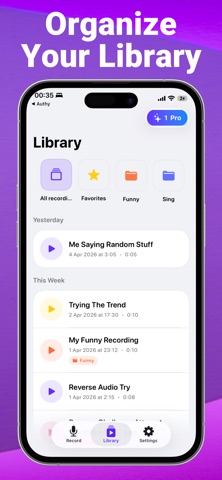
Organize Your Sound Library
Keep your recordings neat and accessible:
- Custom color-coded folders
- Favorites system for quick access
- Search, sort, and filter recordings
- Smart date grouping (Today, Yesterday, Last Week, Earlier)
- Duplicate or rename any recording
Personalization
Make the app yours:
- Light, Dark, or System theme
- Multiple language support
- Recording quality preferences (Medium or High)
Free Features
- 1 free recording per day
- Full reverse playback
- Loop mode
- Audio import (all formats)
- Waveform visualization
- Folder organization & favorites
- Light/Dark theme
Premium Features (require a subscription)
Unlock the full power of Reverse Play with Premium:
- Unlimited recordings — no daily limits
- Professional audio trimming editor
- M4A export with quality control
- High-quality export (48 kHz, 256 kbps)
- Priority audio processing
- All current and future features
Record it. Reverse it. Share it.
Download Reverse Play today and discover how your world sounds backwards!
Note: Premium features require a subscription.
Terms of Use: https://www.flipaudio.app/terms
Privacy Policy: https://www.flipaudio.app/privacy