

RevPDF: PDF Editor & Reader
RevPDF: PDF Editor & Reader is made and published by Pawandeep Singh. AppBrain is an independent app data site and isn't affiliated with Pawandeep Singh. The app name, icon, screenshots and description belong to Pawandeep Singh and are shown as published on the App Store.
AppBrain's verdict
- Rating on App Store
- 4.70
- 23 ratings
- Last updated
- August 19, 2026
- Size
- 57.5 MB
It doesn't have enough ratings yet to judge what users think.
User feedback
Ratings and reviews on the App StoreComments on RevPDF: PDF Editor & Reader for iOS
We don't have enough comments to show example comments. Please check back later.
Store listing
By Pawandeep Singh, from the App Store




Description by Pawandeep Singh Written by the developer, not by AppBrain. Click to read.
EDIT PDF TEXT DIRECTLY
Edit existing text inside the PDF with a true WYSIWYG editing experience. RevPDF supports paragraph reflow, text spilling onto following pages, font handling, find and replace, and precise content editing without rebuilding the document from scratch.
OCR & SEARCH SCANNED PDFS
Recognize text in scanned documents, select and search OCR text, and create searchable PDFs using an invisible text layer.
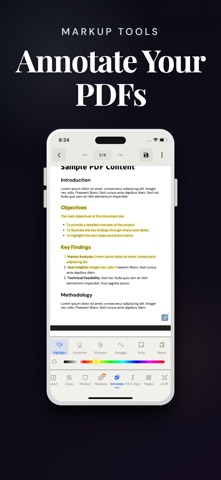
SIGN, DRAW & ANNOTATE
Draw your signature directly onto a PDF. Add freehand pen marks, highlights, comments, bookmarks, strikethroughs, and other annotations for review and markup.
REDACT SENSITIVE INFORMATION
Redact text and content with customizable redaction tools, or use Auto Redaction to find and remove matching sensitive information faster.
CONVERT & PROCESS PDFS
• PDF to Word
• PDF to Excel
• PDF/A conversion
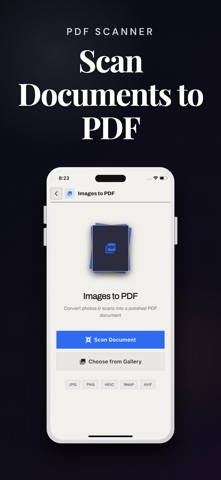
• Scan documents to PDF
• Extract images from PDFs
• Merge, split, and compress PDFs
• Split a PDF page vertically or horizontally at the position you choose
• Organize, reorder, and manage pages
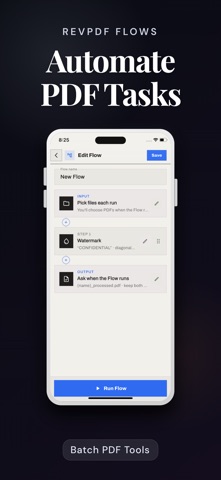
POWER TOOLS
Compare PDF documents, edit PDF metadata, add headers and footers, add watermarks, flatten PDFs, remove passwords from documents you can access, and use Flows to batch-process multiple files with repeatable operations.
PRIVATE BY DESIGN
Your PDF files are processed on your device and are not uploaded for editing or processing. RevPDF can work offline for document operations. The app may occasionally access the internet for supporting resources such as downloading a required font, but your PDF documents stay on your device.
COMPACT, SERIOUS PDF SOFTWARE
RevPDF brings advanced editing, OCR, redaction, conversion, annotation, signing, and batch tools into a compact app designed for everyday documents and professional workflows.
Open a PDF and get the work done with RevPDF.
Safety and technology
Found in the app by AppBrain- Price
- Free
- App size
- 57.5 MB
- Content rating
- Everyone
Technologies used by RevPDF: PDF Editor & Reader
Releases
Updates seen on the App Store- Version
- 5.0.0
- Launched
- February 2026
No changelog data
Alternatives
Similar apps and more from Pawandeep SinghAlso available on Google Play

Rankings
App Store top chartsApp Store Rankings for RevPDF: PDF Editor & Reader
About the app and developer
About RevPDF: PDF Editor & Reader
RevPDF: PDF Editor & Reader is a productivity app developed by Pawandeep Singh.
User Ratings
RevPDF: PDF Editor & Reader is rated 4.70 out of 5 stars. The rating is based on 23 ratings.
App Information
RevPDF: PDF Editor & Reader is freely available from the App Store. The app size is 57.49 MB. The latest version available is 5.0.0. The last update was on August 19, 2026.
Technical Requirements
The app has a content rating of Everyone. The app has been available on the App Store since February 2026.
Developer information for Pawandeep Singh
Address: