

RiffAlly Slowdown
RiffAlly Slowdown is made and published by Fernando Lanner Cardoso. AppBrain is an independent app data site and isn't affiliated with Fernando Lanner Cardoso. The app name, icon, screenshots and description belong to Fernando Lanner Cardoso and are shown as published on the App Store.
AppBrain's verdict
- Last updated
- September 9, 2026
Rankings
App Store top chartsApp Store Rankings for RiffAlly Slowdown
Competitors
Similar apps and more from Fernando Lanner CardosoAlternatives to RiffAlly Slowdown


More from Fernando Lanner Cardoso


Releases
Updates seen on the App Store- Version
- 1.0.3
- Launched
- September 2026
No changelog data
User feedback
Ratings and reviews on the App StoreComments on RiffAlly Slowdown for iOS
We don't have enough comments to show example comments. Please check back later.
Technology
Found in the app by AppBrain- Price
- Free
- App size
- 2.60 MB
- Content rating
- Medium
Technologies used by RiffAlly Slowdown
About the app and developer
About RiffAlly Slowdown
RiffAlly Slowdown is a music app developed by Fernando Lanner Cardoso.
What is the rating of RiffAlly Slowdown?
RiffAlly Slowdown has no ratings yet.
Is RiffAlly Slowdown free?
RiffAlly Slowdown is free. The app size is 2.60 MB. The latest version available is 1.0.3. The last update was on September 9, 2026.
What are the requirements for RiffAlly Slowdown?
The app has a content rating of Medium Maturity. The app has been available on the App Store since September 2026.
Developer information for Fernando Lanner Cardoso
Address:
Store listing
By Fernando Lanner Cardoso, from the App Store



Description by Fernando Lanner Cardoso Written by the developer, not by AppBrain. Click to read.
RiffAlly Slowdown helps you work through the part that keeps tripping you up. Slow your practice audio down without changing its pitch, loop the exact section you need, and increase the speed as you get comfortable.
START WITH SOMETHING TO PLAY
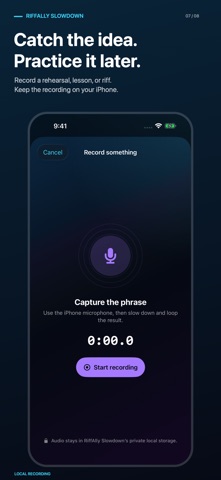
Choose a compatible, unprotected audio or video file from Files, iCloud Drive, or another Files provider. Record a rehearsal, lesson, or musical idea. Or tap Try a practice track and start with Neon Pocket, an original RiffAlly track included in the app.
SLOW DOWN. STAY IN KEY.
Adjust local audio playback from 25% to 150% speed while preserving pitch. Change pitch separately by up to 12 semitones in either direction to practice in another key. Tap Original to restore normal speed and pitch.
REPEAT THE PART THAT MATTERS
Set A and B loop points to repeat a difficult phrase. Zoom into the waveform and drag the boundaries to refine your section. Add named markers so the riff, transition, or turnaround is easy to find again.
BUILD BACK TO FULL SPEED
Use the tempo ladder to choose a starting speed, finishing speed, increment, and number of repetitions. Slowdown steps up the speed as you complete your loop repetitions.
BRING A YOUTUBE LINK
Find a video in YouTube, tap Share, copy its link, and paste it into Slowdown. YouTube already offers playback-speed choices; Slowdown adds A/B section repetition so you can practice without scrubbing back after each pass. Available speeds depend on the video and YouTube player. This optional mode requires internet and uses the official visible YouTube player. YouTube media is never downloaded or exported, and playback stops when the app is inactive. Independent pitch adjustment, waveform editing, and the tempo ladder are for local media.
PICK UP WHERE YOU LEFT OFF
Recent sessions restore your local media, speed, pitch, loop points, named markers, and tempo ladder settings. Your imported media and recordings stay on your iPhone. RiffAlly does not receive your practice files or session history. The optional YouTube player connects to Google/YouTube under their privacy policies.
The complete local practice workflow works offline, with no account or subscription required. Files stored only in iCloud or another provider must first be available on your device.
Supports compatible, unprotected MP3, M4A, WAV, AIFF, MOV, and MP4 files where iOS permits. For imported video, Slowdown practices the audio track; synchronized local video playback is not included.