

Ringly: Alarm Clock & Sleep
Ringly: Alarm Clock & Sleep is made and published by Jason Omar Turkmani. AppBrain is an independent app data site and isn't affiliated with Jason Omar Turkmani. The app name, icon, screenshots and description belong to Jason Omar Turkmani and are shown as published on the App Store.
AppBrain's verdict
- Rating on App Store
- 5.00
- 1 ratings
- Last updated
- September 30, 2026
It doesn't have enough ratings yet to judge what users think.
Rankings
App Store top chartsApp Store Rankings for Ringly: Alarm Clock & Sleep
Competitors
Similar apps and more from Jason Omar TurkmaniMore from Jason Omar Turkmani


Releases
Updates seen on the App Store- Version
- 0.60
- Launched
- May 2026
No changelog data
User feedback
Ratings and reviews on the App StoreComments on Ringly: Alarm Clock & Sleep for iOS
We don't have enough comments to show example comments. Please check back later.
Technology
Found in the app by AppBrain- Price
- Free
- App size
- 119.6 MB
- Content rating
- Everyone
Technologies used by Ringly: Alarm Clock & Sleep
About the app and developer
About Ringly: Alarm Clock & Sleep
Ringly: Alarm Clock & Sleep is a lifestyle app developed by Jason Omar Turkmani.
User Ratings
Ringly: Alarm Clock & Sleep is rated 5.00 out of 5 stars. The rating is based on one rating ratings.
App Information
Ringly: Alarm Clock & Sleep is freely available from the App Store. The app size is 119.61 MB. The latest version available is 0.60. The last update was on September 30, 2026.
Technical Requirements
The app has a content rating of Everyone. The app has been available on the App Store since May 2026.
Developer information for Jason Omar Turkmani
Address:
Store listing
By Jason Omar Turkmani, from the App Store


Description by Jason Omar Turkmani Written by the developer, not by AppBrain. Click to read.
WHY RINGLY?
- Alarm setup with clear readiness before bedtime
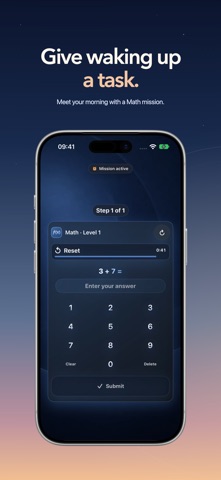
- Math, Memory, Typing, Tap, Symbol, Walk, Shake, Squat, Scan, QR Code, 2048, and Photo Match missions before dismissal
- Sleep Lab detects sleep sounds on device, including snoring, coughing, talking, quiet periods and movement sounds, with a simple session summary
- Sleep Plan connects bedtime, wake time, reminders, dream notes, and morning reflection
- Wake Report helps you review streaks, misses, wake quality, and patterns
- Custom alarm sounds, wallpapers, themes, widgets, and app icons
WAKE MISSIONS
Sound alone can be easy to ignore. Ringly can require a mission before dismissal so stopping the alarm takes more than one sleepy tap. Choose the mission style that fits your morning and keep the setup visible before bedtime.
SLEEP LAB, PRIVATE BY DESIGN
Start Sleep Lab when you go to bed and keep iPhone nearby. Ringly detects sleep sounds locally and saves detected sound events and a summary when you stop. Raw audio is not uploaded.
SLEEP PLAN AND WAKE REPORT
Plan tomorrow's wake-up tonight. Set a sleep goal, bedtime window, wind-down reminder, wake time, and morning reflection. After the alarm, use Wake Report to understand what worked and what needs adjustment.
FREE AND PREMIUM
Free users can create alarms and use the core wake setup. Ringly Premium is optional and unlocks advanced missions, extra mission slots, custom alarm sounds, wallpapers, app icons, widgets, and themes. Weekly, Monthly, and Yearly are subscriptions. Lifetime is a one-time purchase.
ALARM DELIVERY NOTE
Ringly does not use remote push notifications for alarm delivery. On supported systems, Ringly uses system alarm access for alarm behavior. Local notifications may be used only as optional reminders or fallback delivery where available.
Ringly Premium does not make alarm delivery more reliable than Free. Sleep Lab, Sleep Plan, and Wake Report are wellness tools, not medical diagnosis.
Privacy Policy:
https://ringlyalarm.com/privacy/
Terms of Use:
https://ringlyalarm.com/terms/
Apple Standard EULA:
https://www.apple.com/legal/internet-services/itunes/dev/stdeula/