

RingtoneMaker - Make Ringtones
RingtoneMaker - Make Ringtones is made and published by Lyntra Technology Ltd. AppBrain is an independent app data site and isn't affiliated with Lyntra Technology Ltd. The app name, icon, screenshots and description belong to Lyntra Technology Ltd and are shown as published on the App Store.
AppBrain's verdict
New- Rating on App Store
- 5.00
- 1 ratings
- Last updated
- October 23, 2026
RingtoneMaker - Make Ringtones came out 15 days ago. It doesn't have enough ratings yet to judge what users think.
Rankings
App Store top chartsApp Store Rankings for RingtoneMaker - Make Ringtones
Competitors
Similar apps and more from Lyntra Technology LtdMore from Lyntra Technology Ltd


Releases
Updates seen on the App Store- Version
- 1.0.3
- Launched
- October 2026
No changelog data
User feedback
Ratings and reviews on the App StoreComments on RingtoneMaker - Make Ringtones for iOS
We don't have enough comments to show example comments. Please check back later.
Technology
Found in the app by AppBrain- Price
- Free
- App size
- 13.0 MB
- Content rating
- Everyone
Technologies used by RingtoneMaker - Make Ringtones
About the app and developer
About RingtoneMaker - Make Ringtones
RingtoneMaker - Make Ringtones is an utilities app developed by Lyntra Technology Ltd.
User Ratings
RingtoneMaker - Make Ringtones is rated 5.00 out of 5 stars. The rating is based on one rating ratings.
App Information
RingtoneMaker - Make Ringtones is freely available from the App Store. The app size is 12.97 MB. The latest version available is 1.0.3. The last update was on October 23, 2026.
Technical Requirements
The app has a content rating of Everyone. The app has been available on the App Store since October 2026.
Developer information for Lyntra Technology Ltd
Address:
Store listing
By Lyntra Technology Ltd, from the App Store


Description by Lyntra Technology Ltd Written by the developer, not by AppBrain. Click to read.
No computer is needed to finish setting your iPhone ringtone; computer transfer is simply an optional way to import media.
Ringtones brings importing, trimming, previewing, saving, and setup guidance into one focused workflow.
CREATE FROM YOUR OWN MEDIA
• Extract sound from videos in Photos
• Import audio or video from Files
• Choose exportable local songs from your music library
• Record a voice, instrument, or everyday sound
• Transfer media from a computer on the same Wi-Fi
TRIM WITH PRECISION
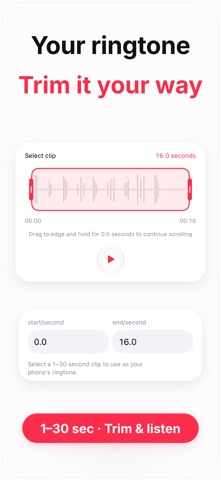
Select a 1–30 second section on a clear waveform and preview it at any time. Add fade in or fade out, change speed, and adjust pitch to make the result feel right.
SET IT AS A RINGTONE
When your clip is ready, follow the built-in guide to open the system share sheet and choose “Use as ringtone.” You can also create shorter text tones.
MORE AUDIO AND VIDEO TOOLS
• Extract audio from video
• Trim audio and video
• Merge multiple audio or video clips
• Change ringtone speed and pitch
KEEP THE ORIGINAL
Saved projects keep the original media and editing details together, so you can return to the same item and refine it without importing again.
PRIVATE, LOCAL PROCESSING
Media processing happens on your device. Computer transfer stays on your local Wi-Fi network, and no account is required.
Make the sound you already love your next ringtone.
Terms of Use: https://ringtones-links.lyntra.ltd/terms.html
Privacy Policy: https://ringtones-links.lyntra.ltd/privacy.html
Terms of Use (EULA): https://www.apple.com/legal/internet-services/itunes/dev/stdeula/