

RiverBank Pro
RiverBank Pro is made and published by Gerald East Jr. AppBrain is an independent app data site and isn't affiliated with Gerald East Jr. The app name, icon, screenshots and description belong to Gerald East Jr. and are shown as published on the App Store.
AppBrain's verdict
- Last updated
- December 6, 2024
Rankings
App Store top chartsApp Store Rankings for RiverBank Pro
Competitors
Similar apps and more from Gerald East Jr.Alternatives to RiverBank Pro





Releases
Updates seen on the App Store- Version
- 1.0.19
- Launched
- October 2023
No changelog data
User feedback
Ratings and reviews on the App StoreComments on RiverBank Pro for iOS
We don't have enough comments to show example comments. Please check back later.
Technology
Found in the app by AppBrain- Price
- Free
- App size
- 30.2 MB
- Content rating
- High
Technologies used by RiverBank Pro
About the app and developer
About RiverBank Pro
RiverBank Pro is a business app developed by Gerald East Jr.
What is the rating of RiverBank Pro?
RiverBank Pro has no ratings yet.
Is RiverBank Pro free?
RiverBank Pro is free. The app size is 30.25 MB. The latest version available is 1.0.19. The last update was on December 6, 2024.
What are the requirements for RiverBank Pro?
The app has a content rating of High Maturity. The app has been available on the App Store since October 2023.
Developer information for Gerald East Jr.
Address:
Frequently asked questions about RiverBank Pro
Is RiverBank Pro free?
Yes. RiverBank Pro is free on the App Store.
Is RiverBank Pro still available?
Yes. RiverBank Pro is on the App Store, and the last update we saw was on December 6, 2024.
How large is RiverBank Pro?
RiverBank Pro is 30.25 MB.
Is RiverBank Pro suitable for children?
App Store gives RiverBank Pro a high maturity rating. It is meant for adults.
Who made RiverBank Pro?
RiverBank Pro was developed by Gerald East Jr. It is listed in the business category on the App Store.
What are the best alternatives to RiverBank Pro?
People looking at RiverBank Pro also look at these business apps: Done4u Marketing, MMP ISO, Presentation Base for Business, Foundation 24/7, Prometheus Mobile PM.
Store listing
By Gerald East Jr., from the App Store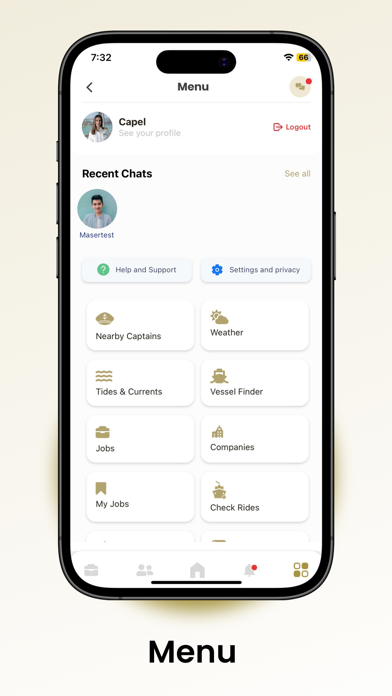




Description by Gerald East Jr. Written by the developer, not by AppBrain. Click to read.
· Finding work on your days off and renewing your US Coast Guard License without breaking a sweat (crew members)
· Keeping your vessel crewed at all times (companies)
How the App Works for Crew members
Crew members sign up on our platform as a:
· Deckhand
· Tankerman
· Steersman
· Mate Pilot
· Master
· D.E.
Once the app’s Admin verifies your credentials, perform a multitude of tasks:
· Check weather forecast
· Apply to get an Authentic Profile
· Examine a location’s tides and currents
· Explore different routes and waterways
· Find if other vessels are nearby
· View charts and maps
· Review trip details
· Contact nearby captains (only for Captains)
The Riverbank Professionals App also helps Captains renew their US Coast Guard License.
· Wait for the notification that alerts you when your Coast Guard License’s expiration date is near
· Provide additional details to confirm your information
· File paperwork
· Schedule a Coast Guard Physical with the nearest physician
· Sign the paperwork and send it to us
· Pay the required amount
· Receive the updated documents
The process will restart when six months are left until the license expires.
How the App Works for Marine Companies
Are you a marine company looking for competent staff to keep your boat crewed at all times? The Riverbank Professionals App simplifies the process by linking you with the right people.
Submit the following details to find the perfect individual:
· Detailed description of the job, including the title and description
· The number of years required for the person to handle the job
· Soft and hard skills the candidate must possess
· The candidate’s qualifications
· The certifications the candidate must have
· Number of vacancies
· The location where the candidate will be deployed
After providing these details, activate the job and review the applicants’ profiles.
The Riverbank Professionals App also allows you to:
· Manage profiles
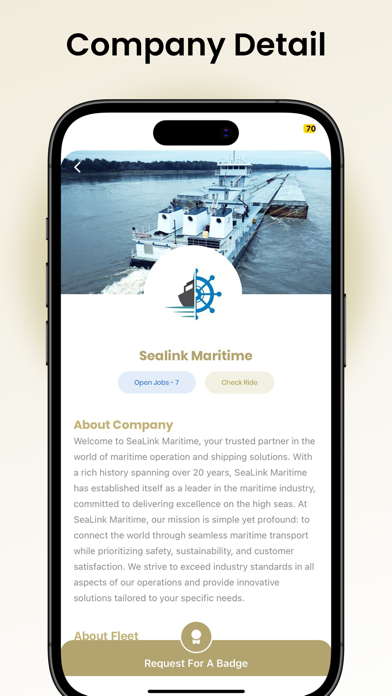
· Upload logos
· Provide business-related information
· Share details regarding fleets
· Add images to the gallery
· Manage the number of employees
Outstanding Features of The Riverbank Professionals App
1. Easy-To-Navigate Interface
The Riverbank Professionals App consists of an easy-to-use interface, loaded with incredible features specifically designed keeping user experience in mind:
· Fast loading time
· Seamless integration
· Real-time maritime data
· Shipping operations management
· Fast processing
2. Multiple User Roles
Sign up on our platform as one of the following users. Each user performs various tasks.
· Crew members
· Marine Companies
· Examiners
· Admins
· Super Admins
3. Top-Notch Security
Whether you’re signing up as a crew member or marine company, you might be hesitant to submit confidential information. That’s why we’ve implemented top-grade security measures, including:
· Secure Socket Layer (SSL)
· Two-Factor Authentication (2FA)
· Limited Failed Login Attempts
· Password Encryption
· Timely Password Change Policy
Bridging the Gap Between Maritime Companies and Crew members
We empower maritime companies and crew members to make decisions their own way using The Riverbank Professionals App.