

Rivet: Life Planner
Rivet: Life Planner is made and published by James Whelan. AppBrain is an independent app data site and isn't affiliated with James Whelan. The app name, icon, screenshots and description belong to James Whelan and are shown as published on the App Store.
AppBrain's verdict
- Last updated
- October 6, 2026
Rankings
App Store top chartsApp Store Rankings for Rivet: Life Planner
Competitors
Similar apps and more from James WhelanAlternatives to Rivet: Life Planner


Releases
Updates seen on the App Store- Version
- 2.0.1
- Launched
- August 2026
No changelog data
User feedback
Ratings and reviews on the App StoreComments on Rivet: Life Planner for iOS
We don't have enough comments to show example comments. Please check back later.
Technology
Found in the app by AppBrain- Price
- Free
- App size
- 126.4 MB
- Content rating
- Everyone
Technologies used by Rivet: Life Planner
About the app and developer
About Rivet: Life Planner
Rivet: Life Planner is a productivity app developed by James Whelan.
User Ratings
The app has no ratings yet.
App Information
Rivet: Life Planner is freely available from the App Store. The app size is 126.45 MB. The latest version available is 2.0.1. The last update was on October 6, 2026.
Technical Requirements
The app has a content rating of Everyone. The app has been available on the App Store since August 2026.
Developer information for James Whelan
Address:
Frequently asked questions about Rivet: Life Planner
Is Rivet: Life Planner free?
Yes. Rivet: Life Planner is free on the App Store.
Is Rivet: Life Planner still available?
Yes. Rivet: Life Planner is on the App Store, and the last update we saw was on October 6, 2026.
How large is Rivet: Life Planner?
Rivet: Life Planner is 126.45 MB.
Is Rivet: Life Planner suitable for children?
App Store rates the content of Rivet: Life Planner as suitable for everyone.
Who made Rivet: Life Planner?
Rivet: Life Planner was developed by James Whelan. It is listed in the productivity category on the App Store.
What are the best alternatives to Rivet: Life Planner?
People looking at Rivet: Life Planner also look at these productivity apps: Lịch Tranh 2026 Calendar, PlanPal: Daily Planner, Planly: Daily Planner & Goals, CalendarBell - Calendar Alarm, Horizon: Calendar Highlights.
Store listing
By James Whelan, from the App Store



Description by James Whelan Written by the developer, not by AppBrain. Click to read.
Smart Add
Type or say what you want to add, like “lunch with Sam on Thursday at 1” or “move standup to 4”. Rivet shows the change first. Nothing changes until you tap Add.
Plans
Your to-dos and threads, one tap from the timeline. Group to-dos, notes, and meetings in a thread. Drag a to-do onto the timeline to give it a time.
Calendars
See Apple Calendar and Google Calendar events next to your to-dos, and create events from Rivet. Add a Google Meet link to an event and join from the timeline. Your Apple Reminders show too.
Later
Save links, text, images, and files from Safari or the share sheet. Keep things to watch, read, cook, visit, and buy. Read supported pages in Rivet, highlight passages, and add comments. Drag anything you saved onto the timeline to plan when you’ll do it.
Fitness
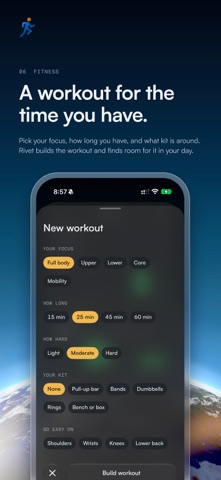
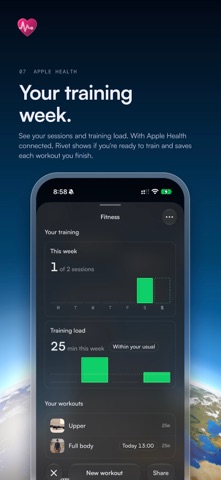
Build a workout, import routines from Hevy or Strong, or paste a workout as plain text. Add it to the timeline, then start it. Rivet takes you through each set and rest. See your rest timer on the Lock Screen and in the Dynamic Island. Finished workouts save to Apple Health.
Meeting notes
Record a meeting and Rivet saves the transcript to Notes. On an iPhone with Apple Intelligence, Rivet also lists the key points and decisions. Rivet records only after you start a recording.
Capsules
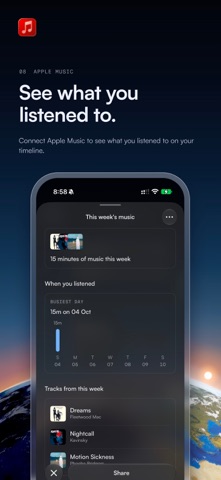
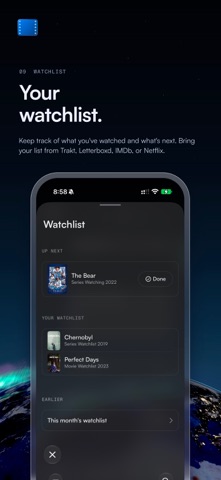
Your workouts, the music you played, and what you watched show on the timeline as Capsules. Connect Apple Health, Apple Music, and Trakt to fill them.
Memory
See each week, month, and year: what you watched, listened to, read, and cooked, where you went, your meetings, and how you moved and slept.
Time Machine
Scroll back through past days and tap one to open it on the timeline.
Sky
The sky and the Earth behind the timeline follow the sun. Open Sky to choose a fixed time of day instead.
Search
Pull down on the timeline to search to-dos, events, notes, meetings, workouts, music, and what you watched.
Built into iOS
• Siri: on iOS 27, ask Siri to add, move, or finish to-dos, notes, and events, or say “move this to Friday” about what’s on screen.
• Shortcuts: add to Rivet, Notes, or Plans, save a link, mark a to-do done, focus on a to-do, start a workout, or mark an episode watched.
• Apple Intelligence: Smart Add, meeting notes, and Later use the on-device model on your iPhone.
• Live Activities and the Dynamic Island: follow meetings, events, and rest timers.
• Widgets: today, what’s next, the week, and the month on the Home Screen and Lock Screen.
• Control Center: a Rivet control to search or add.
• Spotlight: find your to-dos, notes, and events.
• Share sheet and Safari: save links, text, images, and files to Later.
• Apple Health, Apple Music, Apple Calendar, and Apple Reminders.
• iCloud sync between iPhone and Mac, Sign in with Apple, and Family Sharing.
Privacy
Smart Add works on your iPhone. You can let it send a hard sentence to Claude or Gemini for a better result. That’s off unless you turn it on. Fitness asks before it sends a question to Claude. Health data stays on your iPhone. Your timeline syncs through your iCloud account.
Try it free, then pay for it once
Use all of Rivet free for 14 days. Then pay once to keep everything running. No subscription. Family Sharing includes your family.
After the trial, you can still read everything you added. Reminders stop, and Health, Music, and Trakt stop updating.
Your local price shows before you buy. If you bought a plan before, it keeps working.
Terms: https://rivetcal.app/terms
Privacy: https://rivetcal.app/privacy
Icons by Icons8: https://icons8.com