

Rizno is made and published by Asmaa Almarrikhi. AppBrain is an independent app data site and isn't affiliated with Asmaa Almarrikhi. The app name, icon, screenshots and description belong to Asmaa Almarrikhi and are shown as published on the App Store.
AppBrain's verdict
- Last updated
- February 16, 2026
Rankings
App Store top chartsApp Store Rankings for Rizno
Competitors
Similar apps and more from Asmaa AlmarrikhiAlternatives to Rizno


More from Asmaa Almarrikhi


Releases
Updates seen on the App Store- Version
- 1.2.3
- Launched
- April 2025
No changelog data
User feedback
Ratings and reviews on the App StoreComments on Rizno for iOS
We don't have enough comments to show example comments. Please check back later.
Technology
Found in the app by AppBrain- Price
- Free
- App size
- 11.9 MB
- Content rating
- Everyone
Technologies used by Rizno
About the app and developer
About Rizno
Rizno is a productivity app developed by Asmaa Almarrikhi.
User Ratings
The app has no ratings yet.
App Information
Rizno is freely available from the App Store. The app size is 11.91 MB. The latest version available is 1.2.3. The last update was on February 16, 2026.
Technical Requirements
The app has a content rating of Everyone. The app has been available on the App Store since April 2025.
Developer information for Asmaa Almarrikhi
Address:
Frequently asked questions about Rizno
Is Rizno free?
Yes. Rizno is free on the App Store.
Is Rizno still available?
Yes. Rizno is on the App Store, and the last update we saw was on February 16, 2026.
How large is Rizno?
Rizno is 11.91 MB.
Is Rizno suitable for children?
App Store rates the content of Rizno as suitable for everyone.
Who made Rizno?
Rizno was developed by Asmaa Almarrikhi. It is listed in the productivity category on the App Store.
What are the best alternatives to Rizno?
People looking at Rizno also look at these productivity apps: أجندة, TAFE JD, Saved Links, Tooday, Calendar 7: daily planner.
Store listing
By Asmaa Almarrikhi, from the App Store



Description by Asmaa Almarrikhi Written by the developer, not by AppBrain. Click to read.
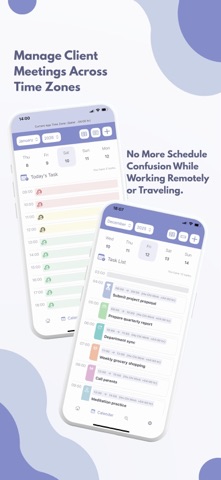
Plan smarter, live better. Whether you're managing personal goals, school assignments, or team tasks, our powerful to-do calendar app helps you stay on track with simplicity and style.
Smart Task Creation
- Add tasks with a title and description
- Set tasks to repeat daily or on specific weekdays, for as long as you need
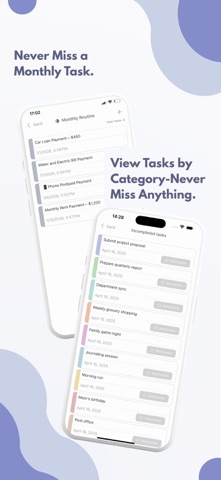
- Organize tasks by categories and browse a full category list
Quick Add with Voice
- Use speech-to-text to instantly create tasks
- Automatically detects title, start and end times, and date from your voice
- Customize the main add button to switch between text or voice input
Calendar Sync & Event Integration
- Sync all your calendars in one place — including your Apple Calendar and work and personal calendars from your email accounts — birthday events from your contacts automatically appear in the calendar.
- You can choose which calendar sources appear in the app and easily hide any source from App Settings while keeping others visible.
- Customize calendar source names and colors inside the app without affecting the original calendar settings.
- Events are view-only inside the app.
- Convert any event into an editable app task and move it to any category you choose.
Bilingual Support
- Fully supports English and Arabic
Search and Smart Timetable
- Easily search for any task by title or category
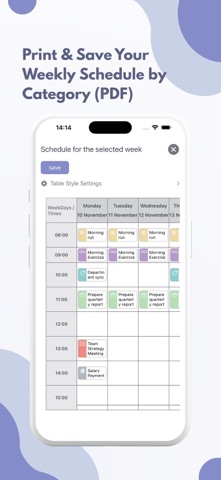
- Visual timetable view - tap a time slot to add a task instantly
- Show or hide the timetable as you prefer
- Navigate easily through months and years
Never Miss a Task
- Set reminders at the task time or up to 24 hours before
- Incomplete tasks are always shown on the homepage so you never miss a thing
Widget and Sharing
- Home screen widget shows today's tasks at a glance
- Share tasks as images with your team, classmates, family, or friends
Flexible Task Management
- Duplicate tasks and assign different times or dates
- Mark tasks complete with your own custom strikethrough style
- Change task status and track your progress
iCloud Sync
- Your tasks are safely backed up and synced across all your Apple devices
* By using this app, you agree to our Terms of Use, which can be found at the link below:
https://www.apple.com/legal/internet-services/itunes/dev/stdeula/