

RLX: Digital Detox
RLX: Digital Detox is made and published by Jan Litjens. AppBrain is an independent app data site and isn't affiliated with Jan Litjens. The app name, icon, screenshots and description belong to Jan Litjens and are shown as published on the App Store.
AppBrain's verdict
- Last updated
- September 28, 2026
Rankings
App Store top chartsApp Store Rankings for RLX: Digital Detox
Competitors
Similar apps and more from Jan LitjensAlternatives to RLX: Digital Detox


More from Jan Litjens


Releases
Updates seen on the App Store- Version
- 1.7.1
- Launched
- August 2026
No changelog data
User feedback
Ratings and reviews on the App StoreComments on RLX: Digital Detox for iOS
We don't have enough comments to show example comments. Please check back later.
Technology
Found in the app by AppBrain- Price
- Free
- App size
- 165.4 MB
- Content rating
- Medium
Technologies used by RLX: Digital Detox
About the app and developer
About RLX: Digital Detox
RLX: Digital Detox is a productivity app developed by Jan Litjens.
User Ratings
The app has no ratings yet.
App Information
RLX: Digital Detox is freely available from the App Store. The app size is 165.38 MB. The latest version available is 1.7.1. The last update was on September 28, 2026.
Technical Requirements
The app has a content rating of Medium Maturity. The app has been available on the App Store since August 2026.
Developer information for Jan Litjens
Address:
Store listing
By Jan Litjens, from the App Store


Description by Jan Litjens Written by the developer, not by AppBrain. Click to read.
Block distracting apps, set daily limits and schedule quiet hours on your iPhone or iPad. Choose which apps, categories and websites to limit. Every feature in RLX is free, with no subscriptions, paywalls, ads or account required. When you want to unwind, breathing, meditation, journaling and sleep sounds are there for you.
YOUR APPS, YOUR BOUNDARIES
Choose apps, categories and websites with Apple Screen Time. Block them now, set a daily limit or plan quiet hours. See your agreements together in your day view. Take a brief pause before opening selected apps, or choose a stronger temporary lock.
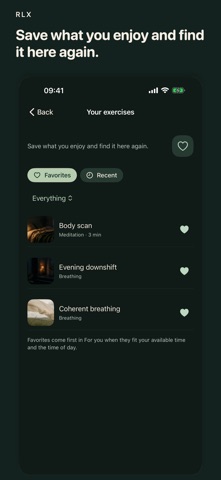
Use the heart to save your favorite breathing, meditation and movement practices. In Your exercises, you’ll find them alongside exercises you’ve recently completed. Your favorites also help shape suggestions in Today and Rest.
More room for your thoughts.
Type or dictate your notes. Add your own topics and a photo, then revisit everything in Overview. Your journal can be included in your automatic iCloud copy, without syncing.
MY EVENING
My evening remembers your exercise, favorite sound and sleep timer. Settle in with breathing, a body scan or one of two new visualizations narrated by your chosen iOS voice. Then let the sound continue with your screen locked. Brief guidance is there if you wake in the night, too. In the morning, record how you slept, alongside your sleep recording and available stages from Apple Health if connected.
A MOMENT OF CALM, YOUR WAY
Take a minute for yourself. Breathe along, follow a short meditation or write about what's on your mind. Choose from 17 breathing rhythms and 18 short text-guided meditations. Make time for a simple movement exercise or a short walk, too. Find what feels right for you today.
AGREEMENTS FOR YOUR FAMILY
Child Mode gives your child a calm home with breathing and quiet moments. A parent manages the agreements on the child's device with a local PIN.
AT HOME ON IPHONE AND IPAD
Use the spacious iPad layout or keep a small moment of calm close on iPhone. Light and dark appearances follow your preference. Widgets, Control Center and Shortcuts bring your choices within reach.
Saved on your device. With iCloud backup enabled, your journal can also be stored in your own iCloud.