

RojX: PC Gaming Controller
RojX: PC Gaming Controller is made and published by Rahel Ali. AppBrain is an independent app data site and isn't affiliated with Rahel Ali. The app name, icon, screenshots and description belong to Rahel Ali and are shown as published on the App Store.
AppBrain's verdict
- Rating on App Store
- 3.00
- 2 ratings
- Last updated
- October 10, 2026
- Size
- 28.1 MB
It doesn't have enough ratings yet to judge what users think.
User feedback
Ratings and reviews on the App StoreComments on RojX: PC Gaming Controller for iOS
We don't have enough comments to show example comments. Please check back later.
Store listing
By Rahel Ali, from the App Store
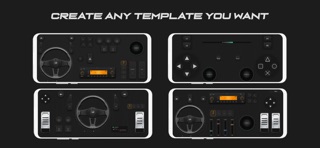

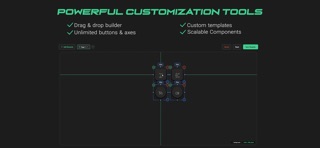
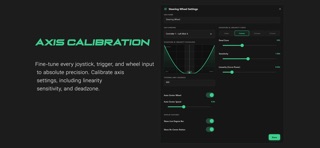


Description by Rahel Ali Written by the developer, not by AppBrain. Click to read.
- VIRTUAL STEERING WHEEL & TILT CONTROLS
Ditch the keyboard and steer like a pro.
• Gyroscope Steering: Use your phone's tilt sensors for highly precise, realistic horizontal tilt steering.
• Gyroscope Pedals: Use vertical tilt to control your gas and brake inputs dynamically.
• Virtual Steering Wheel: Interact with an on-screen wheel featuring visual rotation feedback.
• Responsive Pedals: Play with analog-style visual throttle and brake pedals for smooth acceleration and braking.
- FULLY CUSTOMIZABLE BUTTON BOX & DASHBOARDS
Build your dream gaming layout by placing controls exactly where you want them.
• Drag-and-Drop Elements: Mix and match buttons, rocker switches, sliders, custom axes, analog joysticks, and classic game pads.
• Multi-Page Layouts: Create different control pages and switch between them on the fly using the Page Switcher.
• Custom PS5 & Xbox Bindings: Emulate classic action buttons, D-pads, and L1/L2/R1/R2 shoulder buttons.
- ADVANCED SIMULATOR & TRUCK CONTROLS
Perfect for simulation games like Euro Truck Simulator 2, American Truck Simulator, SnowRunner, and MudRunner:
• Drivetrain & Differential: Quick-toggle switches for AWD, 4x4, Center Diff Lock, Front Diff Lock, and Rear Diff Lock.
• Driving Aids: Dedicated controls for Cruise Control, Traction Control, and Hill Start Assist.
• Lights & Horn: Realistic toggles for Headlights, High Beams, Fog Lights, Hazards, Left/Right Turn Signals, and Horn.
• Truck Specifics: Lift Axle switch, Engine Start/Stop ignition, and horizontal/vertical Gear Shifters and Paddle Shifters.
- ULTRA-LOW LATENCY & EASY SETUP
Our connection is designed for gaming. Running on a fast local UDP protocol, your inputs register with zero noticeable lag.
1. Download and install the free companion RojX Receiver on your Windows PC from: https://rojx.io
2. Make sure your PC and phone are connected to the same local WiFi network.
3. Open the RojX app and scan the QR code displayed on your PC screen to connect instantly.
4. Set up Xbox 360 controller emulation or feed inputs directly into vJoy.
- IDEAL GAMES FOR ROJX:
• Truck Simulators: Euro Truck Simulator 2 (ETS2), American Truck Simulator (ATS), Farming Simulator.
• Off-Road Simulators: SnowRunner, MudRunner, BeamNG.drive.
• Racing & Driving: Assetto Corsa, Forza Horizon, Dirt Rally, F1 Series, Grand Theft Auto V (GTA 5).
• Flight Simulators & Space Simulators.
- Inclusive & Adaptive Gaming
RojX isn't just a controller; it's a powerful accessibility tool. By mapping pedals, steering, and complex dashboards entirely to your device's screen, RojX empowers gamers with physical disabilities to fully experience driving and flight simulators using only their hands.
Get ready to take full control of your simulator experience!
IMPORTANT: This is a companion app. To use RojX, you must download the free RojX onto your Windows PC. Both devices must be connected to the same Wi-Fi network.
Safety and technology
Found in the app by AppBrain- Price
- Free
- App size
- 28.1 MB
- Content rating
- Everyone
Technologies used by RojX: PC Gaming Controller
Releases
Updates seen on the App Store- Version
- 1.0.28
- Launched
- July 2026
No changelog data
Alternatives
Similar apps and more from Rahel AliAlternatives to RojX: PC Gaming Controller


More from Rahel Ali

Rankings
App Store top chartsApp Store Rankings for RojX: PC Gaming Controller
About the app and developer
About RojX: PC Gaming Controller
RojX: PC Gaming Controller is an utilities app developed by Rahel Ali.
What is the rating of RojX: PC Gaming Controller?
RojX: PC Gaming Controller is rated 3.00 out of 5 stars, based on 2 ratings.
Is RojX: PC Gaming Controller free?
RojX: PC Gaming Controller is free. The app size is 28.05 MB. The latest version available is 1.0.28. The last update was on October 10, 2026.
What are the requirements for RojX: PC Gaming Controller?
The app has a content rating of Everyone. The app has been available on the App Store since July 2026.
Developer information for Rahel Ali
Address:
Frequently asked questions about RojX: PC Gaming Controller
Is RojX: PC Gaming Controller free?
Yes. RojX: PC Gaming Controller is free on the App Store.
Is RojX: PC Gaming Controller still available?
Yes. RojX: PC Gaming Controller is on the App Store, and the last update we saw was on October 10, 2026.
How large is RojX: PC Gaming Controller?
RojX: PC Gaming Controller is 28.05 MB.
Is RojX: PC Gaming Controller suitable for children?
App Store rates the content of RojX: PC Gaming Controller as suitable for everyone.
How do people rate RojX: PC Gaming Controller?
RojX: PC Gaming Controller scores 3.00 out of 5 stars, from 2 ratings on the App Store.
Who made RojX: PC Gaming Controller?
RojX: PC Gaming Controller was developed by Rahel Ali. It is listed in the utilities category on the App Store.
What are the best alternatives to RojX: PC Gaming Controller?
People looking at RojX: PC Gaming Controller also look at these utilities apps: Virtual Steering Controller, TruckSim GPS - ETS2 & ATS Map, SIM-Dashboard, PC Remote, reWASD Mobile.