

Roku TV Remote & Channel
Roku TV Remote & Channel is made and published by Imran Yaqoob. AppBrain is an independent app data site and isn't affiliated with Imran Yaqoob. The app name, icon, screenshots and description belong to Imran Yaqoob and are shown as published on the App Store.
AppBrain's verdict
Well rated- Rating on App Store
- 4.36
- 1,342 ratings
- Last updated
- October 9, 2026
Users rate it well: 4.4 stars from 1,342 ratings.
Rankings
App Store top chartsApp Store Rankings for Roku TV Remote & Channel
Competitors
Similar apps and more from Imran YaqoobAlternatives to Roku TV Remote & Channel




More from Imran Yaqoob

Releases
Updates seen on the App Store- Version
- 7.3
- Launched
- October 2021
No changelog data
User feedback
Ratings and reviews on the App StoreComments on Roku TV Remote & Channel for iOS
We don't have enough comments to show example comments. Please check back later.
Technology
Found in the app by AppBrain- Price
- Free
- App size
- 83.3 MB
- Content rating
- Everyone
Technologies used by Roku TV Remote & Channel
About the app and developer
About Roku TV Remote & Channel
Roku TV Remote & Channel is an utilities app developed by Imran Yaqoob.
User Ratings
Roku TV Remote & Channel is rated 4.36 out of 5 stars. The rating is based on 1.3 thousand ratings.
App Information
Roku TV Remote & Channel is freely available from the App Store. The app size is 83.29 MB. The latest version available is 7.3. The last update was on October 9, 2026.
Technical Requirements
The app has a content rating of Everyone. The app has been available on the App Store since October 2021.
Developer information for Imran Yaqoob
Address:
Frequently asked questions about Roku TV Remote & Channel
Is Roku TV Remote & Channel free?
Yes. Roku TV Remote & Channel is free on the App Store.
Is Roku TV Remote & Channel still available?
Yes. Roku TV Remote & Channel is on the App Store, and the last update we saw was on October 9, 2026.
How large is Roku TV Remote & Channel?
Roku TV Remote & Channel is 83.29 MB.
Is Roku TV Remote & Channel suitable for children?
App Store rates the content of Roku TV Remote & Channel as suitable for everyone.
How do people rate Roku TV Remote & Channel?
Roku TV Remote & Channel scores 4.36 out of 5 stars, from 1,342 ratings on the App Store.
Who made Roku TV Remote & Channel?
Roku TV Remote & Channel was developed by Imran Yaqoob. It is listed in the utilities category on the App Store.
What are the best alternatives to Roku TV Remote & Channel?
People looking at Roku TV Remote & Channel also look at these utilities apps: TV Remote : Control Smart TV, TV Remote Control For Roku, Remote For Roku TV Control., Remokuu - Smart TV Remote, Universal Remote TV For Roku.
Store listing
By Imran Yaqoob, from the App Store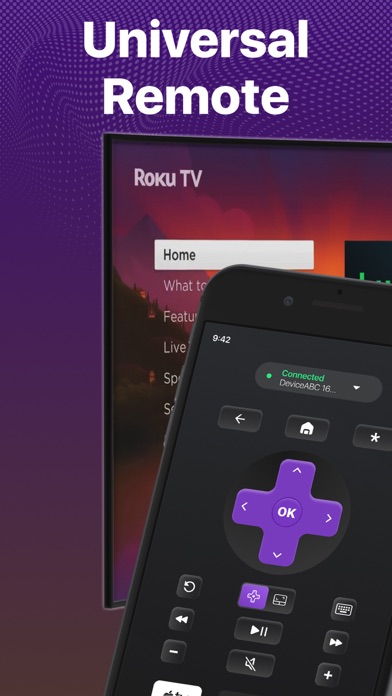




Description by Imran Yaqoob Written by the developer, not by AppBrain. Click to read.
Introducing the new touch-pad and keyboard feature on the Smart TV remote control app! Experience the ultimate convenience of streaming with our Smart TV Remote control mobile app. With a responsive touchpad and full keyboard search function, you can quickly search, browse, and stream your favorite content with just a few clicks. Say goodbye to bulky remotes and hello to effortless control with our TV remote app and touch-pad.
Here are the fully-loaded features you will love in the app:
No setup is required. Just download the app right now and start controlling your Smart TV device instantly.
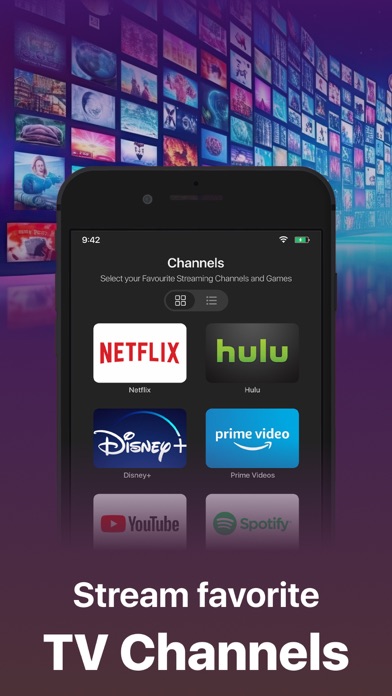
4 Quick shortcuts to directly access your favorite streaming channels. Memorizes the last connected Smart devices.
Easily switch between connected Smart devices. Volume Controls. Turn Smart device On/Off directly from the Remote.
Mirror your iPhone screen to a smart TV.
Cast your favorite videos, photos from your iPhone directly. You can also cast your favorite videos from facebook, dailymotion or anywhere from the internet to directly to your Smart Tv device.
Smooth gaming experience in HD quality display mirroring.
Present your business proposal and presentation with just one tap screen mirroring feature.
Smooth Navigation Controls.
Easy controls for you to navigate and type on a keyboard.
Remote & Mirror Works on both iPhone and iPad.
The Remote Control app automatically finds the devices connected to the same WiFi.
The remote is designed to have the most useful controls on the screen for you. This saves you from a lot of clutter and complex navigation. The universal remote control comes with a zero setup policy. Just connect it to the same WiFi as your Smart device and start controlling the device from your app. The best thing about Universal Remote Control is that you can even control the volume directly from the remote. The remote control app helps you control everything you need on your Smart device.
You can mirror your movies, photos, games, and other relevant stuff through Screen mirror. And for this, you don't need a native AirPlay feature because it provides you with all you need. Just mirror your iPhone to supported devices and mirror the joy of happiness.
Casting photos and videos on your smart devices is also possible through our Smart app.
We have tested every aspect of the Universal Smart Remote Control app on multiple devices. In case you find any bugs or want to give us any suggestions, we would love to receive your feedback at imran.yaqoob35@outlook.com
Disclaimer:
This app is not an affiliated entity of Roku, Inc, and is not an official product of Roku, Inc.
You can upgrade to the premium version by subscribing to our monthly plan. It costs you $4.99 and is charged per month. The monthly plan comes with a free trial of 3 days. We also offer a Lifetime deal for just a one-time fee of $12.99. When you upgrade to our lifetime in-app purchase, the premium version is unlocked forever.
Subscription Info:
Monthly - $4.99
Lifetime - $12.99
- Payment will be charged to iTunes Account at confirmation of purchase
- Subscription automatically renews unless auto-renew is turned off at least 24 hours before the end of the current period
- The account will be charged for renewal within 24 hours prior to the end of the current period, and identify the cost of the renewal
Privacy Policy: https://king-streamer.jimdosite.com/privacy/
Terms & Conditions: https://king-streamer.jimdosite.com/terms-and-conditions/
Terms of Subscription: https://king-streamer.jimdosite.com/subscription-terms/