



AppBrain's verdict
- Last updated
- October 21, 2026
- Size
- 41.4 MB
User feedback
Ratings and reviews on the App StoreComments on Rollside Prompter for iOS
We don't have enough comments to show example comments. Please check back later.
Store listing
By Sam Wysock-Wright, from the App StoreDescription by Sam Wysock-Wright Written by the developer, not by AppBrain. Click to read.
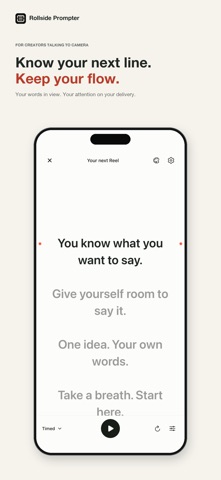
Rollside Prompter gives creators a clear, comfortable script to follow on iPhone and iPad. Write or paste your words, rehearse at your own pace and give your attention to the person watching.
KEEP YOUR PLACE
• Keep one, two or three lines in focus, with softer text around them.
• Two coral guide dots show you where to read.
• Set a comfortable scrolling speed. Play, pause and restart whenever you need.
• Use a starting countdown to give yourself a moment before speaking.
FIND A COMFORTABLE VIEW
• Try free Easy reading Light and Dark presets, then adjust them to suit your preferences.
• Pick any background, text and focus colours with Apple’s colour picker.
• See each adjustment in a preview that stays in view.
• Adjust your font, text size, letter and word spacing, reading width and position.
• Try optional word emphasis if you prefer bolder word beginnings, or leave it off.
• Read in portrait, landscape or mirror mode.
Easy reading is about personal comfort. It does not promise faster reading or proven benefits for dyslexia.
YOUR NEXT VIDEO, READY TO REHEARSE
Keep your Reels, tutorials, speeches and stories together in a clean script library. Write and edit on your device, then open the reader when you’re ready. On iPad, enjoy more space for your scripts and comfortable playback controls. Rotate or resize your window and keep your place.
LEAVE ROOM FOR A PAUSE
Voice follow moves the script as you speak and pauses when you stop. Speech is processed on your device and audio is not saved. Voice follow needs iOS 18 or later, a supported device and an available on-device speech language. Microphone permission is required, plus Speech Recognition permission on iOS 18–26. A language-model download may be needed. Timed scrolling remains available when Voice follow is unavailable.
REHEARSE YOUR WAY
Set an optional rehearsal target from 30 seconds to ten minutes. Compatible keyboard-style Bluetooth remotes and foot pedals can control playback, page jumps and timed speed. Learn buttons in Remote controls settings. Support depends on the key events delivered by iOS.
FROM YOUR MAC TO YOUR READER
An optional Rollside Mac companion can send a script by QR code or import link. QR handoff requires both devices on the same trusted local network and the Mac sender panel open. You can write and use scripts entirely on your iPhone or iPad.
YOUR WORDS STAY YOURS
Scripts and settings are saved on your device. No app account, ads or tracking. Read and edit offline; Apple purchase services and initial speech-model downloads may need a connection.
START FREE
Save up to three scripts and use the full reader, including supported Voice follow. A one-time Rollside Prompter Pro purchase unlocks unlimited saved scripts. No subscription.
Prompter displays scripts. Use your camera app or filming setup to record video.
Safety and technology
Found in the app by AppBrain- Price
- Free
- App size
- 41.4 MB
- Content rating
- Everyone
Technologies used by Rollside Prompter
Releases
Updates seen on the App Store- Version
- 1.2.2
- Launched
- October 2026
No changelog data
Alternatives
Similar apps and more from Sam Wysock-WrightMore from Sam Wysock-Wright

Rankings
App Store top chartsApp Store Rankings for Rollside Prompter
About the app and developer
About Rollside Prompter
Rollside Prompter is a productivity app developed by Sam Wysock-Wright.
User Ratings
The app has no ratings yet.
App Information
Rollside Prompter is freely available from the App Store. The app size is 41.43 MB. The latest version available is 1.2.2. The last update was on October 21, 2026.
Technical Requirements
The app has a content rating of Everyone. The app has been available on the App Store since October 2026.
Rollside Prompter is made and published by Sam Wysock-Wright. AppBrain is an independent app data site and isn't affiliated with Sam Wysock-Wright. The app name, icon, screenshots and description belong to Sam Wysock-Wright and are shown as published on the App Store.
Developer information for Sam Wysock-Wright
Address:
Frequently asked questions about Rollside Prompter
Is Rollside Prompter free?
Yes. Rollside Prompter is free on the App Store.
Is Rollside Prompter still available?
Yes. Rollside Prompter is on the App Store, and the last update we saw was on October 21, 2026.
How large is Rollside Prompter?
Rollside Prompter is 41.43 MB.
Is Rollside Prompter suitable for children?
App Store rates the content of Rollside Prompter as suitable for everyone.
Who made Rollside Prompter?
Rollside Prompter was developed by Sam Wysock-Wright. It is listed in the productivity category on the App Store.