

Roosta: Alarm Clock Challenges
Roosta: Alarm Clock Challenges is made and published by Tobias Scharl. AppBrain is an independent app data site and isn't affiliated with Tobias Scharl. The app name, icon, screenshots and description belong to Tobias Scharl and are shown as published on the App Store.
AppBrain's verdict
- Last updated
- September 23, 2026
- Size
- 55.8 MB
User feedback
Ratings and reviews on the App StoreComments on Roosta: Alarm Clock Challenges for iOS
We don't have enough comments to show example comments. Please check back later.
Store listing
By Tobias Scharl, from the App Store

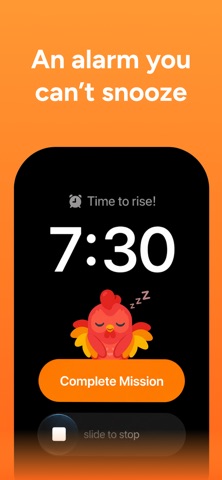

Description by Tobias Scharl Written by the developer, not by AppBrain. Click to read.
An ordinary alarm stops with one tap, and a half-asleep hand can manage that. Roosta doesn't stop until you've actually done something: solved a math problem, walked thirty steps, done push-ups in front of the camera, or scanned the QR code you stuck on the bathroom mirror. By the time it goes quiet, you're standing up.
No more oversleeping. No more snoozing through four alarms.
HOW IT WORKS
1. Set the alarm and pick your challenge
2. It rings as a real system alarm — through silent, through Focus, even if the app was force-quit
3. Complete the mission
4. The alarm stops, and you're already out of bed
17 WAKE-UP CHALLENGES
MATH AND PUZZLES
• Math — solve equations at the difficulty you pick
• Sequence — watch a pattern, then tap it back
• Match Pairs — a memory game to wake your brain up
• Typing — type the phrase exactly, no autocorrect
GET MOVING
• Steps — walk it off before the alarm stops
• Push-ups — real reps, counted by the camera
• Squats — same, in front of the propped-up phone
• Shake — shake the phone until you're awake
PHOTO AND SCAN
• Object Hunt — photograph a random everyday object
• Pet Hunt — go find a cat, a dog or a bird
• Sky Photo — get to a window and point at the sky
• Nature Hunt — find something growing
• Touch Grass — exactly what it says
• Scan a code — stick a QR code or barcode in the bathroom and walk there
ROUTINE
• Affirmation — read a line out loud
• Bible verse — read a verse out loud
• Random — a surprise every morning
WHY SNOOZING MAKES IT WORSE
Every snooze drops you back into a sleep cycle your alarm interrupts nine minutes later. That unfinished cycle is why five more minutes leaves you groggier than none. Roosta puts a small task between you and the off button — not a punishment, just something that happens to require being upright.
A SERIOUS ALARM CLOCK UNDERNEATH
Challenges are the point, but an alarm that doesn't ring is worthless. Roosta schedules with the system, not with the app, so it wakes you on silent, in Focus, and with no signal. Everything runs on your iPhone.
• Loud, with fade-in volume that starts quiet and rises
• A volume target the alarm holds, separate from your phone's
• Eight wake-up sounds, from Sunrise to Foghorn
• Repeat on the days you choose, with a label on every alarm
• Vibration, and an option to silence the ringing while you work the challenge
• Snooze if you want it — cap it, or switch it off completely
IT WILL NEVER TRAP YOU
Every challenge has a way out. Get stuck and it gets easier; stay stuck and you can stop the alarm outright. Friction is the point. Missing your flight is not.
STREAKS AND STATS
Get up each day to keep the flame alive. Roosta tracks wake-ups, challenges won, how long you take to get out of bed, and which ones you're best at, plus achievements.
And there's a rooster. He cheers when you win and shrugs when you don't — and never makes you feel bad about a morning.
PRIVACY
• Camera frames are analysed on your device and are never saved or sent anywhere
• Your voice is processed on your device for spoken challenges, never recorded
• No account, no sign-up, nothing to remember at 6am
• Usage analytics are anonymous, exclude your camera, audio and alarm names, and can be switched off
ROOSTA PLUS
Roosta is free to try and needs no account. Roosta Plus unlocks every challenge and sound, and keeps your alarms running.
Pricing and duration are shown before you pay. Payment is charged to your Apple Account at confirmation of purchase. Subscriptions renew automatically unless auto-renew is turned off at least 24 hours before the end of the current period. Manage or cancel any time in your Apple Account settings.
Privacy Policy: https://roosta.app/privacy
Terms of Service: https://roosta.app/terms
Tomorrow morning the alarm rings, you do the thing, the day has started.
Safety and technology
Found in the app by AppBrain- Price
- Free
- App size
- 55.8 MB
- Content rating
- Everyone
Technologies used by Roosta: Alarm Clock Challenges
Releases
Updates seen on the App Store- Version
- 1.3.2
- Launched
- August 2026
No changelog data
Alternatives
Similar apps and more from Tobias ScharlAlternatives to Roosta: Alarm Clock Challenges


More from Tobias Scharl

Also available on Google Play

Rankings
App Store top chartsApp Store Rankings for Roosta: Alarm Clock Challenges
About the app and developer
About Roosta: Alarm Clock Challenges
Roosta: Alarm Clock Challenges is an utilities app developed by Tobias Scharl.
What is the rating of Roosta: Alarm Clock Challenges?
Roosta: Alarm Clock Challenges has no ratings yet.
Is Roosta: Alarm Clock Challenges free?
Roosta: Alarm Clock Challenges is free. The app size is 55.80 MB. The latest version available is 1.3.2. The last update was on September 23, 2026.
What are the requirements for Roosta: Alarm Clock Challenges?
The app has a content rating of Everyone. The app has been available on the App Store since August 2026.
Developer information for Tobias Scharl
Address:
Frequently asked questions about Roosta: Alarm Clock Challenges
Is Roosta: Alarm Clock Challenges free?
Yes. Roosta: Alarm Clock Challenges is free on the App Store.
Is Roosta: Alarm Clock Challenges still available?
Yes. Roosta: Alarm Clock Challenges is on the App Store, and the last update we saw was on September 23, 2026.
How large is Roosta: Alarm Clock Challenges?
Roosta: Alarm Clock Challenges is 55.80 MB.
Is Roosta: Alarm Clock Challenges suitable for children?
App Store rates the content of Roosta: Alarm Clock Challenges as suitable for everyone.
Who made Roosta: Alarm Clock Challenges?
Roosta: Alarm Clock Challenges was developed by Tobias Scharl. It is listed in the utilities category on the App Store.
What are the best alternatives to Roosta: Alarm Clock Challenges?
People looking at Roosta: Alarm Clock Challenges also look at these utilities apps: OneAlarm: Scan to Wake Up, DaysPop, Loudr - Mission Alarm Clock, Wakeproof: Mission Alarm, WakeWalk: Alarm Clock.