

Rotation - Visual Effect
Rotation - Visual Effect is made and published by 思明 陈. AppBrain is an independent app data site and isn't affiliated with 思明 陈. The app name, icon, screenshots and description belong to 思明 陈 and are shown as published on the App Store.
AppBrain's verdict
- Last updated
- May 15, 2025
Rankings
App Store top chartsApp Store Rankings for Rotation - Visual Effect
Competitors
Similar apps and more from 思明 陈More from 思明 陈


Releases
Updates seen on the App Store- Version
- 1.0.4
- Launched
- May 2025
No changelog data
User feedback
Ratings and reviews on the App StoreComments on Rotation - Visual Effect for iOS
We don't have enough comments to show example comments. Please check back later.
Technology
Found in the app by AppBrain- Price
- $3.99
- App size
- 36.7 MB
- Content rating
- Everyone
Technologies used by Rotation - Visual Effect
About the app and developer
About Rotation - Visual Effect
Rotation - Visual Effect is a graphics & design app developed by 思明 陈.
User Ratings
The app has no ratings yet.
App Information
Rotation - Visual Effect costs $3.99. The app size is 36.66 MB. The latest version available is 1.0.4. The last update was on May 15, 2025.
Technical Requirements
The app has a content rating of Everyone. The app has been available on the App Store since May 2025.
Developer information for 思明 陈
Address:
Frequently asked questions about Rotation - Visual Effect
Is Rotation - Visual Effect free?
No. Rotation - Visual Effect costs $3.99 on the App Store.
Is Rotation - Visual Effect still available?
Yes. Rotation - Visual Effect is on the App Store, and the last update we saw was on May 15, 2025.
How large is Rotation - Visual Effect?
Rotation - Visual Effect is 36.66 MB.
Is Rotation - Visual Effect suitable for children?
App Store rates the content of Rotation - Visual Effect as suitable for everyone.
Who made Rotation - Visual Effect?
Rotation - Visual Effect was developed by 思明 陈. It is listed in the graphics & design category on the App Store.
Store listing
By 思明 陈, from the App Store





Description by 思明 陈 Written by the developer, not by AppBrain. Click to read.
【Main Features】
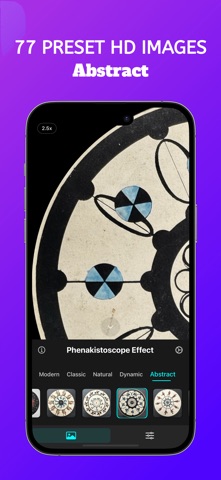
• 77 Pre-installed Images: The app includes various specially selected phenakistoscope and persistence of vision effect images, ready to use
• Custom Images: Import your own images from photo library to create personalized visual effects
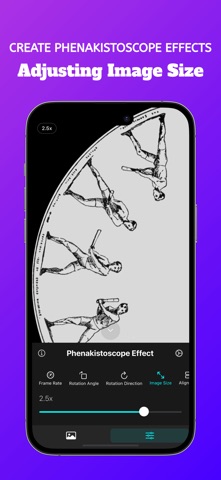
• Flexible Parameter Adjustment: Control frame rate, rotation angle, rotation direction, image size, and position
• Rich Preset Styles: Offers five preset styles including modern, classic, dynamic, natural, and abstract
• Multi-language Support: Compatible with 33 languages, including English, Chinese, Japanese, Korean, and more
【Parameter Details】
• Frame Rate: Controls the number of frames displayed per second, ranging from 1-60 fps
• Rotation Angle: Adjusts the rotation angle of each frame, ranging from 1°-180°
• Rotation Direction: Choose between clockwise or counterclockwise rotation
• Image Size: Controls the display ratio of images on the disc, ranging from 100%-300%
• Alignment: Sets the position of images on the disc, supporting both horizontal and vertical alignment
【Persistence of Vision】
Persistence of vision is a physiological characteristic of the human eye. When we see an image, the impression formed on the retina doesn't disappear immediately but persists for a short period (about 0.1-0.4 seconds). This phenomenon allows us to perceive rapidly presented static images as continuous smooth motion.
【Phenakistoscope Principle】
The phenakistoscope is an optical toy invented in the 19th century that creates visual illusions through rotation, reflection, and optical principles. Combined with the persistence of vision effect, when the disc rotates rapidly, it creates a superimposed effect on the retina, producing stunning symmetrical and fractal patterns.
【Application Scenarios】
• Visual Art Creation: Designers can create unique visual effects
• Educational Demonstrations: Teachers can explain the principle of persistence of vision
• Mental Relaxation: Watching the rotation effects can help relax the mind
• Entertainment: Add fun to family gatherings or friend meetups
【Usage Tips】
• For phenakistoscope effect images, it's recommended to set the rotation angle to 360° divided by the number of evenly divided portions in the image
• Adjusting the image size to 200%-300% can achieve a more concentrated visual effect
• Try different rotation directions to produce different visual experiences
Whether you're a visual art enthusiast, designer, or just someone who enjoys interesting visual experiences, Rotation can bring you a unique visual treat. Download the app and start your phenakistoscope visual journey!