Routinia: Routine Manager is an overall app developed by Leonid Goldberg.
How many times has Routinia: Routine Manager been downloaded?
What is the rating of Routinia: Routine Manager?
Routinia: Routine Manager is rated 4.00 out of 5 stars, based on one rating ratings.
Is Routinia: Routine Manager free?
Routinia: Routine Manager is free to download. The APK download size is 49.05 MB. The latest version available is 1.7.0. The last update was on April 23, 2026.
What are the requirements for Routinia: Routine Manager?
The app has a content rating of Everyone. The app has been available on Google Play May 2025.
Description
Real progress comes from small actions repeated daily and consistently. Following routines is the best way to build that consistency. Routinia is an app designed to help you create and run your daily or occasional routines without unnecessary friction.
Routinia gives you the tools to structure your routines so you can focus on execution, not remembering what to do. Following a routine reduces mental load, saves time, and strengthens good habits through repetition.
Use Routinia for:
• your morning routine, helping you start your day with focus and energy. • evening wind-downs, to relax and prepare for better sleep. • packing for trips, so you don't forget essentials. • any process that benefits from structure and repetition.
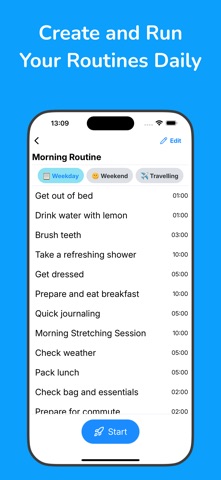
Add steps to your routines, then follow them one by one. Each step can have a timer, letting you see when you need to speed up or how much time you have left.
CREATE ROUTINES
Routinia lets you create an unlimited number of routines. Start with one you already do regularly, like a morning or bedtime routine.
ADD STEPS
A step is a specific action that moves you closer to completing your routine. When creating a routine, start by listing its steps. Adding them is quick: tap 'New Step', type the name, and tap 'return'. Routinia immediately moves to the next step, so you can build your list without interruptions. Once steps are in place, you can fine-tune each one — adjusting durations and setting actions if needed.
SCHEDULE YOUR ROUTINES
For a regular routine, choose the days of the week and time at which it should run. You can then see all your routines scheduled for the day on a timeline.
SET ACTIONS
Actions are optional buttons you can attach to steps. They can open websites or any URL. For example, attach your favorite workout video to a fitness step, or open a meditation app during your evening routine.
MAKE ROUTINE VARIATIONS
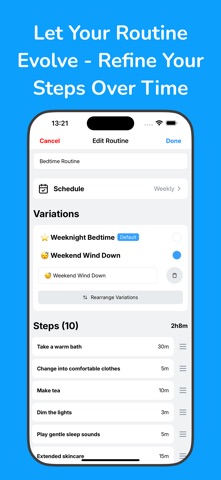
Is your morning routine at home the same as your travel one? Probably not. Routinia lets you create routine variations, keeping your routines organized without cluttering your routine list with duplicates.
ADAPT YOUR ROUTINES OVER TIME
What works today might not work tomorrow. Routinia makes it easy to adjust your routines as your needs change — update steps, or change their order at any time.
SYNC DATA ACROSS ALL YOUR DEVICES
Optionally create an account to sync your routines across all your devices and keep your data safely backed up.
DARK MODE SUPPORT
Routinia adapts to your device's theme so you can comfortably use the app in the dark.
HOW DO I START?
Download Routinia and create your first routine. Start by adding a few steps — it doesn’t need to be perfect. The important thing is to begin. You can always adjust and improve it over time.
Each subscription will automatically renew 3 days before the expiration date for
the same time period. Subscriptions can be cancelled at any time before the renewal.