

RPN 50g is made and published by Guglielmo Pasa. AppBrain is an independent app data site and isn't affiliated with Guglielmo Pasa. The app name, icon, screenshots and description belong to Guglielmo Pasa and are shown as published on the App Store.
AppBrain's verdict
New- Rating on App Store
- 5.00
- 1 ratings
- Last updated
- October 28, 2026
- Size
- 29.7 MB
RPN 50g came out 49 days ago. It doesn't have enough ratings yet to judge what users think. Its best ranking is #21 in Top Paid, Education in Spain.
User feedback
Ratings and reviews on the App StoreComments on RPN 50g for iOS
We don't have enough comments to show example comments. Please check back later.
Store listing
By Guglielmo Pasa, from the App Store



Description by Guglielmo Pasa Written by the developer, not by AppBrain. Click to read.
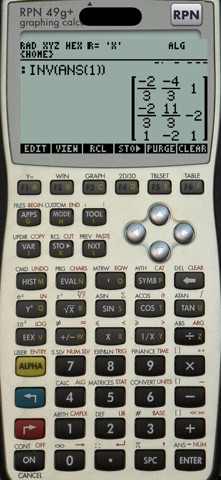
RPN 50g brings that machine to your iPhone and iPad — not an imitation, the real thing. The app emulates the calculator's hardware (its 75 MHz ARM processor, 512 KB of RAM, 2 MB of flash, the 131×80 display, the keyboard and the SD card slot) and runs HP's original firmware, so it behaves exactly as the calculator on your desk: every function, every mode, every flag, every quirk, key click included.
THE CALCULATOR
• An advanced computer algebra system: exact rational and arbitrary-precision integer arithmetic, symbolic simplification, factoring, polynomials, derivatives, integrals, limits, Taylor series, equation and system solving, linear algebra
• An advanced scientific calculator: complex numbers, vectors and matrices, statistics and regressions, unit conversions with dimensional analysis, base conversions (BIN/OCT/HEX) and bit operations, numeric solver, financial (TVM) calculations, date and time arithmetic
• Graphing: 2D function, polar, parametric, conic, slope field, differential equations, statistics and 3D wireframe/surface plots, with zoom, trace and analysis
• The Equation Library with over 300 equations of physics and engineering, with units
• RPN with the four-level or unlimited stack, or algebraic entry with the equation writer, at your choice
• Programmable in RPL (UserRPL and SysRPL): your programs and libraries run as on the real machine
THE APP
• Three faces: the black 50g, the blue 50g and the HP 49g+ — the 49g+ is the same machine, running the same firmware
• Firmware versions 2.15 (2009, with the 2 MB fix), 2.10 and 2.09 — switch between them, each keeps its own memory
• Your calculator's memory stays: close the app, come back later, it is exactly where you left it
• SD card: put files in the app's folder in Files and they appear on the calculator's card; what the calculator writes to the card lands in Files. Install libraries as on the real machine
• HP's manuals (User's Guide, Advanced User's Reference…) can be downloaded into the app and read next to the calculator; the app remembers your page
• Paste: type text from the clipboard onto the calculator
• Hardware keyboard support on iPad and iPhone
• The beeper, so BEEP and key clicks sound like the calculator
• Works fully offline, no account, no ads, no tracking
ABOUT THE FIRMWARE
The app contains no HP software. On first launch you pick a firmware version and it is downloaded from hpcalc.org, the community archive that has hosted HP's own update packages for decades, exactly as you would with a browser (from an identical backup copy if hpcalc.org does not answer, each package checked against its known fingerprint); the image is then kept on your device.
HP, HP 48, HP 49g+ and HP 50g are trademarks of HP Inc. This app is an independent project and is not affiliated with or endorsed by HP.
Safety and technology
Found in the app by AppBrain- Price
- $5.99
- App size
- 29.7 MB
- Content rating
- Everyone
Technologies used by RPN 50g
Releases
Updates seen on the App Store- Version
- 0.4.0
- Launched
- September 2026
No changelog data
Alternatives
Similar apps and more from Guglielmo PasaMore from Guglielmo Pasa


Rankings
App Store top charts- Highest rank
- #21
- Chart
- Top Paid
- Education
- Country
- Spain
App Store Rankings for RPN 50g
Top rankings
| Rank | Country | Category | List |
|---|---|---|---|
| 21 | Spain | Education | Top Paid |
Ranking history in Spain
About the app and developer
About RPN 50g
RPN 50g is an education app developed by Guglielmo Pasa.
User Ratings
RPN 50g is rated 5.00 out of 5 stars. The rating is based on one rating ratings.
App Information
RPN 50g costs $5.99. The app size is 29.68 MB. The latest version available is 0.4.0. The last update was on October 28, 2026.
Technical Requirements
The app has a content rating of Everyone. The app has been available on the App Store since September 2026.
Developer information for Guglielmo Pasa
Address: