

RubiMask: Book Translator
RubiMask: Book Translator is made and published by KeiK LLC. AppBrain is an independent app data site and isn't affiliated with KeiK LLC. The app name, icon, screenshots and description belong to KeiK LLC and are shown as published on the App Store.
AppBrain's verdict
- Rating on App Store
- 5.00
- 1 ratings
- Last updated
- October 6, 2026
It doesn't have enough ratings yet to judge what users think.
Rankings
App Store top chartsApp Store Rankings for RubiMask: Book Translator
Competitors
Similar apps and more from KeiK LLCAlternatives to RubiMask: Book Translator





More from KeiK LLC


Releases
Updates seen on the App Store- Version
- 1.80
- Launched
- December 2025
No changelog data
User feedback
Ratings and reviews on the App StoreComments on RubiMask: Book Translator for iOS
We don't have enough comments to show example comments. Please check back later.
Technology
Found in the app by AppBrain- Price
- Free
- App size
- 26.8 MB
- Content rating
- Everyone
Technologies used by RubiMask: Book Translator
About the app and developer
About RubiMask: Book Translator
RubiMask: Book Translator is an utilities app developed by KeiK LLC.
User Ratings
RubiMask: Book Translator is rated 5.00 out of 5 stars. The rating is based on one rating ratings.
App Information
RubiMask: Book Translator is freely available from the App Store. The app size is 26.77 MB. The latest version available is 1.80. The last update was on October 6, 2026.
Technical Requirements
The app has a content rating of Everyone. The app has been available on the App Store since December 2025.
Developer information for KeiK LLC
Address:
Store listing
By KeiK LLC, from the App Store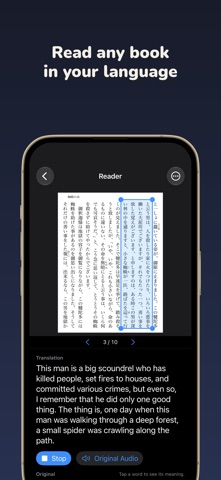


Description by KeiK LLC Written by the developer, not by AppBrain. Click to read.
Point your camera at a page, select a passage, and RubiMask translates it and reads it aloud. Tap any word to see what it means.
Japanese novels, Chinese web fiction, English paperbacks, manga, textbooks, printed handouts: if it's on a page, you can read it.
HOW IT WORKS
1. Scan a page with the camera, or open a photo or PDF
2. Drag over the passage you want to read
3. Listen to the translation — then tap words to learn them
KEY FEATURES
【Translate Any Page】
- Detects the book's language automatically
- Translates on your device with Apple's translation engine
- Reads the translation aloud automatically, or plays the original for listening practice
- Books already in your language are read aloud without translating
【Tap a Word, Get the Meaning】
- Every word in the passage is tappable
- Shows the reading (hiragana for Japanese, pinyin for Chinese) and a quick translation
- Look words up in the built-in iOS dictionary
- On devices with Apple Intelligence, see what the word means in this exact sentence
【Made for Real Books】
- Built-in document scanner straightens and crops pages
- Pinch to zoom in on small print, then select precisely
- Vertical Japanese text supported, with furigana (ruby) ignored so it doesn't scramble the text
- Save your book and pick up where you left off
【Furigana Masking & OCR Tools】
- Automatically mask furigana on vertical Japanese books
- Extract text from PDFs and photos in many languages
- Export as text, masked PDF, images, or audio (M4A)
PERFECT FOR
- Reading books in a language you're learning
- Enjoying Japanese novels and manga before they're translated
- Understanding textbooks, handouts, and printed documents
- Listening to a page instead of reading it
FREE & PREMIUM
Free: 20 reads per day, and word meanings are always free.
Premium:
- Unlimited reading
- Remove all ads
- Unlimited pages (free: 100 pages)
- Unlimited project saves (free: 3 projects)
- PDF export
- Audio export (M4A)
Automatic translation requires iOS 18 or later. "In this sentence" meanings require a device with Apple Intelligence.
Terms of Use (EULA): https://www.apple.com/legal/internet-services/itunes/dev/stdeula/
Privacy Policy: https://keik.co.jp/rubimask/privacy-en.html