

Rubric Scorer is made and published by Glen Botha. AppBrain is an independent app data site and isn't affiliated with Glen Botha. The app name, icon, screenshots and description belong to Glen Botha and are shown as published on the App Store.
AppBrain's verdict
Established- Rating on App Store
- 4.41
- 22 ratings
- Last updated
- August 9, 2025
It doesn't have enough ratings yet to judge what users think.
Rankings
App Store top chartsApp Store Rankings for Rubric Scorer
Competitors
Similar apps and more from Glen Botha







Releases
Updates seen on the App Store- Version
- 1.28.5
- Launched
- April 2017
No changelog data
User feedback
Ratings and reviews on the App StoreComments on Rubric Scorer for iOS
We don't have enough comments to show example comments. Please check back later.
Technology
Found in the app by AppBrain- Price
- Free
- App size
- 20.5 MB
- Content rating
- High
Technologies used by Rubric Scorer
About the app and developer
About Rubric Scorer
Rubric Scorer is an education app developed by Glen Botha.
What is the rating of Rubric Scorer?
Rubric Scorer is rated 4.41 out of 5 stars, based on 22 ratings.
Is Rubric Scorer free?
Rubric Scorer is free. The app size is 20.50 MB. The latest version available is 1.28.5. The last update was on August 9, 2025.
What are the requirements for Rubric Scorer?
The app has a content rating of High Maturity. The app has been available on the App Store since April 2017.
Developer information for Glen Botha
Address:
Store listing
By Glen Botha, from the App Store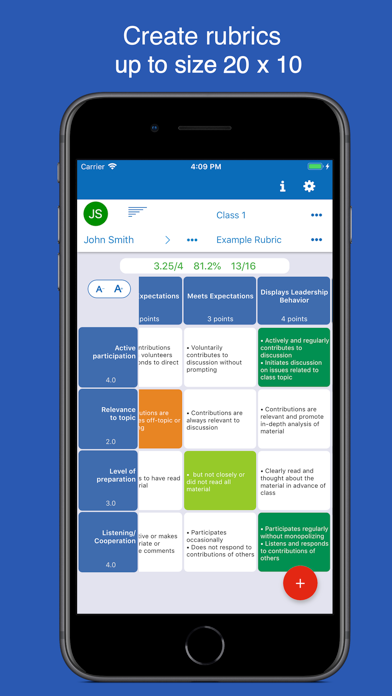


Description by Glen Botha Written by the developer, not by AppBrain. Click to read.
FEATURES
• Import student rosters directly from Google Classroom
• Support up to a 20 row x 10 column rubric
• Sync scores to a Google Classroom assignment
• Import a rubric from a Spreadsheet CSV file
• Feedback with comments
• Email all students in a class a copy of their rubric with 1 tap.
• View rubric statistics screen for a class
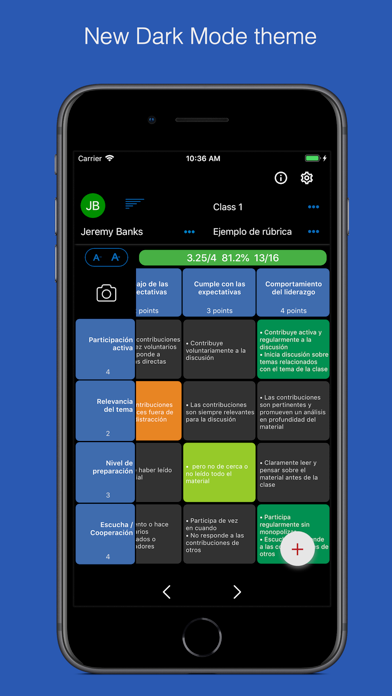
Rubric Scorer makes it grading rubrics fast and easy. Teachers can easily add custom comments as well as set up a list of common comments that can be easily accessed. If you are an art or music teacher, you can also attach a photo or record an audio file to a student's rubric, so you have a record of their work.
Use Rubric Scorer for free with 3 rubrics for one class. Additionally, a one week free trial is available to try out all the premium features.
The monthly renewable subscription option supports up to 100 rubrics for each of 20 classes along with premium features such as generating a PDF to view, print or email.
Auto renewable Subscription Details
To access premium features the user needs to subscribe to an auto renewable monthly subscription. This means the subscription automatically renews 24 hours before the end of the subscription date. Auto renewable subscriptions can be managed from the user iTunes account, and a link is provided in the subscription screen while in the app. All future updates are included with the auto renewable monthly subscription. The subscription may be cancelled for any future months, and the user will still have access to the data, only the additional features will be disabled. Any unused portion of a free trial period, if offered, will be forfeited when the user purchases a subscription to that publication, where applicable
Please email the developer at support@inpocketsolutions.com with any questions or suggestions.
Privacy Policy: http://www.inpocketsolutions.com/privacy-policy.html
Terms of Use: http://www.inpocketsolutions.com/terms.html