

Ruler AR - Measuring Tape Cam
Ruler AR - Measuring Tape Cam is made and published by Vladislav Kovalski. AppBrain is an independent app data site and isn't affiliated with Vladislav Kovalski. The app name, icon, screenshots and description belong to Vladislav Kovalski and are shown as published on the App Store.
AppBrain's verdict
EstablishedWell rated- Rating on App Store
- 4.34
- 3,497 ratings
- Last updated
- July 7, 2026
- Size
- 22.3 MB
Users rate it well: 4.3 stars from 3,497 ratings.
User feedback
Ratings and reviews on the App StoreComments on Ruler AR - Measuring Tape Cam for iOS
We don't have enough comments to show example comments. Please check back later.
Store listing
By Vladislav Kovalski, from the App Store


Description by Vladislav Kovalski Written by the developer, not by AppBrain. Click to read.
Measure anything. Plan any room. No tape measure needed.
Point your camera at any object and get accurate measurements instantly. Whether you're sizing up furniture, checking if a couch fits, or planning a full renovation - this is the only measuring app you'll ever need.
CAMERA MEASURE - Point. Tap. Done.
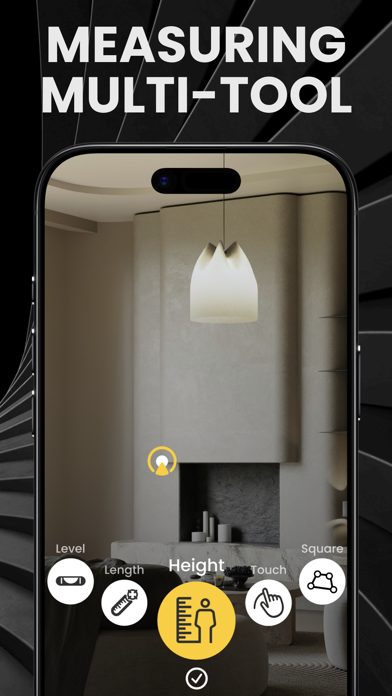
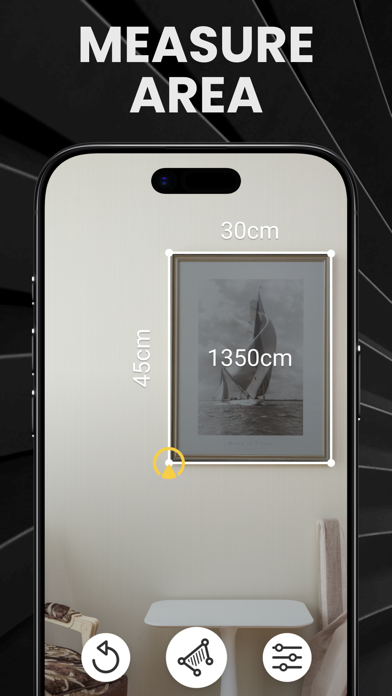
Measure length, height, distance, and area using just your camera. AR technology turns real-world objects into precise dimensions on your screen. No more guessing, no more holding one end of a tape.
3D ROOM PLANS - Your space, digitized.
Scan any room and generate a detailed floor plan. Walk through your space in an interactive 3D preview. Resize, rearrange, and visualize changes before you make them. Export plans to share with contractors, architects, or your partner who "just wants to see it first."
ANGLE & SQUARE - Precision where it counts.
Measure angles with ease. Check if surfaces are square. Perfect for hanging frames, aligning shelves, or verifying corners during construction.
BUBBLE LEVEL - Always on hand.
A reliable digital level right in your pocket. Align anything perfectly — shelves, pictures, appliances — without digging through a toolbox.
ORGANIZE & EXPORT - Your measurements, your way.
Save measurements into custom folders by project or room. Export data and 3D plans to PDF or share directly with your team. Every measurement you take is one tap away from being sent, saved, or stored.
BUILT FOR PEOPLE WHO BUILD THINGS
- Home renovation & remodeling
- Interior design & staging
- Furniture shopping & space planning
- Construction & contracting
- Real estate walkthroughs
- Quick everyday measurements
Download now and measure smarter — not harder.
How to use Touch Mode:
1. Tap the Tools buttons and choose Touch Mode icon (with finger on it)
2. Place you iPhone right next to the starting measurement point
3. Tap anywhere on the screen - the starting measure point will be placed at the same plane your iPhone is and at the center of the iPhone screen
4. Move your iPhone to the end measurement point and tap again
Use Touch Mode for extra precise measurements
Features:
- 3D Room plan LiDar scanner
- Bubble Level Tool for vertical and horizontal surfaces
- Light and easy to design
- Measure distance, length, height, area, angles and more
- Measure in inches, meters, and centimeters
- Height Measure & measure height with camera
- Sliders to measure small objects accurately
- Must have for Home Depot & Lowe's
- Save to Camera Roll in a single tap
SUBSCRIPTION PRICING AND TERMS
Subscription Options:
Premium Membership Weekly offers a $2.99/weekly subscription for premium functionally and removing ads.
* The price is for US customers. Pricing in other countries may vary and actual charges may be converted to your local currency depending on the country of residence.
* Free trial automatically converts to a paid subscription unless canceled at least 24-hours before the end of the trial period.
* Your subscription will automatically renew at the end of each term and your credit card will be charged through your iTunes account at confirmation of purchase.
* Account will be charged for renewal within 24-hours prior to the end of the current period, and identify the cost of the renewal.
* You can turn off auto-renew at any time from your iTunes account settings but refunds will not be provided for any unused portion of the term. The cancellation will take effect the day after the last day of the current subscription period, and you will be downgraded to the free service.
Terms of service https://measuretape.info/terms-of-service/
Privacy policy https://measuretape.info/privacy-policy-3/
Safety and technology
Found in the app by AppBrain- Price
- Free
- App size
- 22.3 MB
- Content rating
- Everyone
Technologies used by Ruler AR - Measuring Tape Cam
Releases
Updates seen on the App Store- Version
- 5.2
- Launched
- October 2017
No changelog data
Alternatives
Similar apps and more from Vladislav KovalskiAlternatives to Ruler AR - Measuring Tape Cam




More from Vladislav Kovalski



Rankings
App Store top chartsApp Store Rankings for Ruler AR - Measuring Tape Cam
About the app and developer
About Ruler AR - Measuring Tape Cam
Ruler AR - Measuring Tape Cam is an utilities app developed by Vladislav Kovalski.
User Ratings
Ruler AR - Measuring Tape Cam is rated 4.34 out of 5 stars. The rating is based on 3.5 thousand ratings.
App Information
Ruler AR - Measuring Tape Cam is freely available from the App Store. The app size is 22.33 MB. The latest version available is 5.2. The last update was on July 7, 2026.
Technical Requirements
The app has a content rating of Everyone. The app has been available on the App Store since October 2017.
Developer information for Vladislav Kovalski
Address: