

Run Ready Fire/EMS
Run Ready Fire/EMS is made and published by RunReady Systems LLC. AppBrain is an independent app data site and isn't affiliated with RunReady Systems LLC. The app name, icon, screenshots and description belong to RunReady Systems LLC and are shown as published on the App Store.
AppBrain's verdict
- Rating on App Store
- 5.00
- 2 ratings
- Last updated
- August 26, 2026
It doesn't have enough ratings yet to judge what users think.
Rankings
App Store top chartsApp Store Rankings for Run Ready Fire/EMS
Competitors
Similar apps and more from RunReady Systems LLCAlternatives to Run Ready Fire/EMS


Releases
Updates seen on the App Store- Version
- 1.2.8
- Launched
- April 2026
No changelog data
User feedback
Ratings and reviews on the App StoreComments on Run Ready Fire/EMS for iOS
We don't have enough comments to show example comments. Please check back later.
Technology
Found in the app by AppBrain- Price
- Free
- App size
- 51.4 MB
- Content rating
- Everyone
Technologies used by Run Ready Fire/EMS
About the app and developer
About Run Ready Fire/EMS
Run Ready Fire/EMS is a productivity app developed by RunReady Systems LLC.
User Ratings
Run Ready Fire/EMS is rated 5.00 out of 5 stars. The rating is based on 2 ratings.
App Information
Run Ready Fire/EMS is freely available from the App Store. The app size is 51.38 MB. The latest version available is 1.2.8. The last update was on August 26, 2026.
Technical Requirements
The app has a content rating of Everyone. The app has been available on the App Store since April 2026.
Developer information for RunReady Systems LLC
Address:
Store listing
By RunReady Systems LLC, from the App Store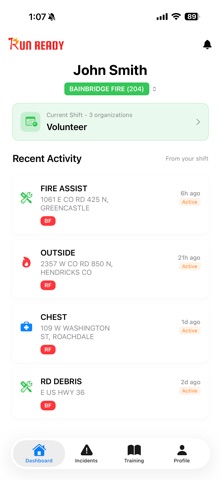
Description by RunReady Systems LLC Written by the developer, not by AppBrain. Click to read.
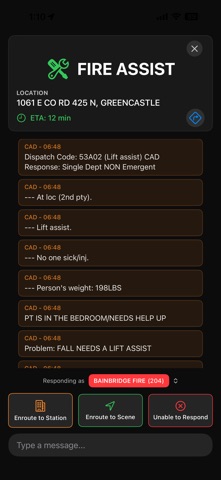
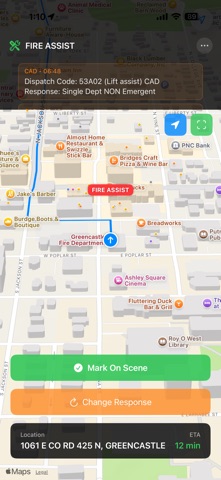
REAL-TIME INCIDENT TRACKING • Receive instant push notifications for new incidents • View incident details including location, type, and caller information • See GPS coordinates and get directions to the scene • Track incident timeline and status updates
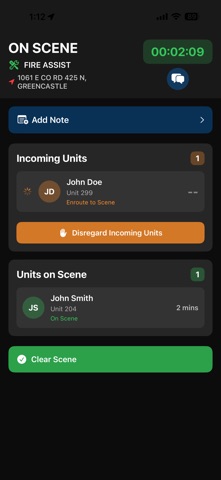
RESPONDER COORDINATION • Indicate your availability: Responding, On Scene, or Unable to Respond • See who else is responding in real-time • View incoming units and their estimated arrival • Disregard incoming units when sufficient resources are on scene • Acknowledge disregard notifications with one tap
SHIFT MANAGEMENT • Set up on-call shifts for your organization • Receive notifications only during your scheduled shifts • Manage multiple shifts across different organizations • Quick shift switching for cross-coverage
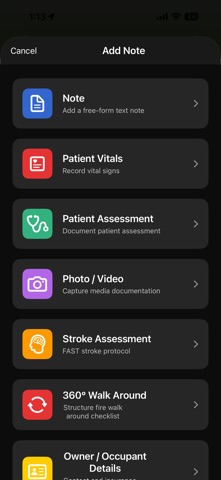
COMPREHENSIVE INCIDENT LOGGING • Log patient assessments and vital signs • Document stroke assessments with FAST protocol • Record owner/occupant details for property incidents • Take photos and videos for documentation • Add free-text notes for additional information • Create detailed 360-degree walkaround assessments
MULTI-ORGANIZATION SUPPORT • Manage membership in multiple departments • Respond as different organizations for mutual aid • View incidents specific to your selected organization • Coordinate with other departments on joint responses
SMART NOTIFICATIONS • Actionable push notifications with quick response options • Background notifications even when app is closed • Acknowledge requests directly from notifications • Customizable notification preferences
SAFETY & RELIABILITY • Secure authentication with Google, Facebook, or Apple • Encrypted data transmission • Real-time data synchronization • Offline incident viewing • Demo mode for training and demonstrations
DESIGNED FOR EMERGENCY SERVICES RunReady is purpose-built for: • Fire Departments • Emergency Medical Services (EMS) • Rescue Squads • First Response Teams • Volunteer Emergency Services
Whether you're a career firefighter, volunteer EMT, or rescue squad member, RunReady helps you stay informed, coordinate effectively, and respond safely.
RunReady integrates with dispatch systems to deliver incident information directly to your device. Stay connected with your team and respond with confidence.
Note: RunReady requires your dispatch center to be configured in our system. Contact your department leadership for access.